
Modbus RTU (Remote Terminal Unit) is a widely used serial communication protocol developed by Schneider Electric in 1979 for industrial applications. It’s designed for communication between various devices such as programmable logic controllers (PLCs), sensors, and other industrial electronic devices.
Modbus RTU uses a Commander/Executor architecture, where one device (Commander) initiates communication and controls one or more devices (Executors). Communication is typically done over serial lines such as RS-232 or RS-485.
This article contains a real-time ledger of a modbus directory change and operation.
Modbus Command Formula:
./modbus-cli –target rtuovertcp://<IP_ADDRESS>:<PORT> –unit-id <UNIT_ID> <OPERATION>
The picture provided below shows the sequence of events that occurred when changing the directory and operating the modbus cli command via Linux OS
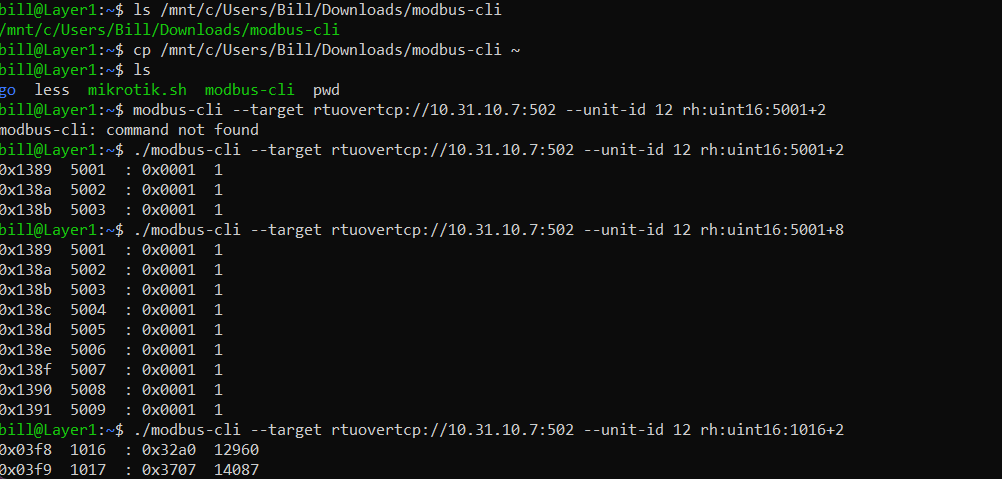
Navigating the Directory:
bill@Layer1:~$ ls /mnt/c/Users/Bill/Downloads/modbus-cli
The ls command lists the files on your Linux terminal.
/mnt/c/Users/Bill/Downloads/modbus-cli.
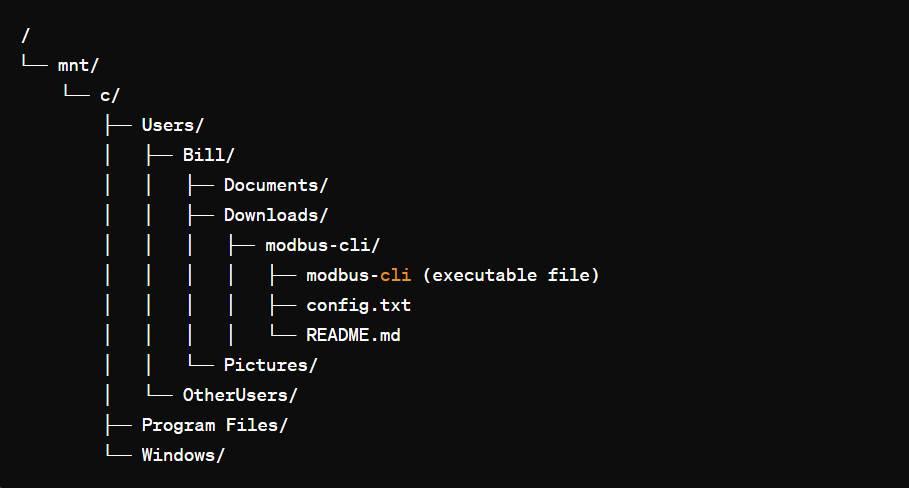
The modbus-cli files are present in the parent /mnt/c/ directory and are also present in the /Downloads subdirectory
/mnt/c/ is essentially pointing to the root directory of the C: drive on a Windows system
Copying modbus-cli to Home Directory:
bill@Layer1:~$ cp /mnt/c/Users/Bill/Downloads/modbus-cli ./
This command copies the modbus-cli files from the Downloads folder to the parent home/working directory (C: drive on the Windows OS).
Listing the Contents of the Home Directory:
bill@Layer1:~$ ls
This command lists the files available, showing that modbus-cli has been copied successfully.
Change the Directory to the one you need to work in:
bill@Layer1:~$ cd modbus-cli
Cd This command changes the current directory to modbus-cli.
After directory is changed, Execute Moddbus-cli to locate and measure PDU

bill@Layer1:~$ modbus-cli –target rtuovertcp://10.31.10.7:502 –unit-id 12 rh:uint16:5001+2
This command attempts to run modbus-cli with specific parameters:
–target rtuovertcp://10.31.10.7:502: Specifies the target Modbus server over TCP/IP with the given IP address and port. In this case the modbus server is in container 31
However, it appears there is an error:

modbus-cli: command not found
Correcting the Command:

bill@Layer1:~$ ./modbus-cli –target rtuovertcp://10.31.10.7:502 –unit-id 12 rh:uint16:5001+2
The corrected command includes the ./ prefix to specify the current directory, making sure the shell can locate the modbus-cli executable.
Reading Modbus Registers:

1. Outlet Status: Identifying specific sockets. 5001+8
bill@Layer1:~$ ./modbus-cli –target rtuovertcp://10.31.10.7:502 –unit-id 12 rh:uint16:5001+8
This parameter will read all 9 sockets of the PDU’s in container 31 Modbus address 5001.
2. Identify specific PDU in respective container. –unit-id 12

bill@Layer1:~$ ./modbus-cli –target rtuovertcp://10.31.10.7:502 –unit-id 12 rh:uint16:5001+8
This parameter identifies the specific pdu that you’re communicating with in that respective container
3. Phase Balance for each phase. 1016+2

bill@Layer1:~$ ./modbus-cli –target rtuovertcp://10.31.10.7:502 –unit-id 12 rh:uint16:1016+2
This parameter will read the phase balance of each pdu
4. Outlet Power Measure:

bill@Layer1:~$ for i in 0 1 2 3 4 5 6 7 8; do ./modbus-cli –target rtuovertcp://10.38.10.7:502 –unit-id 31 rh:uint16:$((1032 + 5*$i)); done
- for i in 0 1 2 3 4 5 6 7 8; do: This is a for loop in shell scripting. It sets up a loop that will execute the following commands for each value of i from 0 to 8.
- rh:uint16:$((1032 + 5*$i)): This part of the command is the read holding registers operation. rh stands for read holding registers, uint16 indicates that the data type of the register is an unsigned 16-bit integer
- $((1032 + 5*$i)) is an arithmetic expansion that calculates the register address to read from. For each iteration of the loop, it reads from a register address starting at 1032 and increases by 5 for each subsequent value of i.
The loop will execute the modbus-cli command 9 times in total, each time reading from a different register address calculated by the expression 1032 + 5*$i. The first read operation will be from register 1032, the second from 1037, and so on, up to the last read operation from register 1072.

 Bitcoin Versus
Leave a comment