
To remotely monitor and control individual sockets on a Power Distribution Unit (PDU) using Modbus communication, Modbus-TCP can be employed to access and modify specific registers over a network.
Each socket (or outlet) on the PDU is associated with unique register addresses that allow users to read the status (on/off) or control the power state. For instance, in the provided setup, outlet 1 can be managed by reading or writing to register address 5001, outlet 2 by address 5002, and so on.
To query the current status of an outlet, the Read Holding Registers (RH) command is used, which retrieves the value stored in the designated register.

This process allows operators to confirm if a socket is active or inactive. Conversely, to change the power state, the Write Single Register (WH) command can be issued, with values such as 1 to turn an outlet on and 0 to turn it off.
For instance, running modbus-cli --unit-id 11 --target rtuovertcp://<PDU_IP>:502 wh:uint16:<register_address> <value> sends a command to toggle the specified outlet’s power state.
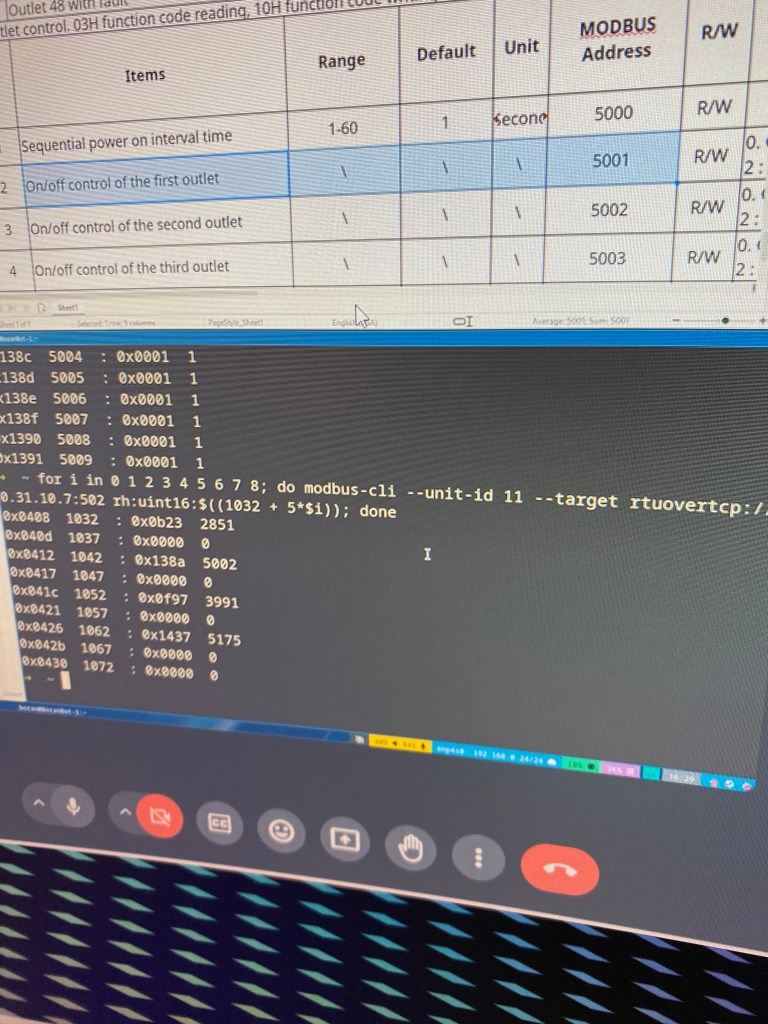
When managing multiple outlets, a looping command enables systematic querying of consecutive register addresses.
This loop approach is helpful for monitoring several outlets in sequence, reducing the need for manual entry for each address.
Overall, Modbus provides a straightforward protocol for remote PDU control, allowing users to efficiently manage power to connected devices in an automated and scalable manner.
 Bitcoin Versus
Leave a comment