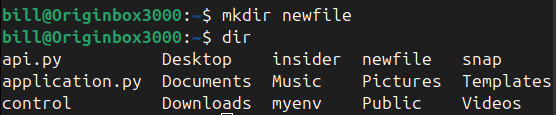
The mkdir command, an abbreviation for “make directory,” is a foundational tool for Linux users, enabling the creation of directories directly within the terminal.
According to Linux documentation, the command is widely used to organize files systematically, promoting efficient file management practices for both personal and professional projects.
Users simply type mkdir <directory_name> to create a new directory, as shown in the uploaded screenshot.

This command supports additional options, such as creating nested directories using the -p flag, which allows multiple directories to be created simultaneously within a specified path.
Per Linux.com, the use of mkdir -p parent/child ensures that any parent directories not already existing in the path will also be created. This functionality is particularly useful for developers and system administrators who require hierarchical file structures.
Furthermore, error-free execution of mkdir depends on sufficient user permissions. If users lack write access to a directory, the command will fail unless superuser privileges are granted.
BitcoinVersus.Tech Editor’s Note:
We volunteer daily to ensure the credibility of the information on this platform is Verifiably True. If you would like to support to help further secure the integrity of our research initiatives, please donate here
BitcoinVersus.tech is not a financial advisor. This media platform reports on financial subjects purely for informational purposes
 Bitcoin Versus
Leave a comment