
The tasklist command is a Windows utility that lists all currently running processes on the system, along with key details like Process IDs (PIDs), memory usage, and executable names. It is commonly used for monitoring and troubleshooting processes.
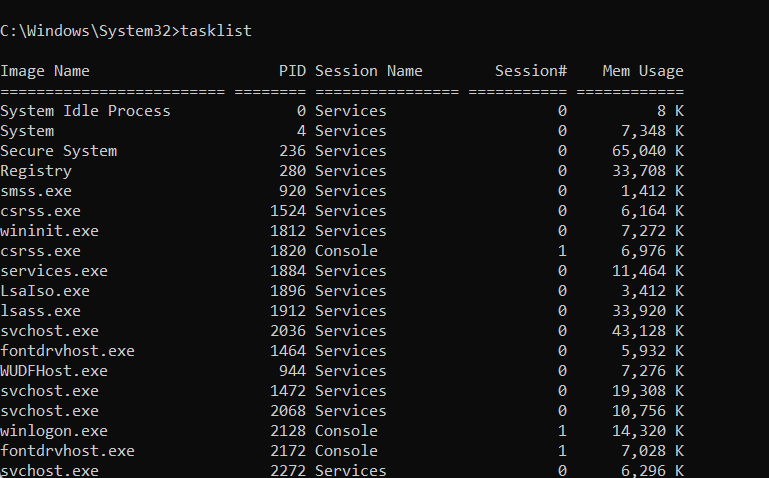
For instance, it can be combined with filters to locate specific tasks, such as running tasklist | find "notepad" to display only Notepad-related processes.
This command is especially useful for identifying resource-heavy applications, debugging, or ensuring that unwanted or malicious processes are not running on the system. It is an essential tool for system administrators and power users for process management.
The first screenshot showcases various examples of how the tasklist command can be utilized with different parameters.
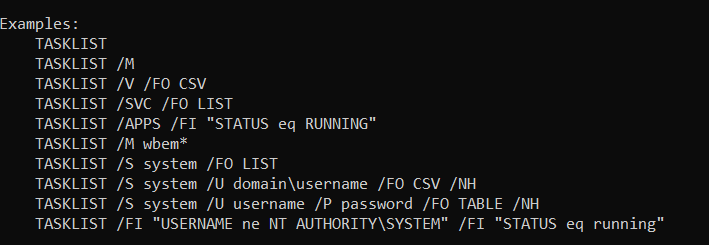
These examples illustrate its flexibility in filtering results by criteria, such as narrowing the list to running applications or specifying a particular format for output, such as CSV or a table.
It also highlights the ability to query processes on remote systems or refine results further using custom filters.
The second screenshot provides a detailed breakdown of the parameters available for the tasklist command.

These parameters include options to connect to remote systems, specify user credentials, display processes tied to specific modules or services, and adjust the output format for readability or compatibility.
This detailed reference is invaluable for tailoring the command to specific troubleshooting or monitoring needs.
The final screenshot demonstrates the use of the tasklist /m wbem* command, which identifies all running processes that use modules with names starting with “wbem.”

The output includes details such as the Image Name, Process ID (PID), and the loaded modules associated with each process. This approach is particularly useful for diagnosing issues or understanding which processes are utilizing specific system libraries.
BitcoinVersus.Tech Editor’s Note:
We volunteer daily to ensure the credibility of the information on this platform is Verifiably True. If you would like to support to help further secure the integrity of our research initiatives, please donate here
BitcoinVersus.tech is not a financial advisor. This media platform reports on financial subjects purely for informational purposes
 Bitcoin Versus
Leave a comment