
The command netsh wlan show networks mode=bssid is a Windows command-line instruction used to display detailed information about wireless networks available within range of the computer’s Wi-Fi router or adapter.
The netsh utility, short for Network Shell, allows users to configure and monitor network settings from the command prompt.
In this case, the command queries the wireless network adapter to list all detected wireless networks along with their respective BSSID (Basic Service Set Identifier), which corresponds to the MAC address of the access points broadcasting the network.
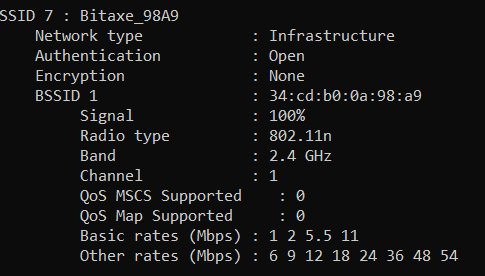
Additionally, it provides details such as SSID (network name), signal strength, supported encryption types, and other relevant parameters that can assist in network analysis and troubleshooting.
The output of the command includes the Wi-Fi interface name currently in use and the number of wireless networks detected. Running the command with the mode=bssid parameter ensures that the system displays access point-specific data rather than aggregated SSID information.
This can be useful for identifying multiple access points broadcasting the same SSID, evaluating signal strength for each BSSID, and determining the security settings of available networks. Network administrators and security professionals often utilize this command to assess wireless environments, troubleshoot connectivity issues, and ensure optimal network performance.
BitcoinVersus.Tech Editor’s Note:
We volunteer daily to ensure the credibility of the information on this platform is Verifiably True. If you would like to support to help further secure the integrity of our research initiatives, please donate here
BitcoinVersus.tech is not a financial advisor. This media platform reports on financial subjects purely for informational purposes
 Bitcoin Versus
Leave a comment