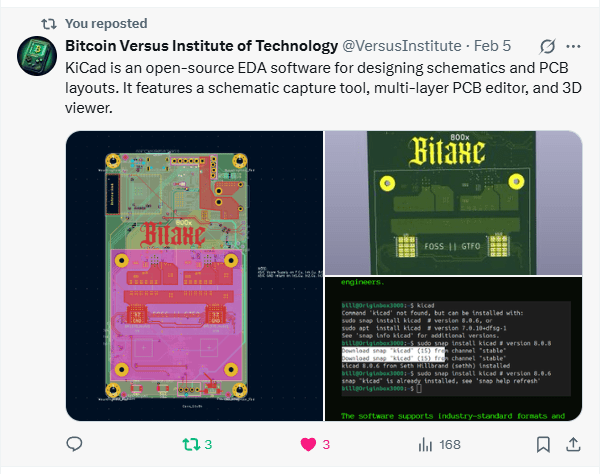
KiCad is a powerful open-source software suite used for designing printed circuit boards (PCBs).
It offers a comprehensive set of tools for schematic capture, PCB layout, and 3D visualization, making it a go-to choice for both hobbyists and professional engineers.
The software supports industry-standard formats and integrates essential features such as Gerber file export and SPICE simulation for circuit analysis.
Installing KiCad on Linux can be done through different package managers, with Snap and APT being the most common methods.
Installing KiCad on Linux Using the Terminal
For Linux users, installing KiCad via the terminal is the most efficient way to ensure a smooth and up-to-date installation. The easiest method is through Snap, a universal package manager supported across multiple Linux distributions.
To install KiCad using Snap, users can open a terminal and enter the following command:
sudo snap install kicad
This command will automatically fetch the latest stable version of KiCad from the Snap repository and install it. Once the process is complete, users can verify the installation by running:
kicad --version
This will display the installed version and confirm that KiCad is ready for use. If users require a specific version, they can specify it during installation. For example, installing version 8.0.6 can be done using:
sudo snap kicad # version 8.0.6
For users who prefer using the default package manager on Debian-based distributions such as Ubuntu, KiCad can also be installed via APT. To install it using APT, the following commands can be executed:
sudo apt update
sudo apt install kicad
This will download and install the latest version available in the official repositories. However, users should note that APT repositories may not always contain the most recent version of KiCad, which is why Snap is often recommended for those who want the latest release.
Understanding the Installation Process in the Provided Screenshot
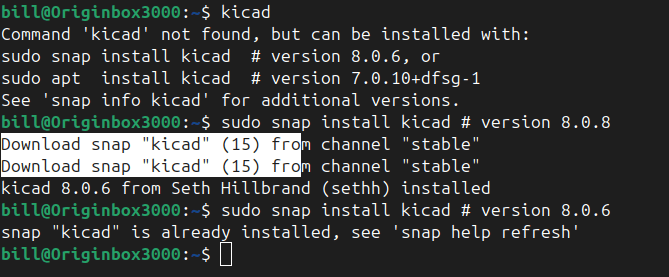
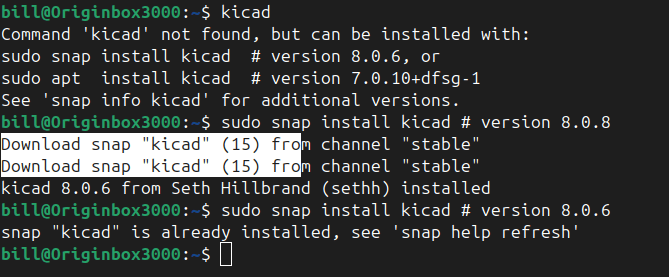
The provided screenshot illustrates an attempt to install KiCad using Snap. Initially, the user entered kicad in the terminal, but the system responded with a message stating that the command was not found. The terminal suggested possible installation methods, including using Snap (snap install kicad) or APT (apt install kicad).
Following the suggestion, the user attempted to install KiCad using Snap by running sudo snap install kicad # version 8.0.8. The system then downloaded the required files from the stable Snap repository and successfully installed the software.
Later, the user tried to install KiCad again, this time specifying version 8.0.6. However, the terminal displayed a message indicating that KiCad was already installed and up to date, suggesting the use of the command snap help refresh if an update was needed. This highlights one of the advantages of Snap—once a package is installed, it remains up to date automatically unless a specific version is requested.
Launching KiCad After Installation
After successfully installing KiCad, users can launch it by simply typing kicad in the terminal. The software can also be accessed from the applications menu under the Electronics category. If users encounter any issues with launching the software, they can try refreshing the installation by running:
snap refresh kicad
KiCad is an essential tool for PCB design, and installing it on Linux is a straightforward process using Snap, APT, or Flatpak.
The screenshot provided demonstrates how Snap simplifies installation by automatically fetching the latest stable version and ensuring that it remains updated. Whether users are hobbyists or professionals, KiCad provides a powerful and feature-rich environment for designing electronic circuits with ease.
BitcoinVersus.Tech Editor’s Note:
We volunteer daily to ensure the credibility of the information on this platform is Verifiably True. If you would like to support to help further secure the integrity of our research initiatives, please donate here
BitcoinVersus.tech is not a financial advisor. This media platform reports on financial subjects purely for informational purposes.
 Bitcoin Versus
Leave a comment