
Accessing the web interface of the Cisco Catalyst 1200-8T switch is a straightforward process that allows IT professionals to configure and monitor network settings efficiently.
The switch’s web-based graphical user interface (GUI) provides an intuitive platform for managing various network functions.

Prerequisites:
- Network Connection: Ensure the switch is properly connected to your local network and powered on.
- IP Address: Determine the switch’s IP address. By default, the switch is set to obtain an IP address via DHCP. If a DHCP server is unavailable, it defaults to
192.168.1.254.
Accessing the Web Interface:
- Configure Your Computer’s IP Address:
- If the switch uses the default IP (
192.168.1.254), set your computer’s IP to the same subnet (e.g.,192.168.1.1).
- If the switch uses the default IP (
- Open a Web Browser:
- Launch a browser and enter the switch’s IP address in the address bar:
http://192.168.1.254.
- Launch a browser and enter the switch’s IP address in the address bar:
- Log In:
- The default credentials are:
- Username:
cisco - Password:
cisco
- Username:
- Upon first login, you’ll be prompted to change these credentials to enhance security. Cisco
- The default credentials are:
Post-Login Configuration:
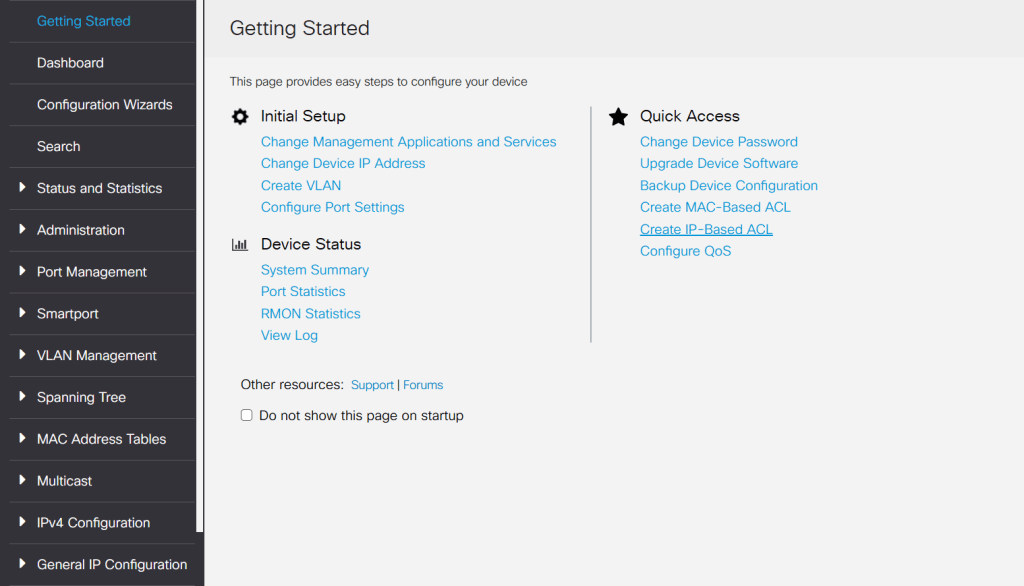
- Set a New Username and Password:
- Follow the on-screen instructions to create a secure username and password.
- Assign a Static IP Address (Optional):
- Navigate to
IPv4 Configuration > IPv4 Interfaceto set a static IP, ensuring consistent network access. Cisco
- Navigate to
- Save Configuration:
- After making changes, click the save icon to apply and retain settings.
For a visual walkthrough of the initial setup, refer to Cisco’s official guide:
BitcoinVersus.Tech Editor’s Note:
We volunteer daily to ensure the credibility of the information on this platform is Verifiably True. If you would like to support to help further secure the integrity of our research initiatives, please donate here\
BitcoinVersus.tech is not a financial advisor. This media platform reports on financial subjects purely for informational purposes.
 Bitcoin Versus
Leave a comment