
When a Linux machine starts feeling slower than normal, it’s often a sign that system resources are strained.
In this case, the user decided to troubleshoot by checking memory usage and cleaning up unused files.
After running the free command to get a snapshot of RAM and swap usage, they used find to delete all empty .txt and .zip files.
A follow-up memory check showed a noticeable increase in available RAM and swap, confirming that even small actions like removing empty files can help improve system performance.
In the screenshot provided, the user begins by running the free command, which displays system memory usage in kilobytes, including physical memory (Mem) and swap space (Swap).
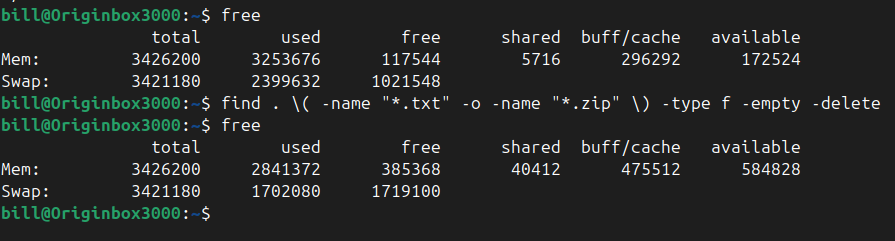
At this initial point, the system showed 117,544 KB of free memory and 102,548 KB of free swap space. This provides a baseline snapshot of memory conditions prior to any cleanup actions.
Next, the user executes a command pipeline using find to search for and delete all empty .txt and .zip files recursively from the current directory downward. The exact syntax used was:
find . ( -name “.txt” -o -name “.zip” ) -type f -empty -delete
This is best described as a command line pipeline or command string, as it is a single compound command executed in one go without internal piping (|).
The find utility, combined with logical OR conditions inside parentheses, instructs the system to identify all files ending in .txt or .zip that are both regular files (-type f) and empty (-empty), then delete them using the -delete flag.
Following the deletion command, the user reruns the free command to assess changes in memory.
After running the find command to delete all empty .txt and .zip files, the system showed a noticeable increase in free memory.
Free RAM rose from 117,544 KB to 385,368 KB, a gain of approximately 7.82%. Swap space increased from 102,548 KB to 1,719,100 KB, which amounts to a 47.25% improvement.
The cleanup not only removed unused files but also helped the system reclaim memory and swap resources.
BitcoinVersus.Tech Editor’s Note:
We volunteer daily to ensure the credibility of the information on this platform is Verifiably True. If you would like to support to help further secure the integrity of our research initiatives, please donate here
BitcoinVersus.tech is not a financial advisor. This media platform reports on financial subjects purely for informational purposes.
 Bitcoin Versus
Leave a comment