
The sed command in Linux is a powerful stream editor used to filter, find, and modify text within files or input streams.
Short for “stream editor,” sed operates line-by-line and can perform operations like search-and-replace, deletion, insertion, or even complex pattern matching using regular expressions. It is commonly used for parsing and transforming text in automation scripts or when editing files without opening a text editor.
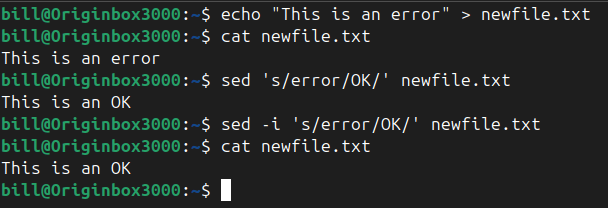
In the screenshot, the user first creates a file called newfile.txt containing the sentence “This is an error” using the echo command. They confirm the file’s contents with cat newfile.txt.
Next, the command sed 's/error/OK/' newfile.txt is used to display the modified version of the file where “error” is replaced with “OK” — but it does not actually change the file. To apply the change permanently, the user runs sed -i 's/error/OK/' newfile.txt, where -i stands for “in-place,” meaning the file is directly updated.
Running cat newfile.txt afterward confirms the change has been saved. This sequence demonstrates both the power of sed as a tool for temporary text transformation and how to make those changes persistent in Linux.
BitcoinVersus.Tech Editor’s Note:
We volunteer daily to ensure the credibility of the information on this platform is Verifiably True. If you would like to support to help further secure the integrity of our research initiatives, please donate here
BitcoinVersus.tech is not a financial advisor. This media platform reports on financial subjects purely for informational purposes.
 Bitcoin Versus
Leave a comment