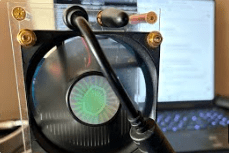
The SupraHex is a compact, ESP32-S3-based mining device designed for small-scale, efficient Bitcoin mining. Developed by TinyChipHub and other vendors recognized by OSMU, it operates on AxeOS firmware and supports both solo and pool mining.
Unlike traditional ASICs, it is optimized for low-power, cost-effective mining while allowing users to tinker with firmware and system configurations. However, as I quickly learned, firmware updates can be tricky, and mistakes can brick the machine.
The Problem: A Bricked SupraHex
After an attempted firmware update, my SupraHex became completely unresponsive:
- No COM port detection when connected to a computer.
- No network access, meaning the web interface was unreachable.
- No LED activity, suggesting the firmware failed to initialize.
At this point, the device was essentially a paperweight, so I had to manually restore it using command-line tools.
The Solution: Command-Line Debugging and Recovery
Since GUI-based troubleshooting wasn’t an option, I turned to the command line for a deep-level firmware recovery.
Step 1: Confirming Device Connection & Entering Bootloader Mode
With no visible response from the machine, I had to force the ESP32-S3 into bootloader mode:
- Disconnected power completely.
- Held down the BOOT button while reconnecting the device via USB.
- Released the button after 5–10 seconds to allow bootloader mode to initialize.
- Checked Windows Device Manager to confirm the COM port was detected.
At this point, my PC finally recognized the SupraHex as a USB-to-serial device (Silicon Labs CP210x).
Step 2: Installing & Running esptool.py
Since BitaxeTool alone couldn’t erase flash memory, I installed esptool.py, a Python-based utility for interfacing with ESP32 devices.
🔹 Installed esptool.py:
pip install esptool
🔹 Erased corrupted firmware:
python -m esptool --chip esp32s3 --port COM5 erase_flash
This fully wiped the flash memory, removing any corrupt firmware files.
Step 3: Re-Flashing the Firmware
With the device now clean, I had to reinstall the SupraHex firmware using BitaxeTool:
bitaxetool -p COM5 -f "C:\Users\YourUsername\Downloads\esp-miner-factory-v2.5.1-TCH-All-in-one-702.bin"
Once completed, the terminal confirmed:
Leaving...
Hard resetting via RTS pin...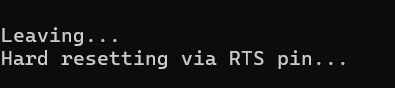
This meant the firmware successfully flashed onto the device.
Step 4: Power Cycling & Letting the Device Initialize
- Unplugged the SupraHex for 15 seconds.
- Reconnected power and USB.
- Waited ~5–10 minutes for the first boot sequence.
- Checked my router’s DHCP list to find the new IP address.
Finally, the web interface was accessible again, and the machine began hashing.
This entire recovery process reinforced how critical it is to be comfortable using the command line for embedded systems troubleshooting.
Understanding ESP32 microcontroller architecture helped in recognizing how bootloader mode functions.
Python-based utilities (esptool.py, bitaxetool) are key tools for embedded firmware flashing.
Knowing how to debug COM port issues is a must when working with UART-based devices.
Patience is crucial—some steps require waiting for initialization instead of rushing into another fix.
Additionally, implementing practical steps into your SOP like correspondence with vendor/manufacturer as well as reviewing any documentation on their website is essential for the completion of board recovery.
For those using the SupraHex or similar embedded mining devices, firmware recovery is possible, but only if you’re willing to dive deep into the command line.
The SupraHex is an incredible small-scale mining device, but firmware updates require careful execution.
If something goes wrong, knowing how to work with serial communication, bootloader recovery, and firmware flashing tools is necessary to bring it back online.
For anyone struggling with a bricked SupraHex, I highly recommend learning python and the fundamentals of UART serial communication. I also encourage you to look into how to install python packages like esptool.py, BitaxeTool, and basic network troubleshooting.
BitcoinVersus.Tech Editor’s Note:
We volunteer daily to ensure the credibility of the information on this platform is Verifiably True. If you would like to support to help further secure the integrity of our research initiatives, please donate here
BitcoinVersus.tech is not a financial advisor. This media platform reports on financial subjects purely for informational purposes.

 Bitcoin Versus
Leave a reply to Bitaxe Gamma 601 “Device Overheat!” Mode: Standard Procedure for Resolving Bitaxe Miner Overheat Alerts – Bitcoin Versus Cancel reply