Information Technology
-

Installing and configuring laptop hardware involves replacing or upgrading essential components such as memory (RAM), storage drives, and batteries. When upgrading RAM, the laptop must be powered off, and the correct type and size of memory modules must be installed in the designated slots. Storage upgrades often involve swapping out traditional hard disk drives (HDDs)…
-

The x64 architecture, commonly referred to as 64-bit computing, supports larger amounts of memory and improved computational capabilities compared to its predecessors. According to Microsoft, x64 CPUs can address substantially more RAM, enhancing performance for memory-intensive tasks such as gaming, software development, and video editing. Dominant in modern desktops and servers, x64 processors from companies…
-

The command netsh wlan show networks mode=bssid is a Windows command-line instruction used to display detailed information about wireless networks available within range of the computer’s Wi-Fi router or adapter. The netsh utility, short for Network Shell, allows users to configure and monitor network settings from the command prompt. In this case, the command queries…
-
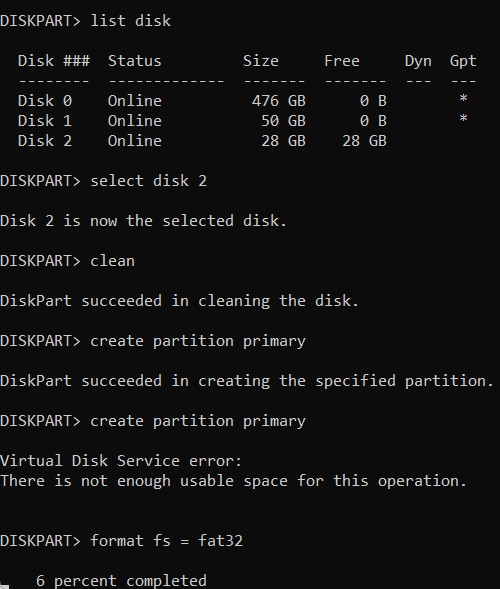
DiskPart is a command-line disk partitioning tool built into the Windows operating system. It allows users to manage their storage devices such as hard drives, SSDs, USB flash drives, and SD cards. DiskPart provides more control and flexibility over disk management compared to the GUI Disk Management utility in Windows. BitcoinVersus.Tech Editor’s Note: We volunteer…
-

The tasklist command is a Windows utility that lists all currently running processes on the system, along with key details like Process IDs (PIDs), memory usage, and executable names. It is commonly used for monitoring and troubleshooting processes. For instance, it can be combined with filters to locate specific tasks, such as running tasklist |…
-

SFC (System File Checker)System File Checker (SFC) is a built-in Windows utility designed to scan for and repair corrupted or missing system files. SFC ensures the integrity of critical operating system files by replacing them with the correct versions from the Windows installation source, helping to resolve system stability or performance issues. Keep in mind,…
-
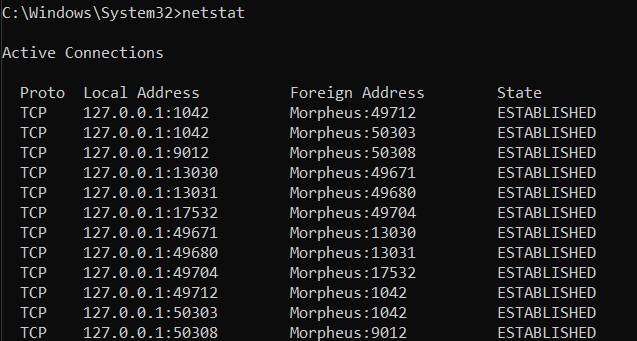
The netstat command provides statistics on current network connections and listening ports, offering insight into which applications are communicating over the network. Running netstat -a displays all active connections and ports. Netstat -b reveals the applications associated with each connection, valuable for security assessments (you need admin privileges for the “netstat -b” command). This command is used to detect suspicious…
-
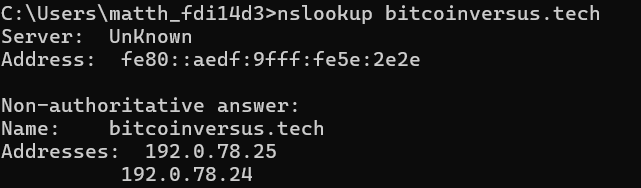
Nslookup (Name Server Lookup) is a command-line tool for querying Domain Name System (DNS) servers. It allows users to obtain the IP address associated with a domain name, or vice versa, helping in diagnosing DNS-related issues. For instance, nslookup google.com will show the IP addresses linked to bitcoinversus.tech This command is useful for troubleshooting DNS…
-
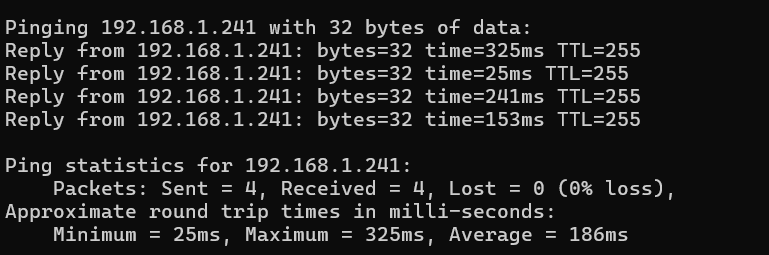
BitcoinVersus.Tech Editor’s Note: We volunteer daily to ensure the credibility of the information on this platform is Verifiably True.If you would like to support to help further secure the integrity of our research initiatives, please donate here The ping command is a fundamental network utility used to test the reachability of a host on an…
-

The ‘tracert’ command, short for ‘Trace Route,’ is a network diagnostic tool that tracks the path data packets take from your device to a specified IP address or domain. By listing each hop and measuring the time it takes to travel between them, ‘tracert’ helps identify delays or connection issues along the route. For instance,…
-

The ipconfig command in Windows OS provides essential network configuration details, helping users view IP addresses, subnet masks, and default gateways, vital for resolving connectivity issues. Running ipconfig /all offers extended data such as DNS servers, DHCP settings, and MAC addresses. This command is commonly used in troubleshooting scenarios where network connectivity is interrupted or…


