The following operational site reports were documented during active Bitcoin mining infrastructure operations between April and May 2026. These reports contain real time observations involving machine diagnostics, network infrastructure, thermal management, repair workflows, technician training, inventory accountability, and operational decision making inside a live industrial Bitcoin mining environment.
The reports are presented for journalistic, educational, and technical documentation purposes to provide insight into the realities of maintaining large scale digital energy infrastructure. Information included throughout the reports reflects on site operational conditions, troubleshooting procedures, environmental challenges, and standard operating practices observed during day to day mining operations.
Some sections may contain technical terminology, machine identifiers, internal workflow procedures, or infrastructure references relevant to ASIC mining operations and data center management. The reports have been preserved in a structured format to maintain operational context and accuracy surrounding the events, observations, and conclusions documented during each reporting period.
Site Report 4-28-2026
Training Patrick for machine diagnosis standard operation procedure.
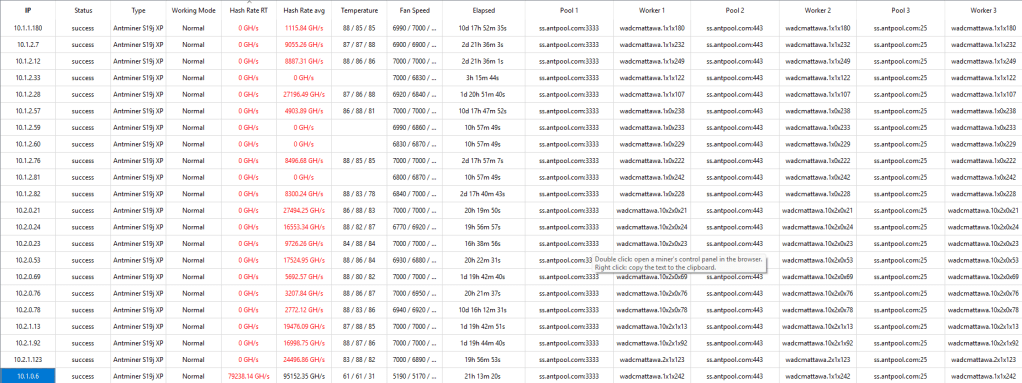
Initial scan of btc tools miner management found 16 machines failing (Key failing indicator is the Hashrate Rate Avg RT Column, showing Real-Time (RT) hashrate of the machine).
Work Flow Procedure: Before plugging back in 26+ machines, we are going to diagnose, locate, and pull the 16 machines that are failing.
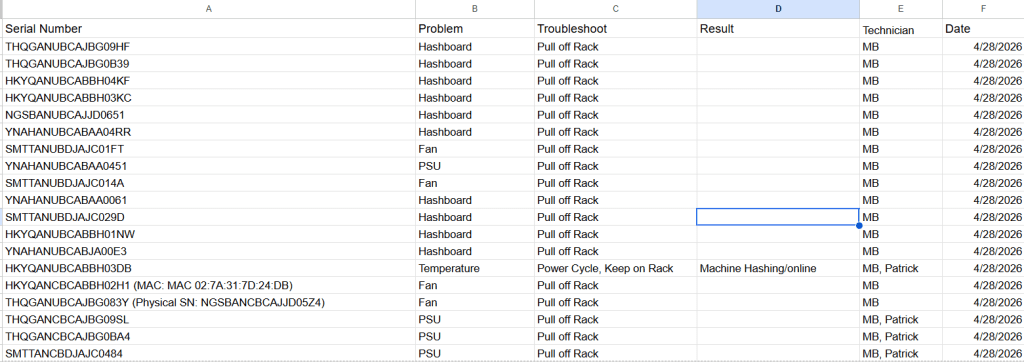
Noticed that out of the 16 machines failing, 1 machine (bad fan) did not display a Serial Number on its User Interface (Shown in screen shot below, it only shows the MAC address).
We may need to update the firmware of the machine, but I recommend a stock firmware update from the bitmain website, NOT a 3rd party firmware.
I believe that will solve the issue so that we can see the machine’s serial number in the User Interface. I will update the firmware of the machine after the bitmain technician fixes the primary issue (fan replacement)
The SN for this machine is HKYQANCBCABBH02H1


Note: Need access to all company laptops available on site. I’m still using my own personal laptop(completed).
THQGANUBCAJBG083Y was a SN that showed up on the User Interface, but the actual physical Serial number was NGSBANCBCAJJD05Z4, this has been noted in all inventory documents.
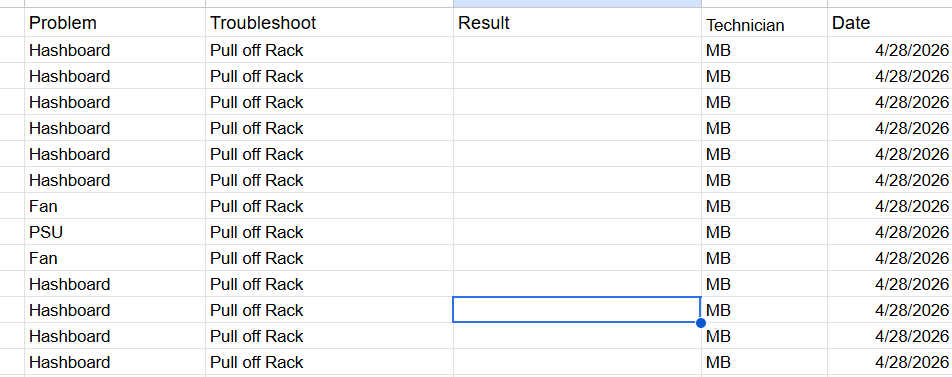
All Machines that need repair (15) during initial 4-28-2026 morning btc tools scan have been pulled for repair and added to Machine off Rack Sheet in google sheet and also the excel sheet.
There were 3 additional found failing due to PSU issues after diagnosing and pulling 15/16 machines failing. 1 machine was power cycled and came back online hashing:
Total Machines Pulled on 4/28/26 — 18 Machines:
Now that all machines have been diagnosed, Patrick has been assigned to plug in all the machines that were unplugged due to infrastructure maintenance from last week.
After the machines have been plugged in, we will scan the network and wait to see how many of the 50+ machines that were down from last week come back online and hashing due to infrastructure.
There are another 12 machines that are absolutely failing (0 TH/s) and will need to be diagnosed 4-29-2026 (top priority for tomorrow morning)
After troubleshooting 19 machines and replugging in 26+ machines that were unplugged due to infrastructure maintenance, we were able to bring back 19 more machines online today and 10 more hashing (we were at 321 hashing yesterday)

Note (Completed): After the Bitmain Technicians come and fix the machines, on Monday 5-4-2026 The main assignment for Technician Patrick will be to flip the switches around (See Picture below) so that we can see the green LED’s (Light Emitting Diodes), as this is the key physical indicator to determine whether the switch/port is working. I have equipment available for him to use, but will also send over a new equipment list before the end of day.

Tried to send a test email today from company email and this showed up (problem fixed)
Webmail

Site Report 4-29-2026
Initial scan of the site showed 339 online. There are now 14 machines that are absolutely failing and will be diagnosed and pulled if needed.
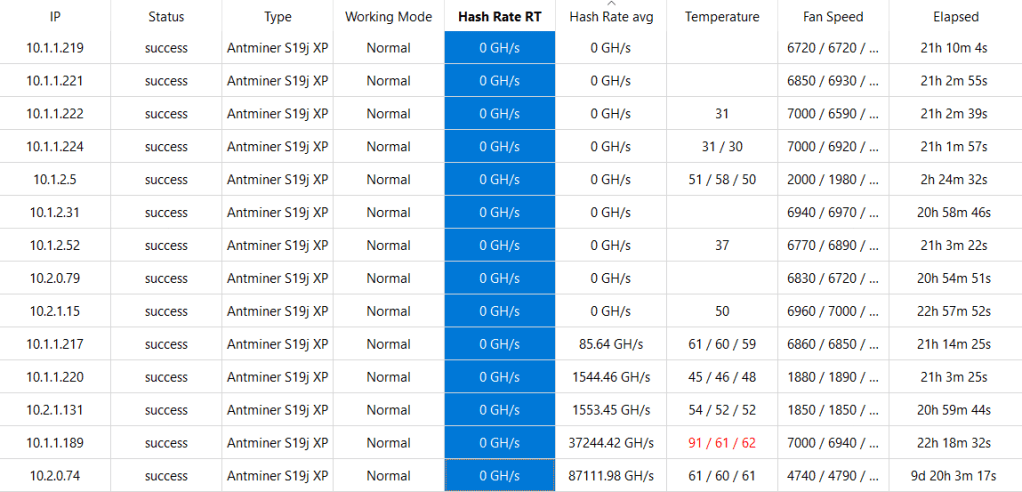
There are about 34 + 6 machines total that have been identified but 2 of them will need a power cycle.
40 machines total have been pulled over the past 2 days.
Note: Machine YNAHANUBCABAA04R1 is on the rack but has yet to be found because the miner locator feature seems to not be working.
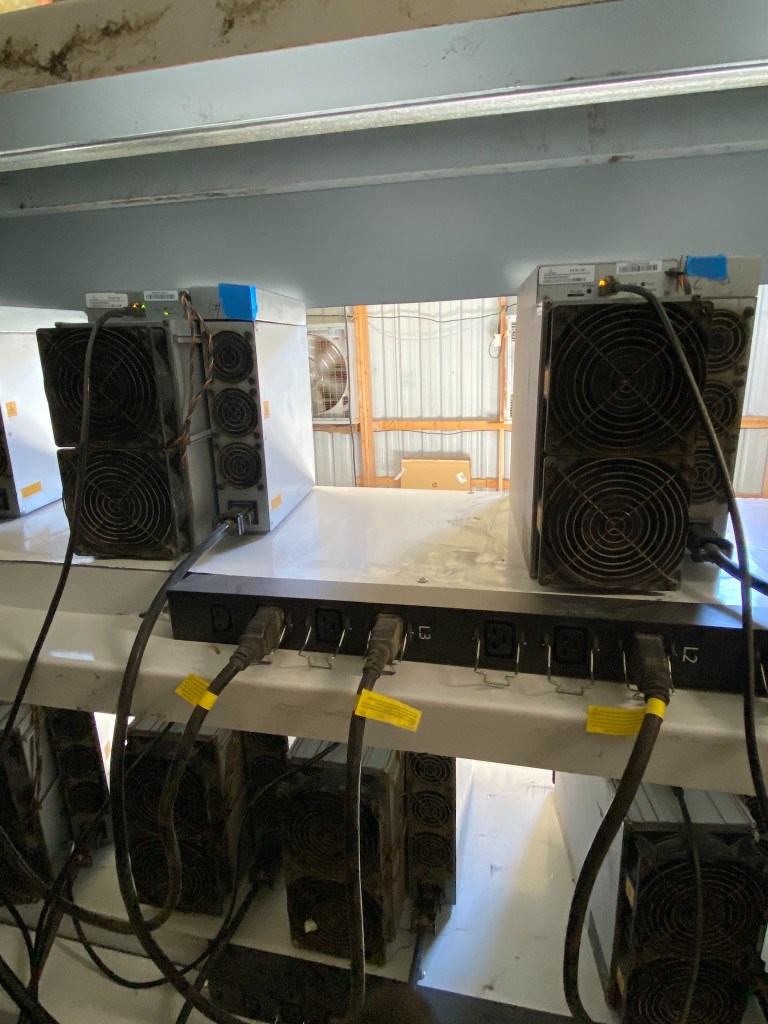
The machines will need a shield from the heat in between all the gaps. This will protect them from the heat (see picture below) But these can’t be permanent shields; they have to be modular. So things like foam and cardboard usually work.
This would be a good modular heat shield to help block heat from open gaps on racks: https://www.amazon.com/dp/B0G3P6JN3V/ref=sspa_dk_detail_2?sp_csd=d2lkZ2V0TmFtZT1zcF9kZXRhaWw
Site Report 4-30-2026
New Employee Arrival, Training Guadalupe on Standard Operation and Procedure.
Machine Scan on BTC tools showed about 3 machines failing.
Today we’ve pulled 4 machines.
YNAHANUBCABAA03Z8
NGSBANCBCAJJD067F
YNAHANCBCABAA03LV
YNAHANCBCABAA04R1
We have a machine check-in sheet available now!
It’s a new tab on our Machine Inventory sheet in excel and google docs.
Site Report Module: Please review the site report module daily everyone on-site will be required to submit a site report at the end of each day. https://docs.google.com/document/d/1aVVxDMzifXxZj4wJ7gm57BWdFZ-Ik8ZR-25RoDnuLPA/edit?tab=t.0
We keep 2 accounts of the same documentation (Double asset-counting) to keep up with what we actually worked on during the day.
1st accuount google docs sheet: https://docs.google.com/spreadsheets/d/1hbOXjq4rhe-5jNaLbLfdBRp2vLKVBKEMYCIpIVVzrQY/edit?gid=1449509028#gid=1449509028
2nd account excel spread sheet: WADC – EMPLOYEE SCHEDULE.xlsx
There are 6 main reasons we will check a machine in for repair.
1. Online, Not Hashing
2. Hashboard Failure
3. Control Board Failure
4. PSU Failure
5. Fan Failure
6. Machine Over Heating
Please sign your name and/or initial after checking in a machine.
If you have any questions please let me know.
Key Metrics to look for in any bitcoin mining operation
The cost of energy (typically measured in cents/kilowatt hours)
The efficiency of the machine (measured in Joule / Per TeraHash Efficiency)
The total hashrate of the machine/entire operation (measured in TeraHash/PetaHash/ExaHash)
Infrastructure: T568B Ethernet Termination Training With Patrick and Lupe.
We can physically fit 11 machines per row on rack.
Site Report 5-1-2026
Ethernet bench test termination completed by Operations Team (Network) and Infrastructure Team (Electrical)
Machines are now being tested by the Bitmain technician.
The testing process will take a little time as each machine takes at least 2-15 minutes to fully boot up and diagnose/give some sort of indication of online hashing or failure or fault.
Today’s machine stats according to btc tools:

All machines according to btc tools machines are currently hashing/online.
There seems to be 2 other machines that we are unable to find, however, 1. we don’t know the SN of these 2 machines and 2. can’t seem to get the IP address.
A solution to find the machine will be to scan in every machine that’s on the rack. That way we have all SN’s on the rack scanned in.
Chris Set up Ethernet cable in Room 2 for network redundancy purposes
Important Network information for site operations
For Building 1 Miners:
DHCP Range is: 10.1.0.1 – 10.1.1.255
Static Range is: 10.1.2.1 – 10.1.3.250
Subnet Mask for All Miners is: 255.255.252.0
Gateway for All Miners is: 10.1.3.254
For Building 1 Laptop Static IP:
IP Address – 10.1.3.252
Subnet Mask – 255.255.252.0
Gateway – 10.1.3.254
Static Range is: 10.1.2.1 – 10.1.3.250
DNS1 8.8.8.8
– DNS2 – 8.8.4.4
For Building 2 Miners:
DHCP Range is: 10.2.0.1 – 10.2.1.255
Static Range is: 10.2.2.1 – 10.2.3.250
Subnet Mask for All Miners is: 255.255.252.0
Gateway for All Miners is: 10.2.3.254
For Building 2 Laptop Static IP:
IP Address – 10.2.3.252
Subnet Mask – 255.255.252.0
Gateway – 10.2.3.254
DNS1 – 8.8.8.8
DNS2 – 8.8.4.4
Building 1 Core Switch Info:
ssh management IP: 192.168.1.2
username: admin
password: WAdatacenter123!
To clear DHCP Leases, type this: clear ip dhcp bind *
Building 2 Core Switch Info:
ssh management IP: 192.168.1.3
username: admin
password: WAdatacenter123!
To clear DHCP Leases, type this: clear ip dhcp bind *
There needs to be more water curtains down each aisle in room 1 and room 2 to help out with the heat dissipation.
The heat shield has been put up, but we need more air pressure on the cold side to help with heat dissipation, especially on the end. Requesting the infrastructure team to continue working on fans and water curtains in the cold aisle.
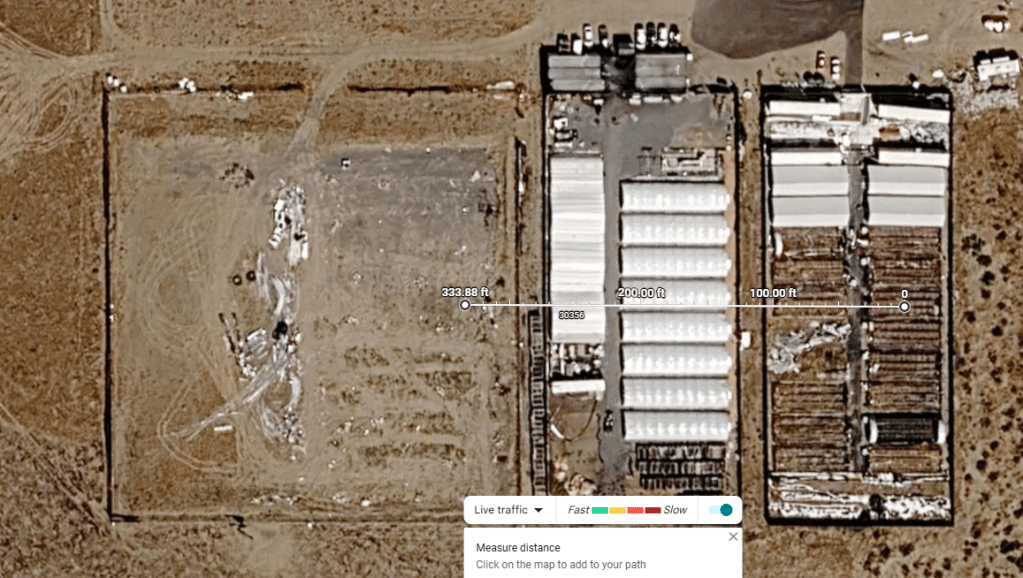
We have essentially 2 options for Network infrastructure for a reliable internet connection in room 3:
Option 1 – We can use multimode fiber. Run it about 800-1000 feet. I highly recommend this option. It’s the most cost effective option that will absolutely guarantee network reliability.
Option 2 – We can run the ethernet cable/fiber straight through about 330+ feet. We are running our network direct through the colocation property. I do not recommend this option due to the interference of property with another client leasing on the company property.
The Bitmain/Bitfix Technician is reporting that there are machines that have functional components, but they are not able to work due to an operating system/firmware issue.
So far 1 machine has been repaired:
physical: YNAHANCBCABAA0475 UI: (YNAHANUBCABJA03Z4)
Faulty machines on the rack 5-1-2026
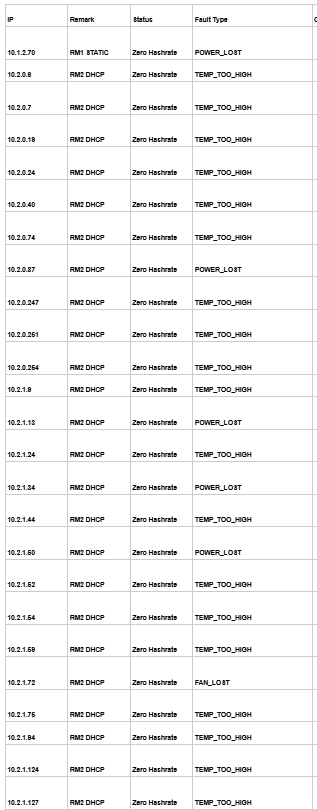
In the morning, technicians Patrick and Guadalupe will work on physically scanning all the machines on the rack. Counting (Scanning in) Machines on the rack will be a daily task if new machines have been added to the rack and if no other high priority assignments are available.
Site Report 5-2-2026
Continuing to train Patrick and Lupe on Machine Diagnostics and Inventory SOP
SN YNAHANUBCABAA04R1 was found by “walking down” every machine and using the ip reporter application to find the machine as well as a btctools or bitfufu miner management application.
Run a Scan in the miner management to cross reference the IP’s in the respective miner management applications.
Whichever one shows up in IP reporter that isn’t on your btc tools or bitfufu Site Wide or Room Wide scan is the one that has not been “found” and needs to be changed to a Static IP address that corresponds with the Room 1 or Room 2 LAN range (see network credentials from 5-1-2026) so this is how you actually find a machine that you can’t identify by Serial Number, MAC, or IP initially.
Another way to try to find a machine is flash all the machine locators in a room, and whichever one isnt flashing, that’s the one that should be the machine that you were looking for.
Technicians Patrick and Lupe to rescan all machines on the rack physically (New Physical SN Sheet has been added to the WADC Inventory sheet).
As the Bitmain Technician continues to repair/consolidate the bitcoin mining servers, Technicians Patrick and Lupe are to keep account of the total machines repaired.
This machines repaired sheet can be found in the WADC Machine Inventory Google Sheet and will be copied to the Excel Sheet (For QA Accounting Purposes).

Temperature issue: After a Hashcore and Btc tools Scan, we found 40+ machines over heating in room 2 and 3 machines overheating in room 3.
Some of the machines over heating were in spots that were not too hot, but other machines are failing in areas that have a lot of heat, especially on the far end of the cold aisle in room 2.
The heat in room 2 and room 1 is because we need more water curtains and fans installed all the way down the cold aisle in room 1 and room 2. We are going to power cycle the 40 machines due to over heating, let the power fully drain, and then plug them back in and see if any of the machines failing come back online.
There were also 3 Machines Overheating in Room 1 that will be power cycled due to overheating issues.
Power Failure issues have been found for machines on the rack. When the machine shows a power loss or power failure issue, even if they are power cycled, they will likely fail again because there is a problem with the PSU (Power Supply Unit) under a standard load.
Some tabs from the WADC Machine Inventory Google Sheet have been removed due to over redundancy. We will count everything again on the rack in rack 1 and rack 2 once the Bitmain contractor has finished repairing all machines.
After plugging back in the 43 machines that were offline/ not hashing, we are going to do a comprehensive power cycle of the 10+ machines overheating and see if any of them come back online hashing. If the machine is still showing errors, we will go ahead and check-in the machine.
Both ends of the intake (cold) aisle in room 2 are of higher abnormal temperatures currently. We will leave machines that are over heating unplugged (because we already power cycled the machine and its still overheating).
As a reminder:
if a machine is overheating we power cycle or leave unplugged.
If a machine has a hardware issue or isn’t hashing at all, we pull it off the rack and check-in the machine
T568 B Ethernet Cable Termination (Labeled “Free Cable”) in room 1 and room 2 termination Complete for backup network purposes. If the wifi or the managed switches go out for whatever reason, we still have a long blue “Free Cable” connected to the main switch that you can use for your laptop.
Site Report 5-3-2026
Technician Patrick is to continue scanning the network to check the status of all the machines utilizing BTC Tools, BitFufu MinerManagement, and HashcoreToolKit.
As a reminder:
- If a machine is overheating on the rack we power cycle
- if the overheating is still there after the power cycle, leave the machine unplugged until the environment cools down.
- If a machine has a hardware issue or isn’t hashing at all, we pull it off the rack and check-in the machine.
Patrick’s main job for the day: continue adding all machines that have been repaired by the Bitmain Technician to the machines repaired under warranty sheet and also deploying the machine on the rack in room or room 2.
Don’t forget to label the IP address physically on the newly repaired machine once it has been confirmed online and hashing.
The temperature of the environment at the ends of both cold aisles in room 1 and 2 are still a concern and it’s important that we continue to add water curtains and fans (on the hot aisle and cold aisle).
Reminder: Starting Monday 5 – 4 – 2026
Each day one technician is to copy and paste the list of machines that are overheating/faulty (From Bitfufu Miner Management application or BTC Tools) into a spreadsheet or screenshot, and email that to the operations manager. This will be done once per day in the morning.
http://10.1.1.122/ is overheating and will be power cycled.
We have several machines overheating today. The same ones that we unplugged yesterday to cool off are still overheating.
This is a temperature environment problem that will not be completely solved until there is more cooling infrastructure to combat the heat dissipation from the machine. I do not advise putting up more machines in this current environment, as we will find out very quickly that the machines will fail due to the lack of the heat properly dissipating and leaving the environment.
In order for us to have a successful operation, It is VERY IMPORTANT that the infrastructure is fully complete up and down the entire aisle on both sides of the rack.
We need more fans pulling the heat from the backside of the rack in the outtake/hot aisle.
And we also need more fans cooling off the front side of the machine in the intake/cold aisle.
Here are all the machines currently having problems due to the heat: There are 34 machines showing problems due to overheating:
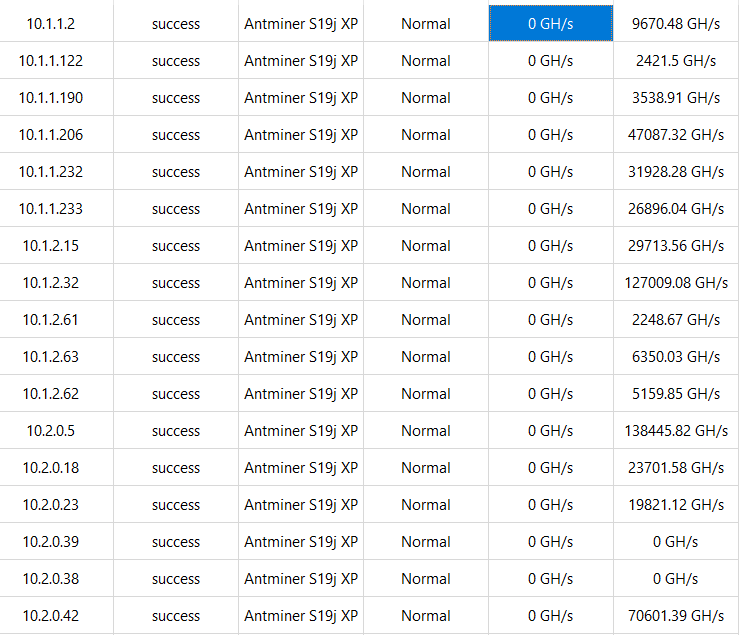
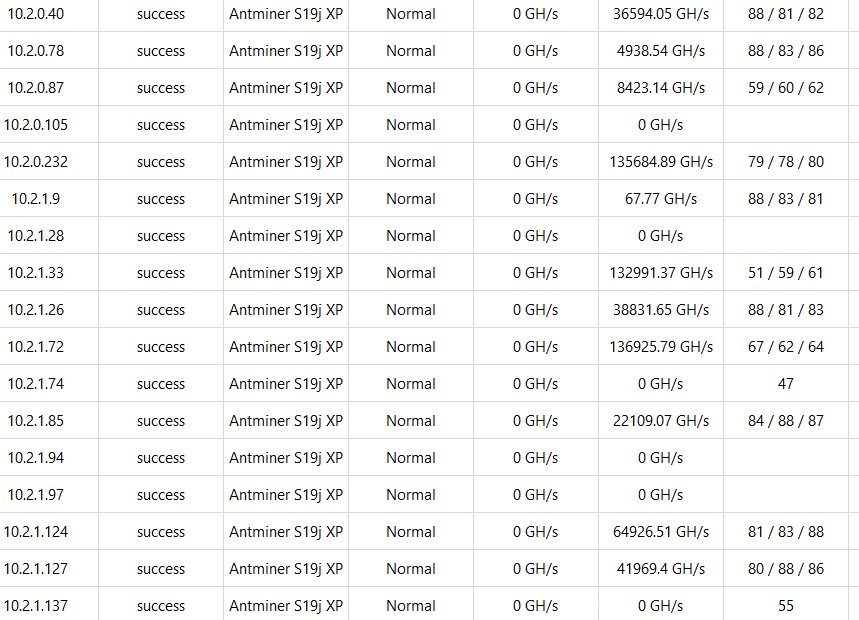
Also keep in mind that these machines are of an older generation and have been performing non stop for 4-6 years. It is a guarantee that used machines will underperform relative to new machines installed on the rack.
We have to also keep in mind that the summer season is here, which means that there will be an excess amount of heat. The seasons of the year also can have an impact on the operation in a positive or negative way. If machines get too hot, they overheat and destroy components. Machines also can get to a point where they are too cold and will also fail in that environment.
Extreme temperatures, both hot and cold, can affect the servers tremendously.
UPDATE: There are 6 main reasons we will check a machine in for repair.
1. Online, Not Hashing
2. Hashboard Failure
3. Control Board Failure
4. PSU Failure
5. Fan Failure
6. * Machine OverHeating *
While pulling machines off the rack that have been identified as failing, other machines are starting to fail. There will be machines that continue to fail/overheat because of the current heat problem that we are dealing with.
The next few days will be hot so expect an excess amount of machines to overheat and fail until the cooling infrastructure is complete
Site Report 5-4-2026
Today’s main objective: Beat the heat. If a machine is overheating pull it and remove it from the harmful environment and check-in the machine for repair.
DEOM – M. Burton: On-Site Team Temperature Management. Bringing in more fans to help cool down the Command room. Testing the repaired machines and verifying if the repaired machines are hashing or not. Scanning machines via BTC tools in Room 1 and Room 2
Operations team objective:
DET, X. Zhang (Patrick): Assisting with Testing Repaired machines, Scanning Machines via BTC tools and Bitfufu Miner in room 2 and assisting in room 1.
DET, G. Lomeli: Assisting with Testing repaired machines, Scanning Machines with miner management application (Btc Tools, Hashcore, Bitfufu, etc.) in room 1 and assisting in room 2.
Machine Diagnostic ID Operational Procedure:
There are 6 main reasons we will check a machine in for repair.
1. Online, Not Hashing
2. Hashboard Failure
3. Control Board Failure
4. PSU Failure
5. Fan Failure
6. * Machine Temperature OverHeating *
Overheating Machine SOP
- If a machine is over heating on the rack we power cycle,
- If the over heating remains after the power cycle, Check the machine in and remove from the rack and place on the Overheating Pallet(s) until the environment cools down.
- If a machine has a hardware issue or isn’t hashing at all, we pull it off the rack and check-in the machine.
- If the machine is in an obvious unsafe overheating environment, remove the machine from the rack and check-in the machine for repair AND PLACE ON THE OVERHEATING MACHINE PALLET
20 Machines are currently showing faults due to Overheating or hashboards being undetected.
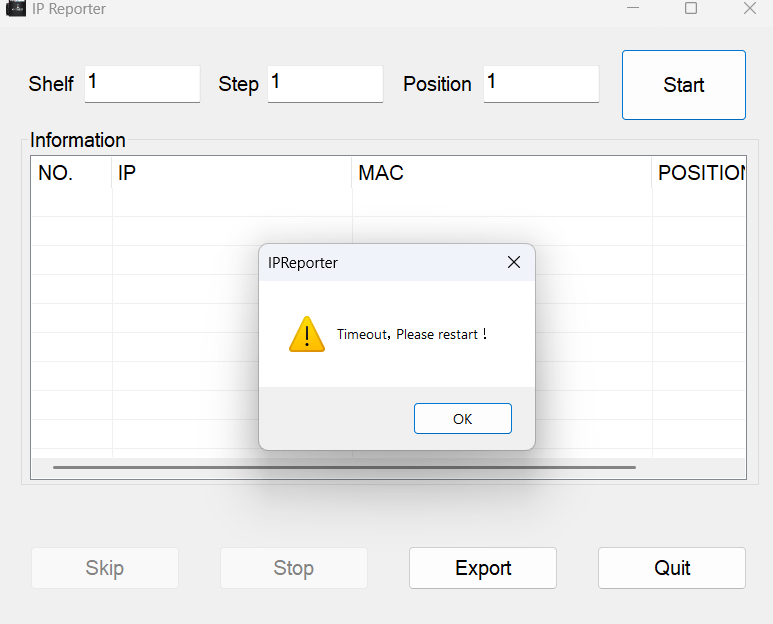
ip reporter on one of the company Dell rugged laptops doesn’t work. I tried troubleshooting for several minutes. It will remain a stationary laptop.
There may still be a network connection issue with the WIFI in ROOM 2. I tried joining the network but it took much longer than expected with no success
DIGITAL ENERGY MASTER MANAGEMENT POLICY:
WE DO NOT UNDER ANY CIRCUMSTANCES LEAVE MACHINES ON THE RACK WHILE THEY AREN’T HASHING. IT IS A WASTE OF MONEY AND ENERGY. OUR GOAL IS TO OPTIMIZE REVENUE AS BEST WE CAN, GIVEN THE CIRCUMSTANCES OF THE CURRENT ENVIRONMENT.
UNSURE WHY, BUT THE IP REPORTER TOOL IS FAILING ON MULTIPLE LAPTOPS. MAY BE A NETWORK ISSUE.
Post-Repair Machine Testing SOP.
Test the machine on the 1st rack in room 1.
DO NOT TEST MORE THAN 2 MACHINES AT 1 TIME.
Verify that the machine is online and hashing.
If you can assign an IP, great. BUT THIS IS NOT THE MAIN PRIORITY.
MAIN PRIORITY IS TO MAKE SURE WE ARE VERIFYING THE MACHINE IS ONLINE AND HASHING.
We have a new overheating machine pallet. All machines overheating will now be placed on this pallet. We will add a new pallet as machines continue to overheat due to high temperature.
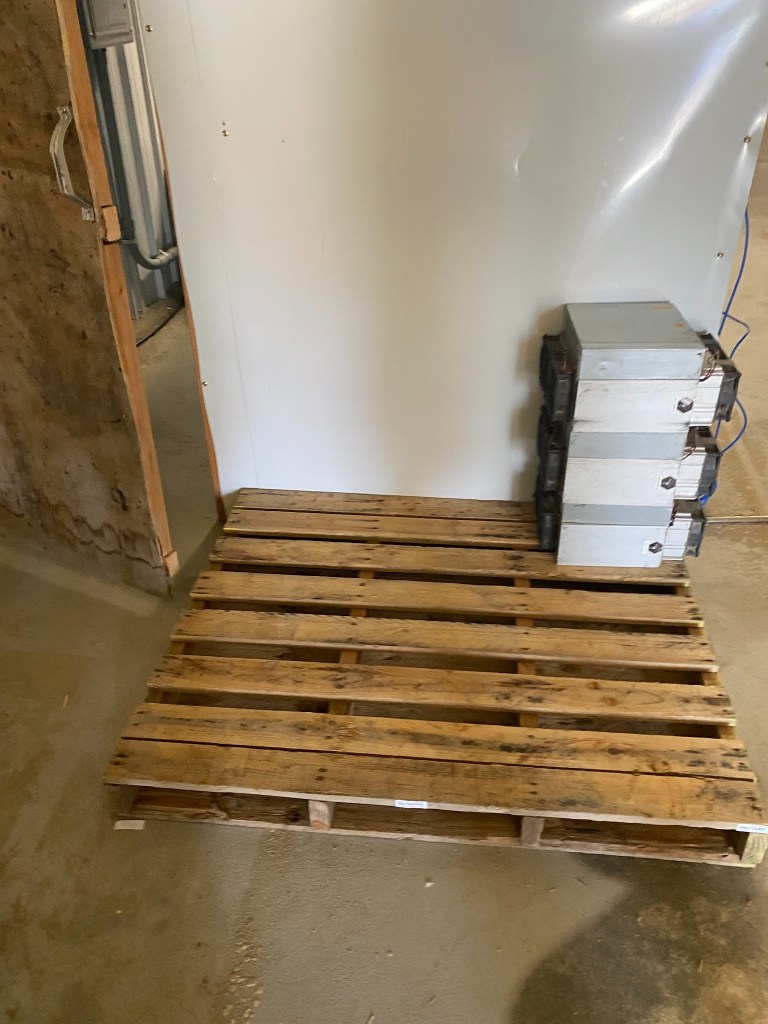
Overheating Machine SOP
- If a machine is over heating on the rack we power cycle,
- If the over heating remains after the power cycle, Check the machine in and remove from the rack for repair until the environment cools down.
- If a machine has a hardware issue or isn’t hashing at all, we pull it off the rack and check-in the machine.
- If the machine is in an obvious unsafe overheating environment, remove the machine from the rack and check-in the machine for repair AND PLACE ON THE OVERHEATING MACHINE PALLET
Site Report 5-5-2026
Both the Operations Manager and the Bitmain Technician have come to a CONSENSUS on the CONCLUSION: that you CANNOT repair an overheating machine, because the malfunction is only while the machine is turned on in real-time.
So the only SOLUTION to “repair” an overheating machine is to remove the machine off the rack and allow it to cool off and be retested so that it is made functional. BUT WE MUST WAIT until there is proper COOLING INFRASTRUCTURE AVAILABLE FOR THE OVERHEATING MACHINES BEFORE we redeploy them for the SOLUTION to work.
You have to implement energy intensive cooling infrastructure, because the machines dissipate energy intensive heat.
Main objective: Beat the heat. We can’t leave the machines on the rack that are overheating, so we have implemented a machine overheating SOP.
Overheating Machine SOP
- If a machine is over heating on the rack we power cycle,
- If the over heating remains after the power cycle, Check the machine in and remove from the rack for repair until the environment cools down.
- If a machine has a hardware issue or isn’t hashing at all, we pull it off the rack and check-in the machine.
- If the machine is in an obvious unsafe overheating environment, remove the machine from the rack and check-in the machine for repair AND PLACE ON THE OVERHEATING MACHINE PALLET
- Place all the overheating machines on a pallet.
Site Report 5-6-2026
Site Clean up and organization day. Straightening up and cleaning things in room 1.
Brought in a refrigerator and one extra fan for team temperature management
Infrastructure OM M.Burton Successfully mounted a new table in room 1 To place laptops/servers safely while troubleshooting machines:
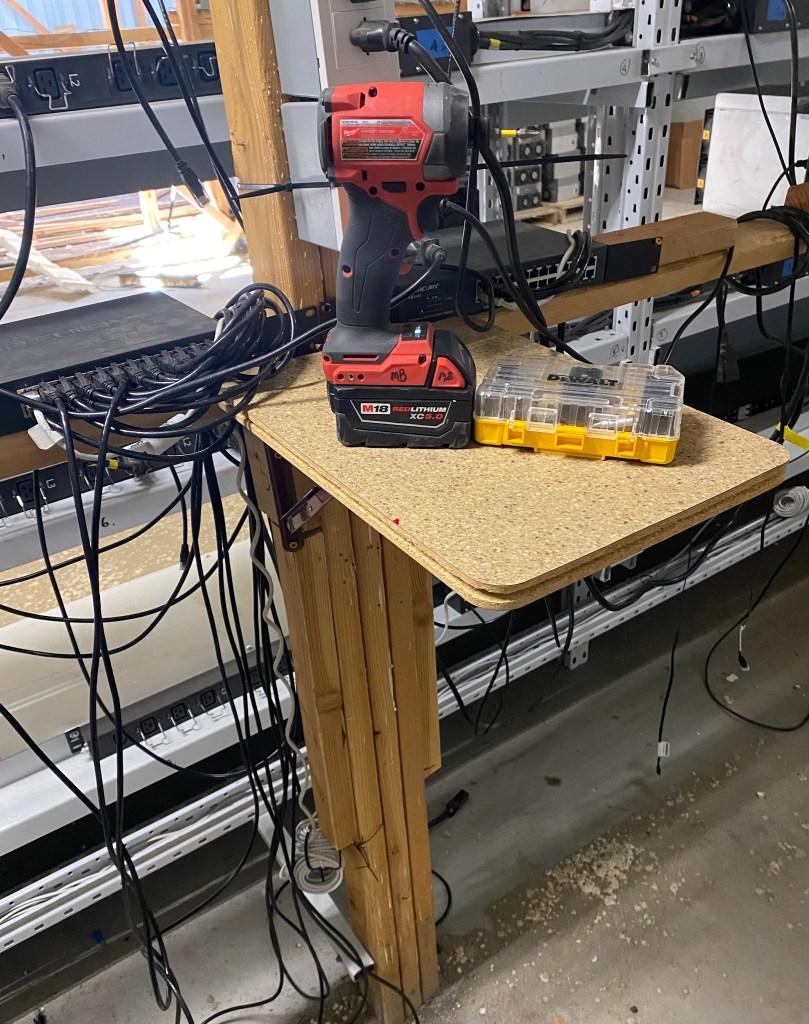
We are also working on building an extra table for the command room.
We were able to complete the table, but the surface area is too wide, so we will cut the table in half, and then add it to the command room.
Update: table has been added to command room
Patrick and Lupe have set up new pallets for the successful repairs.
To clarify, ALL machines repaired/overheating will remain on the pallets provided until the coolant infrastructure is complete.
We will run the fiber around the gate but instead of the back way we’ll run it around the property in the front.
91 servers were deployed today along with organization and cleanup. The day started with 262 machines detected by btc tools. Now, over 300+ have been detected to BTC tools.
Site Report 5-7-2026
We will start clocking in via a googlesheet/excelsheeet to be shared with GM Selena
Some machines like 10.1.1.98 are showing up with 0 Hashrate but actually hashing.
Best practice is to always open the UI via the IP address and verify if the machine is actually online and hashing or not

(SHOWS NOT HASHING IN BTC TOOLS MINER MANAGEMENT TOOL BUT IT’S HASHING!)
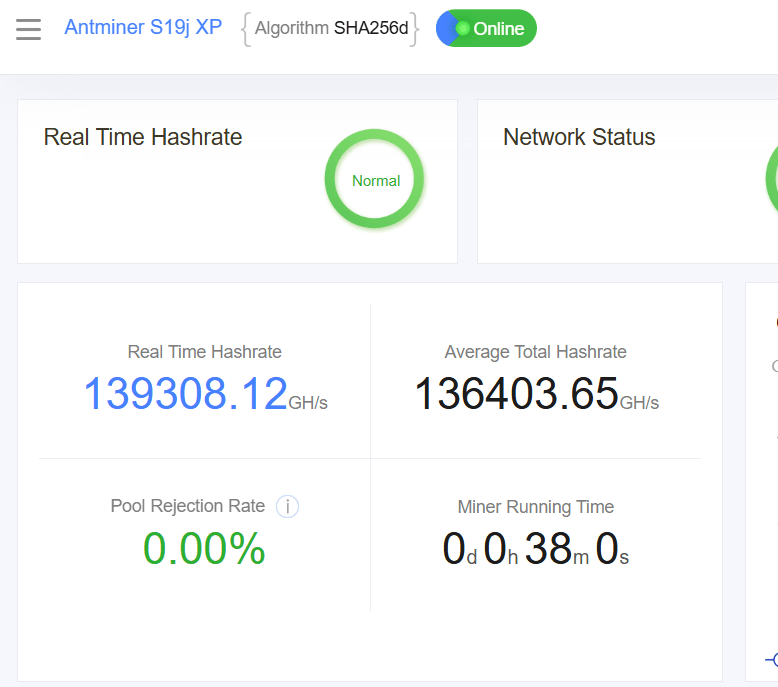
After racking and energizing an additional 40+ machines this morning, I was able to bring back 358 machines online with 15 machines showing errors.
After a 2nd scan this morning both btc tools and hashcore show that only 318 machines are online currently
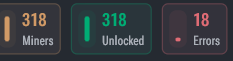

At about 9:30 A.M. we started experiencing a site wide power issue.
The 240V voltage is okay. But the 120v voltage is faulty which is affecting our network connection and our light bulbs.
We can get s19 jpro cables and we can power the switches with 240V.
BitcoinVersus.Tech Editor’s Note:
We volunteer daily to ensure the credibility of the information on this platform is Verifiably True. If you would like to support to help further secure the integrity of our research initiatives, please donate here: 3C9o19EH5HSiwEPyCTmEKzxhNCbo2X6TTb
BitcoinVersus.tech is not a financial advisor. This media platform reports on financial subjects purely for informational purposes.


Leave a Reply