When you open a browser, music player, game, or terminal, the operating system has to keep many pieces of software moving at once. Two of the most important ideas behind that multitasking are processes and threads.
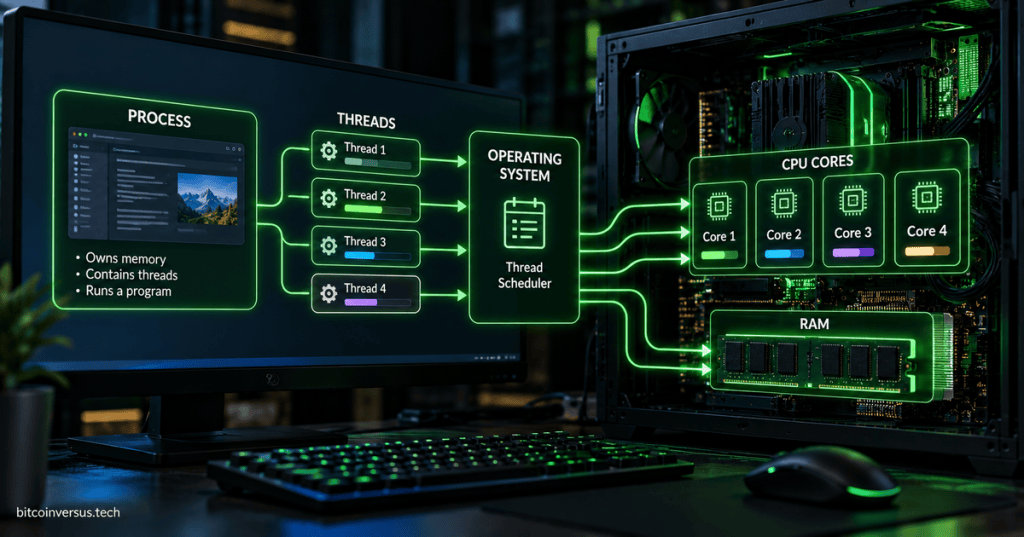
The easiest mental model is: a process is a running program with its own resources; a thread is a path of execution inside that process.
A Program Is Not Quite the Same Thing as a Process
A program stored on an SSD is mostly passive data until you run it. Once the operating system loads that executable into memory, assigns resources, and begins executing it, you have a process.
That distinction connects directly to our earlier explanation of how source code becomes an executable. Compilation creates the program file; launching that program creates a running process.
A Process Owns a Working Environment
A process normally has its own virtual address space, executable code, data, open resources, security information, and at least one thread. Microsoft’s process documentation describes a process as the environment that provides the resources needed to execute a program.
Much of the process’s active data lives in RAM. Keeping processes separated helps the kernel prevent one ordinary application from casually reading or overwriting another application’s memory.
For a formal reference, see Microsoft’s Processes and Threads documentation, which defines a process as an executing program and a thread as the basic unit to which processor time is allocated.
A Thread Is the Work Being Scheduled
A process needs at least one thread to actually execute instructions. A thread is the sequence of work that the operating system schedules onto the CPU.
A simple program might use one main thread. A larger application can create multiple threads so different parts of the program can make progress independently. A browser, for example, may separate user-interface work, networking, media decoding, background tasks, and other activity across multiple execution paths.
Threads Inside One Process Share Resources
Threads inside the same process generally share that process’s memory and many of its resources. That makes communication between threads fast, because they can work with the same data structures instead of copying everything between isolated processes.
But shared memory also creates risk. If two threads modify the same data at the wrong time, the program can develop race conditions or corrupted state. That is why multithreaded software uses synchronization tools such as locks, mutexes, semaphores, events, and other coordination mechanisms.
The Scheduler Decides What Runs Next
The kernel contains a scheduler that decides which runnable work gets CPU time. If more threads are ready than there are available CPU execution resources, the operating system rapidly switches between them.
The Linux kernel documentation describes this job through its scheduler subsystem, which tracks runnable tasks and chooses which task should execute next. Modern Linux has been transitioning toward the EEVDF scheduler model, which aims to distribute CPU time while improving responsiveness for latency-sensitive work.
The broader scheduler documentation is available in the Linux kernel scheduler reference.
CPU Cores Change the Picture
On a single execution core, only one software thread can actually be executing on that core at a particular instant, so the operating system creates the illusion of many things happening together by switching quickly between runnable work. A modern multicore CPU can execute multiple threads at the same time on different cores.
This is the difference between concurrency and parallelism. Concurrency means multiple tasks can make progress during the same period. Parallelism means multiple tasks are literally executing at the same time on separate processing resources.
What Is a Context Switch?
When the operating system stops one runnable thread and lets another execute, it has to preserve enough of the first thread’s CPU state to resume it later. That transition is called a context switch.
Context switching is essential to multitasking, but it is not free. Saving state, loading another thread’s state, changing memory mappings in some cases, and disturbing CPU caches can add overhead. Good schedulers try to balance responsiveness, fairness, throughput, latency, and the cost of switching.
Processes Give Isolation; Threads Give Lightweight Parallel Work
Separate processes are heavier because each process has its own address space and operating-system resources, but that separation improves isolation. If one process crashes, another process may continue running normally.
Threads are lighter because they share the process environment. They can be excellent for splitting work inside one application, but a serious bug in one thread can damage the shared process and bring down the whole application.
You Can See Processes and Threads in Real Systems
In Windows, Task Manager shows running applications and processes, while lower-level tools can expose individual threads. Linux tools such as ps, top, htop, and ps -eLf can show processes, threads, CPU use, and scheduling information.
Those tools sit on top of the same operating-system machinery we discussed in our device-driver explainer and our guide to what happens when a PC boots: applications ultimately depend on the operating system, kernel, memory, drivers, and CPU working together.
The Simple Mental Model
Program file → process → one or more threads → operating-system scheduler → CPU core.
Think of a process as a workshop with its own tools, materials, and workspace. Threads are the workers inside that workshop. The operating system is the coordinator deciding which worker gets time on which CPU core.
Once that distinction is clear, a lot of computer terminology becomes easier: multitasking, CPU utilization, thread count, process crashes, parallel computing, scheduling, and memory isolation all fit into the same picture.
BitcoinVersus.Tech
Advertisement
Editor’s Note
BitcoinVersus.Tech publishes technical explainers and reporting for informational and educational purposes.
BitcoinVersus.tech is not a financial advisor. Content is provided for informational purposes.


Leave a comment