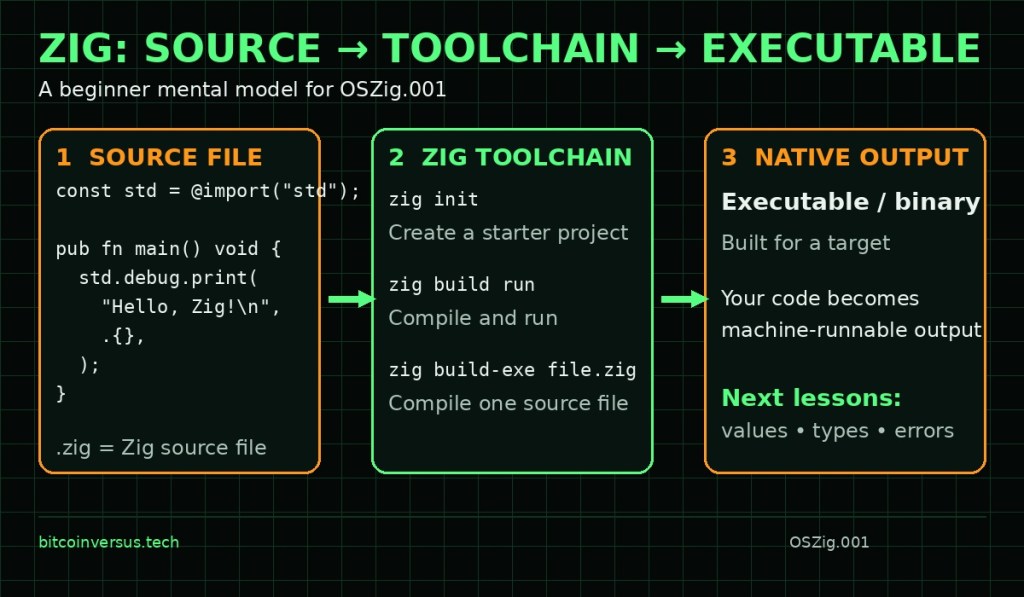
Elementary overview: Zig is a general-purpose programming language and toolchain built for software where programmers care about performance, explicit behavior, portability, and close control over the machine. The official Zig language reference describes the project in terms of robustness, optimality, reuse, and maintainability. For a beginner, the most useful first mental model is simpler: you write a .zig source file, invoke the Zig toolchain, and produce something the computer can run. This fits into the broader history of programming languages, but Zig is especially aimed at work that might otherwise involve languages such as C, C++, or Rust.
The Zig Toolchain Is More Than a Compiler
When you install Zig, the zig command gives you the language compiler plus project, build, test, and tooling commands. The official Zig Learn page currently lists 0.17.0 as the latest stable release. After installation, your shell needs to find the Zig executable through the system PATH environment variable. Running zig version is therefore a quick first check: if the command returns a version number, your terminal can find the toolchain.
zig versionCreate a Starter Project
- Create a directory for the project.
- Enter that directory in your terminal.
- Run
zig init. - Inspect the generated files, including
build.zig,build.zig.zon, and the files undersrc/. - Run
zig build runto build and execute the starter program.
mkdir hello-zig
cd hello-zig
zig init
zig build run
The current official Getting Started guide uses this same zig init → zig build run flow. The important beginner lesson is not the generated build files yet; it is recognizing the chain from source code → Zig toolchain → executable output. Later lessons can unpack the build system without forcing it into the first lesson.
Read a Minimal Zig Program
const std = @import("std");

pub fn main() void {
    std.debug.print("Hello, Zig!\n", .{});
}
const std = @import("std");gives the file a constant namedstdthat refers to Zig’s standard library.pub fn main()declares the program’s public entry-point function.voidmeans this version ofmaindoes not return a value.std.debug.print(...)prints formatted text for this simple example.\nis the newline escape sequence..{}is an empty tuple of formatting arguments.
Compile One File Without a Project
A full Zig project can use zig build, but a single source file can also be compiled directly with zig build-exe. That distinction helps beginners separate the language compiler from the larger project build system. It is similar to the broader difference between source code and the runtime/tooling layers discussed in our .NET platform lesson, although Zig produces native executables rather than relying on the .NET CLR execution model.
zig build-exe hello.zigWhy Systems Programmers Care About Zig
- Explicit behavior: Zig emphasizes code whose intent is visible rather than hidden behind large amounts of implicit runtime behavior.
- Native compilation: Zig can produce machine-code executables for supported targets.
- C interoperability: Zig is designed to work closely with C code and headers, which matters in operating systems, embedded software, libraries, and existing native codebases.
- Cross-compilation: the toolchain is built with targeting other platforms in mind.
- Manual resource control: Zig exposes low-level choices that make concepts such as heap memory and allocation important later in the curriculum.
Exercises
- Run
zig versionand record the version installed on your machine. - Create a new directory, run
zig init, and list the files it creates. - Run
zig build runand record the output. - Change the starter program so it prints your own message.
- Create a separate
hello.zigfile and compile it withzig build-exe hello.zig. - Explain in one sentence the difference between a
.zigsource file and the executable produced from it.
Knowledge Check + Answers
- What file extension normally identifies Zig source code?
.zig. - What command checks the installed Zig version?
zig version. - What command creates the starter project used by the current Getting Started guide?
zig init. - What command builds and runs that starter project?
zig build run. - What does
@import("std")provide? Access to Zig’s standard library namespace through the constant assigned to it. - What is
main? The program entry point. - What is the beginner compilation model? Zig source → Zig toolchain → native output.
Primary Technical References
Next Lesson
Next in the Zig track: OSZig.002 — Values, const, var, and Basic Types. That lesson will stay narrow and focus on how Zig stores values before introducing pointers, allocators, errors, or compile-time programming.
BitcoinVersus.Tech
Editor’s Note: Zig is still evolving, so examples should be checked against the documentation for the exact Zig version installed on your system.
We volunteer daily to improve the credibility of the information on this platform. If you would like to support the research, please donate here: 3C9o19EH5HSiwEPyCTmEKzxhNCbo2X6TTb
BitcoinVersus.tech is not a financial advisor. This media platform reports on technical and financial subjects purely for informational purposes.


Leave a Reply