
Rust is a compiled programming language designed to help developers build fast software while catching many memory and concurrency mistakes before a program runs. If you have already seen Go, JavaScript, Java, or Zig, Rust belongs in the same broad family of tools used to turn source code into working software, but it has its own unusually strict approach to memory safety.
This first lesson stays deliberately foundational. You will learn what Rust is, what rustup, rustc, and Cargo do, how a Rust project is laid out, how to compile and run a small program, and why the word ownership appears so often when people talk about Rust.
1. The Big Picture: Source Code → Compiler → Program
You write Rust source code in files that normally end in .rs. A compiler reads that source code, checks it, and produces machine code that your computer can execute. This is different from languages that are commonly run through an interpreter or virtual machine. Rust is normally compiled ahead of time into a native executable.
The idea is simple: you write human-readable instructions, the compiler performs a large amount of checking, and the finished binary runs directly on the target operating system. If you want a refresher on how software tools find commands such as compilers, review the PATH environment variable. If you want a broader view of why editors color code differently, see syntax highlighting.
2. The Three Tools You Should Know First
Rust beginners will quickly meet three names: rustup, rustc, and cargo. They are related, but they are not the same thing.
- rustup manages Rust toolchains. It installs Rust, lets you update it, and can switch between toolchain versions.
- rustc is the Rust compiler. It turns a Rust source file into an executable or library.
- Cargo is Rust’s project, build, dependency, and package-management tool. In real projects, you will use Cargo constantly.
The official Rust installation guide recommends installing through rustup. After installation, verify the toolchain with:
rustc --version
cargo --version
rustup --version
If each command prints version information, the core toolchain is available. Rust development also works naturally with Git and GitHub; Cargo can even initialize a Git repository when you create a new project.
3. Your First Rust Program
Create a file named main.rs and enter:
fn main() {
    println!("Hello, Rust!");
}
fn declares a function. The function named main is the starting point of an executable Rust program. println! prints a line of text. The exclamation mark is meaningful: println! is a macro rather than an ordinary function.
You can compile this tiny file directly with rustc:
rustc main.rsThen run the executable. On Linux or macOS:
./mainOn Windows PowerShell:
.\main.exeThe output should be:
Hello, Rust!4. Why Cargo Becomes the Normal Workflow
Compiling one file with rustc is useful for learning, but real programs need source directories, dependencies, repeatable builds, tests, and configuration. Cargo organizes those pieces. The official Cargo Book introduces this workflow directly.
cargo new hello_rust
cd hello_rust
cargo run
cargo new creates a project directory. Inside it, Cargo.toml is the project manifest and src/main.rs contains the starting source file. cargo run compiles the project if necessary and then launches it.
This walkthrough demonstrates the same beginner Cargo workflow: create a Rust project, compile it, and run a “Hello World” program.
Cargo also creates a target directory for build output. As projects grow, dependencies are declared in Cargo.toml, and Cargo resolves, downloads, and builds them. This is the Rust equivalent of the package-and-toolchain workflow you saw in OSGo.001, although the exact commands and project conventions differ.
5. What Makes Rust Different: Ownership
Rust’s signature idea is ownership. Ownership is a set of compile-time rules that helps Rust manage memory safely without requiring a garbage collector for normal memory management. At a high level, every value has an owner, and Rust tracks when ownership moves or when code temporarily borrows access to a value.
For a first example, use a heap-allocated String:
fn main() {
    let a = String::from("hash");
    let b = a;

    println!("{b}");
}
After let b = a;, ownership of that String moves from a to b. Rust prevents you from using a as if it still owned the same allocation. That rule helps prevent classes of mistakes where multiple parts of a program might otherwise believe they are responsible for the same resource.
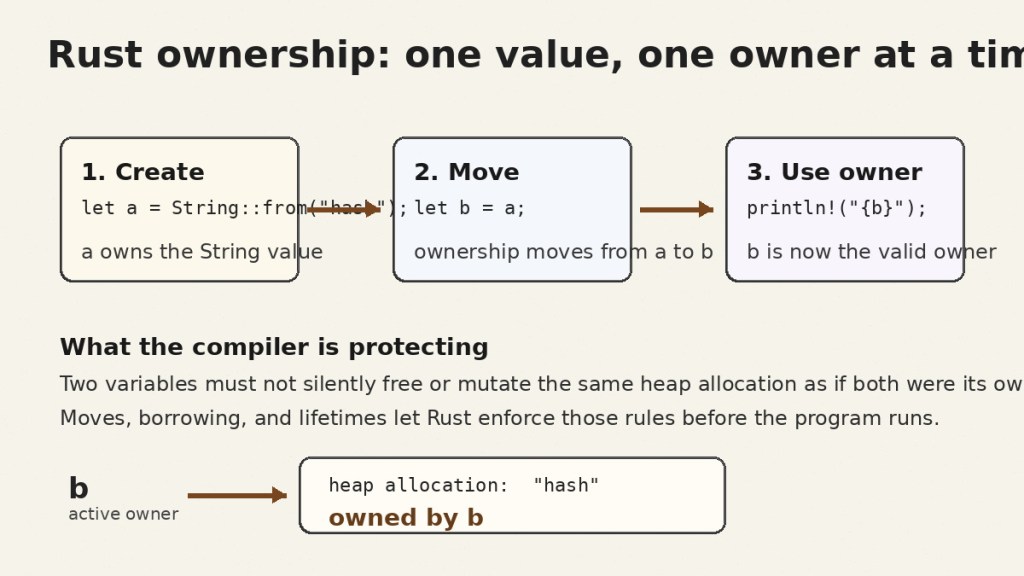
This diagram is intentionally simplified. Later Rust lessons will separate three ideas that beginners often mix together: moving a value, borrowing it through a reference, and deciding how long a reference may remain valid. For now, remember the central idea: Rust tries to prove that memory use is valid before producing the executable.
If the term “memory” feels abstract, compare it with virtual memory. Virtual memory explains how an operating system presents memory to processes; Rust ownership is a language-level rule system for how your program may use values and references inside that process.
6. Rust Tries to Make Compiler Errors Useful
A strict compiler can feel annoying at first because it rejects code that another language might accept. Rust’s philosophy is that a clear error during development is often cheaper than a mysterious crash, data race, or memory corruption problem after deployment. The compiler therefore explains many ownership, type, and lifetime mistakes in detail.
The language and tooling also keep evolving. BitcoinVersus recently covered Rust 1.99 and Cargo improvements, while the broader Rust community continues discussing future type-system and correctness features.
This Rust Bytes post highlights ongoing community discussion about stronger correctness-oriented language features.
7. A Small Practice Workflow
Run this sequence in a terminal:
cargo new ownership_demo
cd ownership_demo
cargo run
Then open src/main.rs and replace its contents with:
fn main() {
    let miner = String::from("S21");
    let active_miner = miner;

    println!("Active miner: {active_miner}");
}
Run cargo run again. Next, add println!("{miner}"); after the move and compile. Read the compiler message carefully. Do not treat the error as failure; the error is the lesson. Rust is showing you exactly where the old owner became invalid.
8. Exercises
- Create a new Cargo project named
first_rust_lab. - Change the program so it prints your own sentence.
- Run
cargo build, then locate the generated executable inside thetargetdirectory. - Open
Cargo.tomland identify the package name, version, and Rust edition. - Create a
String, move it into a second variable, then intentionally try to use the first variable again. Record the compiler’s explanation. - Run
cargo check. Compare how quickly it checks the project with a full build.
9. Knowledge Check
- What file extension is normally used for Rust source files?
- What is the role of
rustup? - What is the role of
rustc? - What is Cargo used for?
- Which function starts a normal Rust executable?
- Why does
println!end with an exclamation mark? - What happens to a
Stringwhen ownership moves from variableato variableb? - Why is Rust willing to reject code at compile time?
Answers
.rs.- It installs and manages Rust toolchains and versions.
- It is the Rust compiler.
- It creates projects, manages dependencies, builds, checks, tests, and runs Rust code.
main.- Because
println!is a macro. bbecomes the owner andacan no longer be used as though it still owns that value.- To catch many correctness and memory-safety problems before the program runs.
10. What You Should Remember
Rust source code normally lives in .rs files. rustup manages the toolchain, rustc is the compiler, and Cargo is the normal project workflow. A Rust executable starts in main. The language’s defining beginner concept is ownership: Rust tracks who is responsible for each value so it can reject many unsafe memory patterns at compile time.
Next in this Rust sequence: borrowing and references — how Rust lets code use a value without taking ownership of it.


Leave a Reply