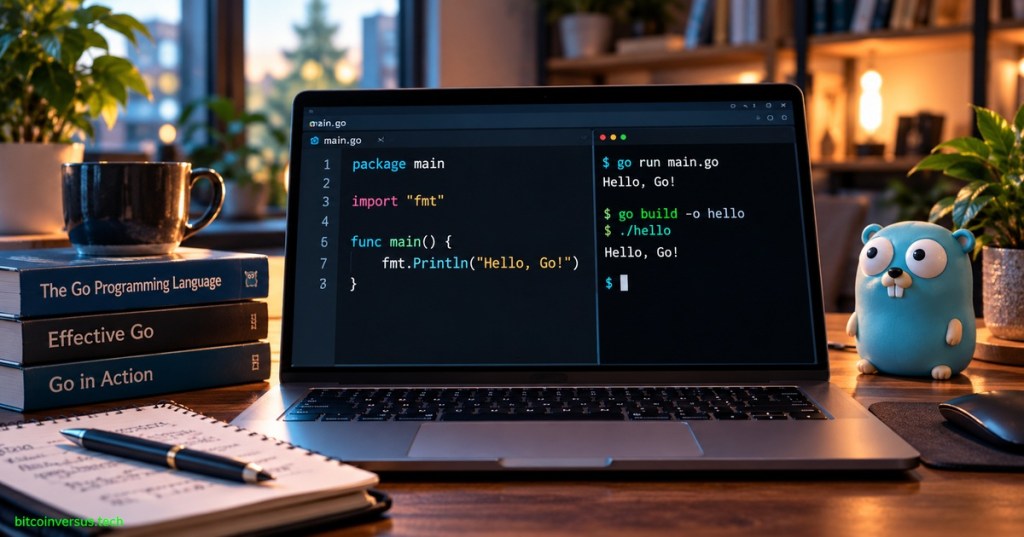
Elementary overview: Go is an open-source, statically typed, compiled programming language designed to make software easier to build, understand, and maintain at scale. You write Go source code in .go files, organize that code into packages, and use the go command to run, test, format, and build programs.
This first Open Source Go lesson stays intentionally narrow: understand what Go is, why it exists, what a package is, what the Go toolchain does, and how to run and build one tiny program. Variables, types, functions, methods, interfaces, goroutines, channels, modules, and concurrency patterns will each get their own lessons later.
What You Should Learn
- What Go is and why it was created.
- What a Go source file and package are.
- What
package mainandfunc main()mean. - What the
gocommand does. - The difference between
go runandgo build. - How to run your first Go program.
What Is Go?
Go is a general-purpose programming language created at Google. Robert Griesemer, Rob Pike, and Ken Thompson began sketching the language in 2007 after encountering software-engineering problems involving large codebases, long build times, networked systems, multicore hardware, and complex development workflows. Go became open source in 2009.
The Go project describes the language as focused on building simple, reliable, and efficient software. Its design deliberately removes some language complexity while combining static typing, compilation, garbage collection, built-in concurrency support, fast tooling, and a strong standard library.
As of October 8, 2026, the official Go release history lists Go 1.27.2 as the latest patch release. The beginner workflow in this lesson—source files, packages, go run, and go build—remains the core model regardless of the patch version installed.
Go Is a Compiled Language
Go source files normally end in .go. The Go compiler translates source code into machine code for a target operating system and processor. For a command package, go build can produce a native executable that runs without requiring a Go virtual machine.
This differs from the execution model in OSJava.001, where Java source is commonly compiled to JVM bytecode. Go generally compiles application code directly into a native executable for the selected target platform.
Packages Organize Go Code
Every Go source file begins with a package declaration. A package groups related source files and the declarations inside them. Files in the same directory normally belong to the same package.
package mainA package named main is special: it identifies an executable command. To actually start execution, that package also needs a main function.
Your First Go Program
package main

import "fmt"

func main() {
    fmt.Println("Hello, Go!")
}
There are four beginner ideas in this program. package main marks an executable package. import "fmt" makes the standard library’s formatting package available. func main() defines the entry function. fmt.Println() prints a line of text.
Create a Module for the Project
The official Go getting-started tutorial begins a small project by creating a module. From an empty project directory, run:
go mod init example/helloThis creates a go.mod file that identifies the module and becomes the foundation for dependency tracking. Modules will get a dedicated lesson later; for now, treat go.mod as the project-level file that tells the Go tooling which module your code belongs to.
Run the Program with go run
Save the program as hello.go, then run:
go run .The expected output is:
Hello, Go!go run is convenient while learning or iterating because it compiles and runs the program in one operation. It does not leave the normal project executable behind for you to distribute.
Build an Executable with go build
go buildFor a command package, go build compiles the package and its dependencies and writes an executable in the current directory. The executable name normally follows the package or module directory name unless you specify another output name.
go build -o hello
./hello
On Windows, the executable will normally use an .exe suffix. This is one of Go’s practical strengths: a command can be compiled into a native binary that is straightforward to deploy.
The official Go project’s release post is included as a directly relevant social example of the language’s active maintenance and release cycle.
The go Command Is a Toolchain Front End
The go command is not just a launcher. It is the main front end for Go’s development tooling. Common commands include go run, go build, go test, go fmt, go mod, go install, and go help.
go version
go help
go version reports the installed Go version. go help lists available commands and gives you a built-in path to documentation from the terminal.
Go and “Golang” Mean the Same Language
The language’s official name is Go. The term Golang became common largely because the original project website used the domain golang.org and because “Go” is a very common search word. In documentation and formal writing, “Go” is the preferred language name.
Why Go Was Designed Differently
The Go team’s FAQ explains that the language grew from frustration with tradeoffs among compilation speed, execution efficiency, safety, and ease of programming. The design intentionally reduces clutter: no header files, few keywords, automatic garbage collection, a simple package model, built-in formatting tools, and language-level support for concurrency.
Do not confuse “simple” with “limited.” Go is used for servers, command-line tools, networking software, distributed systems, cloud infrastructure, developer tooling, and many other production workloads. Simplicity is a design constraint intended to keep large programs understandable.
Common Beginner Mistakes
- Calling the language Golang everywhere: the official name is Go.
- Forgetting
package main: an executable command needs the main package. - Forgetting
func main(): the main package needs an entry function. - Importing a package you never use: the compiler rejects unused imports.
- Expecting
go runto leave a distributable executable: usego buildfor that. - Skipping
go mod initin a new module-based project: modern Go tooling expects module metadata for normal project dependency management.
Practice
- Run
go version. - Create an empty directory and run
go mod init example/hello. - Create
hello.gowith the example program. - Run
go run .. - Change the message and run it again.
- Run
go build -o hello. - Run the generated executable.
- Explain the difference between
go runandgo buildin one sentence.
Knowledge Check + Answers
- What is Go? An open-source, statically typed, compiled programming language designed for productive software engineering.
- Who began designing Go? Robert Griesemer, Rob Pike, and Ken Thompson at Google.
- What does
package mainidentify? An executable command package. - What does
func main()do? It defines the entry function for a command. - What does
go run .do? It compiles and runs the current package for immediate execution. - What does
go builddo? It compiles the package and dependencies and can produce an executable for a main package. - What is
go.mod? The module definition file used by Go’s module-aware tooling. - Is Golang a different language from Go? No. Go is the official name.
Primary Technical References
- Go Documentation — Tutorial: Get Started with Go
- Go Documentation — Compile and Install the Application
- Go Documentation — Frequently Asked Questions
- Go Documentation — Release History
- Go Documentation — Download and Install
Elementary Review
Write Go source in a package. Use the Go toolchain to run or build it. A command uses package main and func main(). go run is convenient for immediate execution; go build creates the executable you can keep and deploy.
Next Go Lesson
OSGo.002: Variables, Constants, and Short Declarations will introduce var, const, :=, zero values, and Go’s basic declaration rules without jumping ahead into larger program structure.
Editor’s Note
The featured artwork is a unique 1200×630 photorealistic Go programming scene created specifically for OSGo.001 and is not reused inside the lesson. The body uses a separate developer-workspace photograph rather than a simplified diagram. No boxed prose or decorative callout panels are used.
BitcoinVersus.Tech content is provided for informational and educational purposes.


Leave a Reply