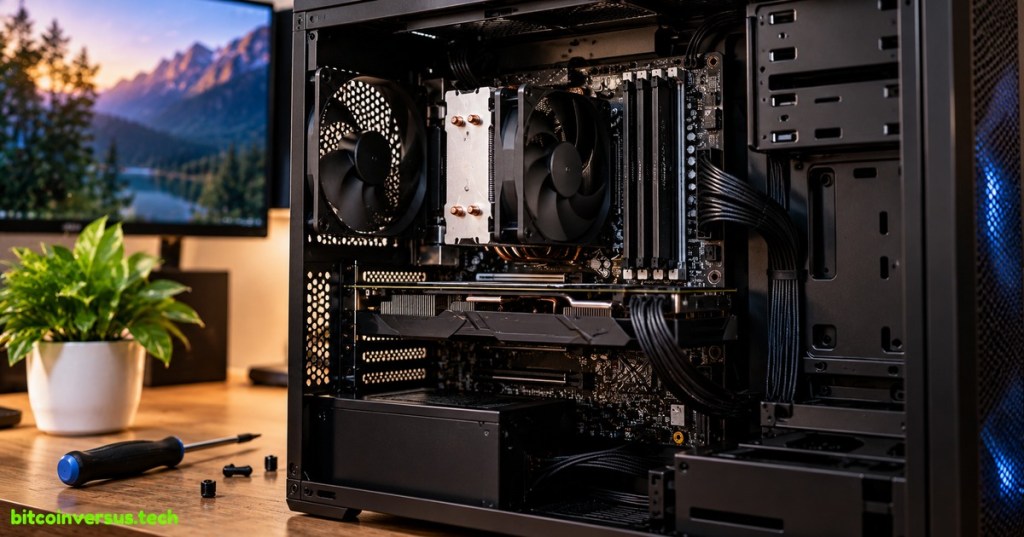
A motherboard is the main circuit board that connects the major parts of a computer. The CPU, memory, storage, graphics hardware, USB ports, network interfaces, power connections, and many other devices either attach directly to the motherboard or communicate through it.
It is tempting to call the motherboard the computer’s “brain,” but that job belongs more closely to the CPU. A better analogy is a city’s road, power, and communication network combined into one board. The motherboard gives components places to connect and electrical pathways for power, control signals, and data.
Why Does a Computer Need a Motherboard?
A modern computer contains specialized parts that do very different jobs. The processor executes instructions. RAM holds data the processor needs quickly. Storage keeps files when the computer is turned off. A graphics processor may render images. Network hardware moves data to other systems.
Those parts are useful only if they can communicate. The motherboard provides the physical sockets, slots, connectors, copper traces, buses, controllers, and power-delivery circuits that let the separate pieces operate as one machine.
Intel describes the motherboard as a PC’s primary circuit board: it connects hardware to the processor, distributes power from the power supply, and determines which memory, storage, graphics, and expansion devices the system can support.
The CPU Socket
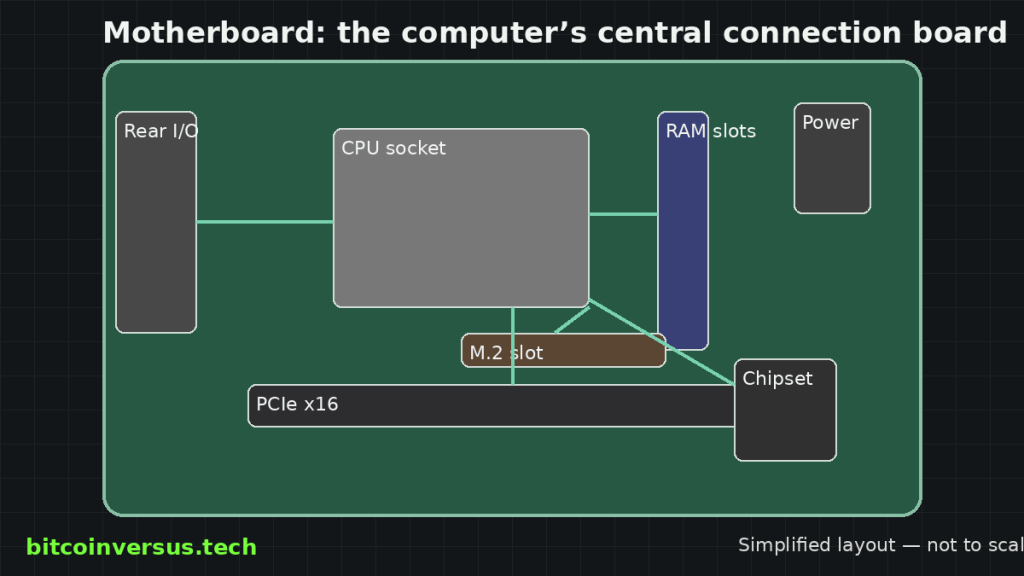
Desktop motherboards normally have a CPU socket designed for a particular family of processors. The socket provides hundreds or thousands of electrical contacts connecting the processor to power, memory, PCI Express lanes, and the rest of the platform.
This is why a processor cannot simply be installed in any motherboard. The physical socket, electrical design, firmware, chipset, and supported processor generation all have to match.
When the computer first powers on, motherboard firmware helps initialize that hardware before the operating system takes control. BitcoinVersus.Tech’s PC power-button explainer follows that startup process from the power supply through firmware and boot.
RAM Slots
Next to the CPU are usually slots for RAM, or random-access memory. RAM stores active program data so the processor can reach it far more quickly than it could from long-term storage.
Modern processors often contain the memory controller themselves, so the CPU can communicate with RAM through dedicated electrical paths on the motherboard. The board still matters because it determines the supported memory generation, number of modules, electrical layout, and practical speed limits.
PCIe Connects High-Speed Devices
PCI Express, or PCIe, is one of the motherboard’s most important high-speed connection systems. Graphics cards commonly use a long PCIe x16 slot, while network cards, capture cards, accelerators, and other expansion hardware may use PCIe as well.
PCIe is organized into lanes. Some lanes connect directly to the CPU because performance and latency matter, while others may pass through the motherboard chipset. That distinction becomes important when several fast devices are competing for bandwidth.
Technologies such as Direct Memory Access allow PCIe devices to move data to and from system memory efficiently without making the CPU manually copy every byte.
Jeff Geerling’s look at a replaceable Framework mainboard is a modern example of the motherboard as a complete computing platform rather than merely a passive piece of fiberglass.
Where Does Storage Connect?
Motherboards usually provide several ways to connect storage. Older and larger drives commonly use SATA cables, while many modern solid-state drives use compact M.2 slots directly on the motherboard.
An M.2 slot describes the physical form factor, not automatically the underlying protocol. Many fast M.2 SSDs use NVMe over PCIe, while other devices can use different electrical interfaces. The motherboard manual therefore matters when determining exactly what a slot supports.
For the larger storage picture, see BitcoinVersus.Tech’s storage and file-systems overview.
What Does the Chipset Do?
The chipset helps manage many of the motherboard’s secondary connections. Depending on the platform, it can provide additional PCIe lanes, USB ports, SATA connections, audio, networking interfaces, and other input/output functions.
Older PCs often used separate “northbridge” and “southbridge” chips. Many functions once handled by the northbridge—especially the memory controller and some high-speed PCIe connections—have moved directly into modern CPUs. That leaves today’s chipset responsible for a different set of lower-level I/O and expansion duties.
The Motherboard Also Distributes Power
The power supply connects to the motherboard through large power connectors, but the board does more than simply pass electricity along. Around the CPU socket, voltage-regulator modules—usually shortened to VRMs—convert incoming power into the lower, tightly controlled voltages required by the processor.
Power quality matters because modern processors can change their operating frequency and power demand extremely quickly. The motherboard has to keep those voltages stable while the workload changes.
Ports Are Part of the Motherboard Too
The cluster of USB, Ethernet, audio, display, antenna, and other connectors on the back of a desktop PC is called the rear I/O. Many of those ports are soldered directly onto the motherboard.
Internal headers perform a similar job for the computer case. The front power button, USB ports, audio jack, status LEDs, fans, and sometimes pumps all connect to motherboard headers.
The operating system eventually communicates with much of this hardware through device drivers.
What Does “ATX” Mean?
ATX is a common motherboard form factor. A form factor defines major physical dimensions and mounting conventions so cases, boards, power supplies, and expansion hardware can fit together predictably.
Smaller standards such as microATX and Mini-ITX reduce board size and usually provide fewer expansion slots. The tradeoff is straightforward: smaller computers can be easier to place, while larger boards generally have more room for expansion, connectors, cooling hardware, and power circuitry.
A Motherboard Defines the Platform
Choosing a motherboard effectively defines much of the computer’s platform. It determines which CPUs fit, what RAM is supported, how many storage devices can connect, how many PCIe lanes and slots are available, which external ports exist, and what firmware features the machine has.
That is why two computers with the same processor can still have very different capabilities. One motherboard might provide multiple high-speed NVMe slots, faster networking, stronger power delivery, more USB ports, and several expansion slots, while another board built around the same CPU family may offer only the basics.
The Simple Way to Think About It
The motherboard is the physical platform that lets the computer’s specialized parts become one system.
The CPU computes, RAM holds active data, storage keeps files, and expansion devices add capabilities. The motherboard connects those parts, routes signals, distributes power, and establishes the rules for what hardware can work together.
References
BitcoinVersus.Tech
BitcoinVersus.Tech explains computing, hardware, networking, energy, Bitcoin, and modern technology.
BitcoinVersus.tech is not a financial advisor. Content is provided for informational purposes.


Leave a Reply