Linux does not jump straight from the power button to a desktop or shell. A modern system moves through a chain of stages: firmware starts the machine, a boot loader finds Linux, the kernel initializes hardware, initramfs prepares the real root filesystem, and an init system such as systemd starts user-space services.
Understanding that chain is useful because every stage can fail in a different way. A machine that never reaches GRUB has a different problem from one that drops into an initramfs shell, and both are different from a machine that reaches systemd but hangs while starting a service.
1. Firmware starts before Linux exists
When power reaches the machine, the operating system is not running yet. The motherboard firmware—normally UEFI on modern computers—initializes enough hardware to locate something bootable. On a UEFI system, that usually means reading the EFI System Partition and launching a boot application such as GRUB.
Older BIOS-based systems followed a different path through the master boot record, but the goal was similar: find a boot loader and transfer control to it. Red Hat’s boot-process documentation describes both BIOS and UEFI paths and shows how the early boot stages differ by platform.
2. GRUB chooses what to boot
GRUB is a boot loader and boot manager. It can present a menu containing Linux kernels, recovery entries, firmware settings, or other operating systems. When an entry is selected, GRUB loads the chosen Linux kernel into memory and normally loads an initramfs image alongside it.
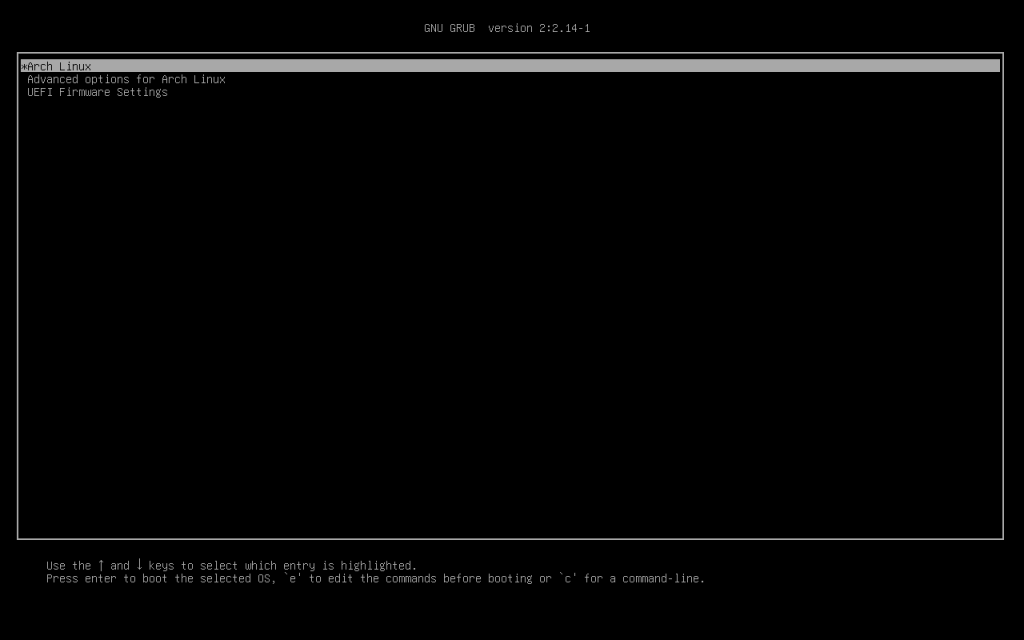
The kernel image is commonly stored under /boot, often with a name beginning with vmlinuz. The initramfs image is usually nearby. Distribution tools normally maintain the GRUB configuration automatically, so editing the generated grub.cfg file directly is usually the wrong first move.
3. The kernel takes control
Once GRUB transfers control, the Linux kernel begins executing. It initializes the CPU, memory management, interrupt handling, device drivers, storage, and other core subsystems. At this point Linux itself is running, but the normal user-space environment is not ready yet.
The kernel also receives a command line from the boot loader. You can inspect the command line used for the current boot with:
cat /proc/cmdlineThose parameters can tell the kernel where the root filesystem is, enable or disable features, select recovery behavior, or change logging. When troubleshooting, comparing the current command line with a known-good boot can reveal why the system behaved differently.
4. initramfs builds a temporary early userspace
The kernel may need drivers, storage discovery, encryption tools, LVM support, RAID assembly, or other utilities before it can mount the real root filesystem. That is the job of initramfs: a small temporary filesystem loaded into RAM during early boot.
Once initramfs has made the real root filesystem available, the system switches from that temporary environment to the installed operating system. If this stage fails, Linux may stop at an initramfs or emergency shell instead of continuing to the normal system.
5. systemd becomes PID 1
After the real root filesystem is ready, the kernel starts the first normal user-space process. On most current Linux distributions that process is systemd, running as process ID 1. Its job is to bring up the rest of user space: filesystems, networking, login services, daemons, graphical sessions, and other units required by the selected boot target.
The systemd documentation defines systemd as the system and service manager that acts as the init system when it runs as PID 1. If you want a deeper foundation before continuing, see our earlier lesson on what systemd does and how it manages background services.
Linux process creation becomes especially important after this point. Our lesson on how fork() and exec() create and launch programs explains how user-space processes multiply once the system is running. The related lesson on Linux file descriptors shows how those processes interact with files, devices, pipes, and sockets.
6. Targets determine the operating state
systemd groups related units into targets. A server may normally boot to multi-user.target, while a desktop commonly reaches graphical.target. You can see the configured default target with:
systemctl get-defaultThis is the modern equivalent of choosing a broad system state. Targets do not simply run one script after another; systemd uses dependencies and can start independent units in parallel when their ordering rules allow it.
7. Use the boot itself as troubleshooting data
A successful boot leaves evidence. The following commands are useful because each answers a different question:
ls -lh /boot
cat /proc/cmdline
systemctl get-default
systemd-analyze
systemd-analyze blame
journalctl -b
ls -lh /bootshows installed kernel and initramfs files.cat /proc/cmdlineshows the kernel parameters used for this boot.systemctl get-defaultshows the target the system normally tries to reach.systemd-analyzesummarizes boot timing.systemd-analyze blameranks units by activation time, although a slow unit is not automatically the root cause of a slow boot.journalctl -bdisplays logs from the current boot.
A practical troubleshooting map
- No firmware or vendor screen: investigate power, hardware, display, or firmware first.
- Firmware appears but no boot loader: inspect boot order, the EFI System Partition, and boot-loader installation.
- GRUB appears but the kernel will not start: check the selected kernel, kernel command line, and matching initramfs.
- The machine drops into initramfs: investigate root-filesystem discovery, storage drivers, encryption, LVM, RAID, UUIDs, and filesystem health.
- The kernel boots but services fail: inspect systemd unit status and the journal.
- The desktop never appears: determine whether the system reached
graphical.targetand whether the display manager or graphics stack failed.
Exercise
On a Linux machine you can safely inspect the current boot without changing anything. Run the six diagnostic commands above and answer these questions: Which kernel is installed? What root-device argument was passed to the kernel? What is the default systemd target? How long did userspace take to initialize? Which five units show the longest activation times? What errors or warnings appear in the current boot journal?
Do not change boot-loader configuration simply because a unit appears near the top of systemd-analyze blame. First establish which stage is actually slow or failing. Boot troubleshooting becomes much easier when you identify the handoff where progress stopped.
Knowledge check
- What runs first: GRUB or the Linux kernel?
- Why does Linux use initramfs?
- What is special about PID 1 on a typical systemd-based distribution?
- Which file exposes the kernel command line used for the current boot?
- Which command shows logs from the current boot only?
Answers
- GRUB runs before the Linux kernel and loads the kernel into memory.
- initramfs provides a temporary early user space containing the drivers and tools needed to make the real root filesystem available.
- PID 1 is the first normal user-space process; systemd uses that role to start and supervise the rest of the system.
/proc/cmdline.journalctl -b.
The boot chain in one line
Power → UEFI/BIOS → boot loader → Linux kernel → initramfs → real root filesystem → systemd/PID 1 → services and targets → login or desktop.
Memorizing that sequence is less important than understanding the handoffs. Once you know which component owns each stage, a failed boot stops looking like one giant mystery and becomes a smaller, testable problem.
BitcoinVersus.Tech Editor’s Note: Linux distributions can use different firmware paths, boot loaders, initramfs implementations, and init systems. This lesson describes the common UEFI + GRUB + initramfs + systemd path used by many modern distributions.
Follow BitcoinVersus.Tech for Linux, networking, data-center, semiconductor, firmware, and open-source technical lessons.
Support independent technology education: Bitcoin donations help fund BitcoinVersus.Tech research and publishing.
Disclaimer: BitcoinVersus.Tech provides technology education and analysis for informational purposes only.


Leave a Reply