
OSPython.042 — Capturing Python Warnings in Application Logs. Python’s warnings module tells programmers when code might need attention, such as when an older API is approaching retirement. But warnings can appear outside an application’s normal log stream. This lesson teaches one targeted solution: logging.captureWarnings(True) routes eligible warnings into Python’s standard logging system. It follows OSPython.041 on secure logging and builds on OSPython.028 on logging fundamentals.
Learning Objectives
- Explain the difference between
warnings.warn()andlogging.warning(). - Enable warning capture and identify the destination logger.
- Turn capture off and understand what warning filters still control.
What Are Python Warnings?
A warning describes a condition worth addressing without necessarily stopping execution. For instance, a library may use warnings.warn() to report a deprecated feature. Unlike an exception, that warning usually lets the program continue. The official Python warnings documentation explains that warning filters decide which messages appear, disappear, repeat or become exceptions.
A call to logging.warning(), on the other hand, already creates a logging record. By default, a warning from warnings.warn() takes the warnings module’s reporting path instead of automatically joining your application’s configured log handlers.
How captureWarnings Works
Call logging.captureWarnings(True) to install a bridge between these systems. Python formats warnings and sends them to the logger named py.warnings at the WARNING level. Existing logging handlers can then write those records to a terminal, log file or approved central logging destination. The exact behavior is defined in the standard-library logging reference.
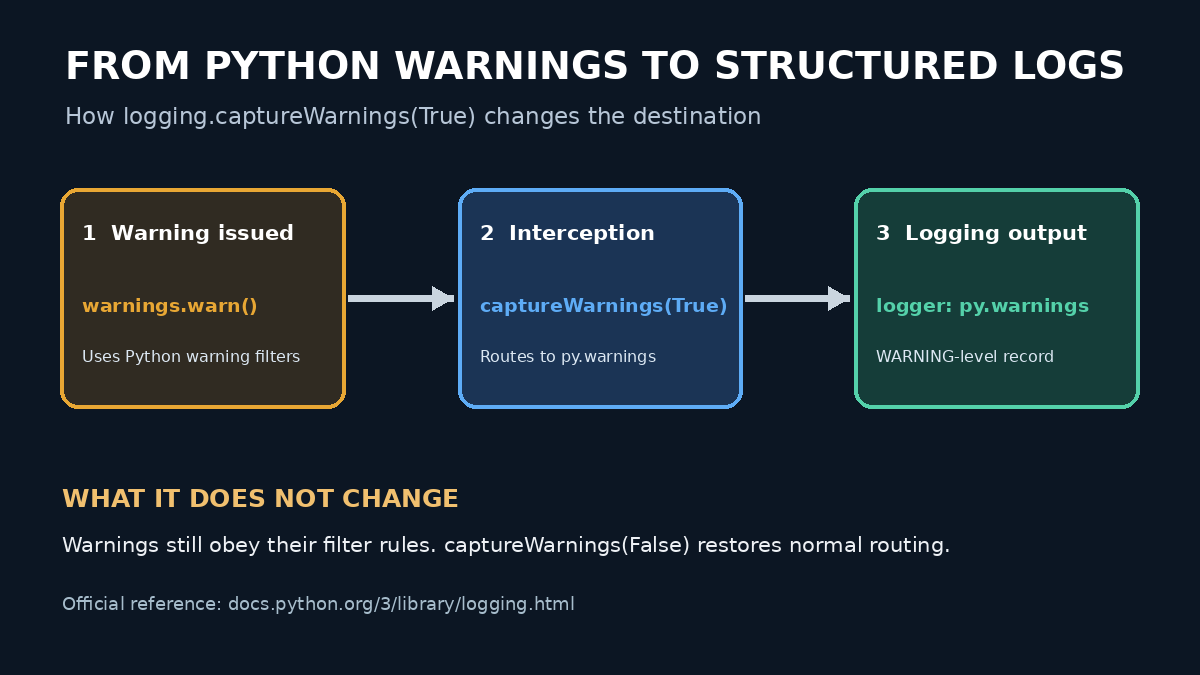
Original lesson diagram: captureWarnings changes where displayed warnings are logged; it does not disable warning filters.
Hands-On Example
Create warnings_demo.py using the steps below. The code uses only Python’s standard library; no package installation is required.
Enter these seven lines in warnings_demo.py, in order. The numbers below guide you and are not part of the Python script:
import loggingimport warningslogging.basicConfig(level=logging.INFO, format="%(levelname)s %(name)s: %(message)s")logging.captureWarnings(True)warnings.simplefilter("always", UserWarning)warnings.warn("A configuration value will change soon", UserWarning)logging.captureWarnings(False)
Run python warnings_demo.py (or python3 warnings_demo.py where applicable). The warning now appears in the application log rather than in a separate large output block:
Expected output (example): WARNING py.warnings: warnings_demo.py:6: UserWarning: A configuration value will change soon. The file location and line number may vary.
Notice WARNING, which is the severity, and py.warnings, which is the logger name. The warning remains a warning; it is simply emitted through the logging pipeline. The demonstration’s simplefilter("always", UserWarning) ensures the warning shows up reliably. In real services, choose warning-filter behavior deliberately instead of enabling all warnings without a reason.
Practical Data-Center Use
Imagine a Python monitoring script that collects temperature readings or polls device status. A dependency announces that a configuration interface will soon change. Without coordinated logging, that warning might be missed while operators inspect the application’s normal log file. Warning capture can keep the notice near other operational events. If logs may be shared, first apply the credential-protection techniques covered in OSPython.041.
Three Important Limits
- Filtering remains active. Suppressed warnings do not suddenly reappear because capture is enabled. Review Python’s warning-filter rules when expected events are missing.
- Handlers still matter. Ensure the
py.warningsrecord reaches an appropriately configured logging handler; capturing does not create a durable log file on its own. - Restore carefully.
logging.captureWarnings(False)stops redirection and restores the previous warning reporting behavior. Treat capture as application-level configuration rather than something repeatedly toggled in many threads.
Knowledge Check
- Which logger receives captured warnings?
- Does
captureWarnings(True)override ignored-warning filters? - What does
captureWarnings(False)do?
Answers: 1. py.warnings, using severity WARNING. 2. No; warning filters still decide which warnings are emitted. 3. It turns off warning-to-logging redirection and restores the previous warning destination.
Conclusion and Source References
The key takeaway is simple: logging.captureWarnings(True) sends visible Python warnings into the existing logging system. It helps operators review application and dependency notices together, but it does not replace good filtering, handler configuration, or secure-log practices. For additional context, review OSPython.033 on logging filters; remember that those logging filters are distinct from the warnings module’s filters. Primary references are the Python logging documentation and Python warning-control documentation.
BitcoinVersus.Tech Editor’s Note: We volunteer daily to help keep technical education accurate and accessible. To support independent research and educational lessons, consider a donation of 5,000 sats using the QR code below.

For easiest scanning, display the QR code on a desktop or larger screen and scan it with your mobile wallet. Thank you for supporting verifiable technical education.


Leave a Reply