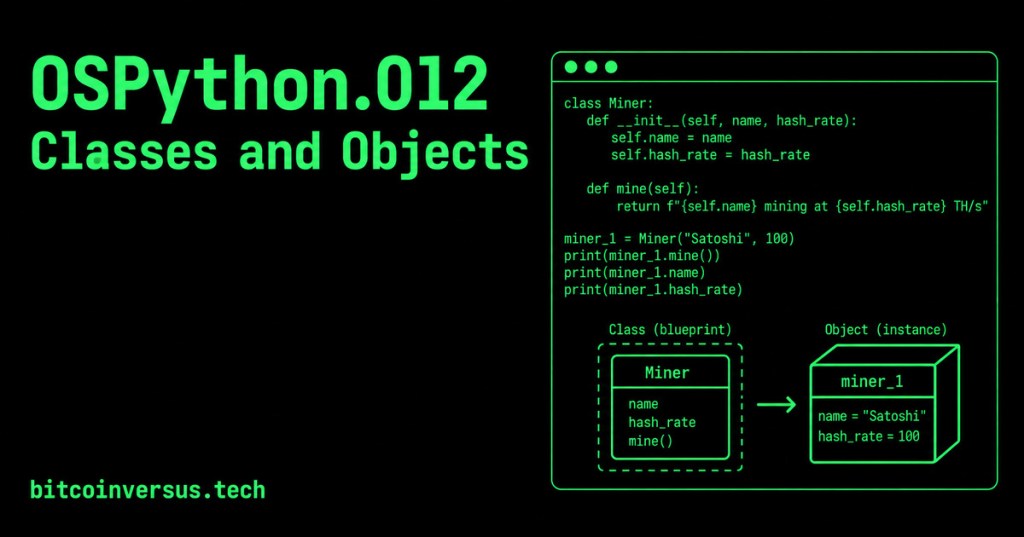
A class is a blueprint that describes what data and behavior a type of object should have. An object is one specific instance created from that class.
Think of a class as a miner model specification. The specification can define fields such as a miner’s name, hashrate, and temperature. Each physical miner is a separate object with its own values. Python classes let us model that relationship directly in code.
Why classes matter
Functions organize reusable actions, while classes organize related data and actions together. Review OSPython.001: Functions, Parameters, and Return Values if function definitions still feel unfamiliar.
A dictionary can hold one miner’s values, as introduced in OSPython.003: Dictionaries and Key-Value Data. A class goes further: it gives every miner object a consistent structure and can include methods that operate on its data.
Create your first class
class Miner:
    def __init__(self, name, hash_rate):
        self.name = name
        self.hash_rate = hash_rate
The keyword class begins a class definition. By convention, class names use capitalized words, so this class is named Miner.
The __init__() method runs when a new object is created. It receives the starting values and stores them on that object. The name self refers to the particular object currently being created or used.
Create an object
miner_1 = Miner("Satoshi", 100)

print(miner_1.name)
print(miner_1.hash_rate)
miner_1 is an object—also called an instance—of the Miner class. Its name attribute contains "Satoshi", and its hash_rate attribute contains 100.
Add behavior with a method
A method is a function defined inside a class. It describes an action an object can perform.
class Miner:
    def __init__(self, name, hash_rate):
        self.name = name
        self.hash_rate = hash_rate

    def status(self):
        return f"{self.name}: {self.hash_rate} TH/s"
Call the method through the object:
miner_1 = Miner("Satoshi", 100)
print(miner_1.status())
The output is:
Satoshi: 100 TH/sOne class, multiple objects
miner_1 = Miner("Satoshi", 100)
miner_2 = Miner("Hal", 200)

print(miner_1.status())
print(miner_2.status())
Both objects follow the same Miner blueprint, but each object stores its own attributes. Changing miner_1.hash_rate does not automatically change miner_2.hash_rate.
Attributes, methods, classes, and objects
- Class: the blueprint, such as
Miner. - Object or instance: one item created from the blueprint, such as
miner_1. - Attribute: data stored on an object, such as
nameorhash_rate. - Method: behavior defined by the class, such as
status(). - self: the current object receiving a method call.
Common beginner mistakes
- Forgetting
selfas the first parameter of an instance method. - Writing
name = nameinstead ofself.name = name. - Calling an instance method on the class without creating an object first.
- Using inconsistent indentation inside the class body.
- Confusing the class name
Minerwith the object variableminer_1.
Practice: build a temperature alarm
Create a Miner class with name and temperature attributes. Add a method named needs_attention() that returns True when the temperature is greater than 80.
class Miner:
    def __init__(self, name, temperature):
        self.name = name
        self.temperature = temperature

    def needs_attention(self):
        return self.temperature > 80
Create two miner objects with different temperatures. Print each miner’s name and the result of needs_attention(). Then place the class in its own module or package using the structure from OSPython.011: Packages and __init__.py.
Quick knowledge check
- What is the difference between a class and an object?
- When does
__init__()run? - What does
selfrepresent? - What is the difference between an attribute and a method?
Check your answers
- A class is a blueprint; an object is one instance created from that blueprint.
- It runs when a new object is created from the class.
- The particular object currently being created or used.
- An attribute stores data; a method defines behavior.
Key takeaway
Use a class when several objects need the same structure and behavior. The class defines the pattern; each object keeps its own state.
Reference
Continue with the official Python tutorial on classes.


Leave a Reply