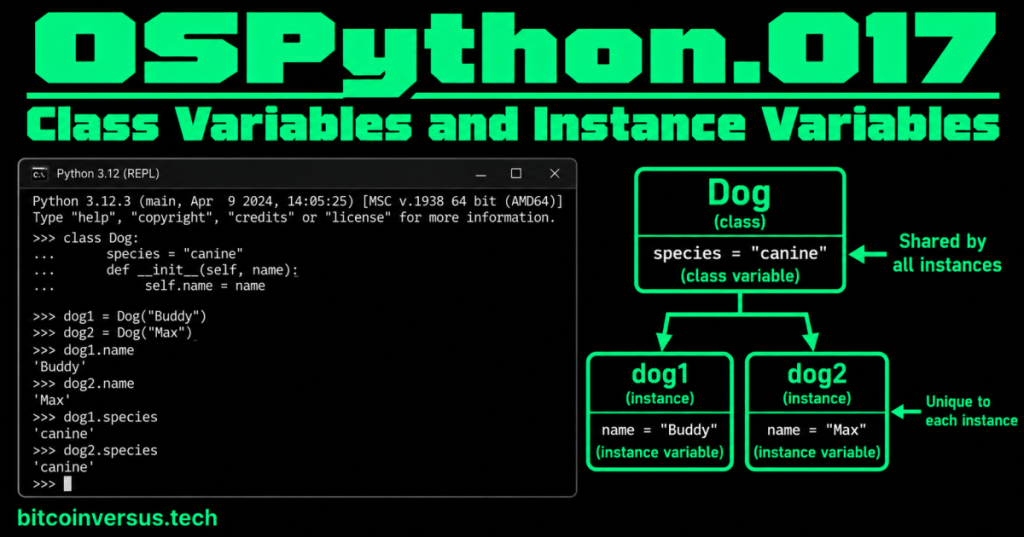
A class variable is shared. An instance variable belongs to one object.
That is the whole lesson in one sentence.
If you create two dogs, both dogs can share the fact that they are canine. But each dog can have its own name.
Start with the smallest example
class Dog:
    species = "canine"

    def __init__(self, name):
        self.name = name
There are two kinds of data here:
speciesis a class variable. It is defined on the class and shared as class-level data.self.nameis an instance variable. EachDogobject gets its own name.
Create two dogs
dog1 = Dog("Buddy")
dog2 = Dog("Max")

print(dog1.name)
print(dog2.name)

print(dog1.species)
print(dog2.species)
Output:
Buddy
Max
canine
canine
Buddy belongs to dog1. Max belongs to dog2. Both objects can read the shared class value canine.
Video 1: Class variables vs. instance variables
Think: shared vs. unique
A simple way to decide which kind of variable makes sense is to ask:
- Should every object normally share this value? A class variable may fit.
- Can each object have a different value? An instance variable usually fits.
For a game, every basic enemy might start with the same category:
class Enemy:
    category = "basic"

    def __init__(self, name, health):
        self.name = name
        self.health = health
category is shared class-level data. But one enemy can be named Goblin with 50 health while another is named Guard with 100 health.
Video 2: Class variables in a simple example
You can read a class variable from the class
print(Dog.species)Output:
canineThis makes the relationship clear: species lives on Dog as class data.
An instance can have its own value
dog1.species = "robot dog"

print(dog1.species)
print(dog2.species)
print(Dog.species)
Output:
robot dog
canine
canine
Here, assigning dog1.species creates an instance attribute that hides the class value when you read that name through dog1. It does not change Dog.species or dog2.species.
The shared-list mistake
This is one of the most important beginner mistakes to recognize.
class Dog:
    tricks = []

    def __init__(self, name):
        self.name = name
Because tricks is a class variable, the same list is shared.
dog1 = Dog("Buddy")
dog2 = Dog("Max")

dog1.tricks.append("sit")

print(dog2.tricks)
You may be surprised to see:
['sit']Why? Both objects are using the same class-level list.
The simple fix
If every dog should have its own tricks, create the list on each instance:
class Dog:
    species = "canine"

    def __init__(self, name):
        self.name = name
        self.tricks = []
Now every new Dog gets a separate tricks list.
Video 3: Another direct comparison
How this connects to earlier lessons
OSPython.012: Classes and Objects introduced classes and objects. This lesson zooms in on where object data can live.
The official Python tutorial describes instance variables as data unique to each instance and class variables as data shared by all instances of the class.
Common beginner mistakes
- Putting unique object data in a class variable.
- Using a mutable class variable such as a list when each object needs its own list.
- Assuming changing an instance attribute always changes the class variable.
- Forgetting that
self.namebelongs to the current object.
Quick practice
- Create a
Playerclass. - Add
game = "Hash Race"as a class variable. - Give each player its own
namein__init__(). - Create two players with different names.
- Print both names and the shared game value.
- Add an empty inventory list to each instance, not to the class.
Key takeaway
Class variable = shared class-level data. Instance variable = data belonging to one object. If every object needs its own mutable value, such as its own list, create that value on the instance.


Leave a Reply