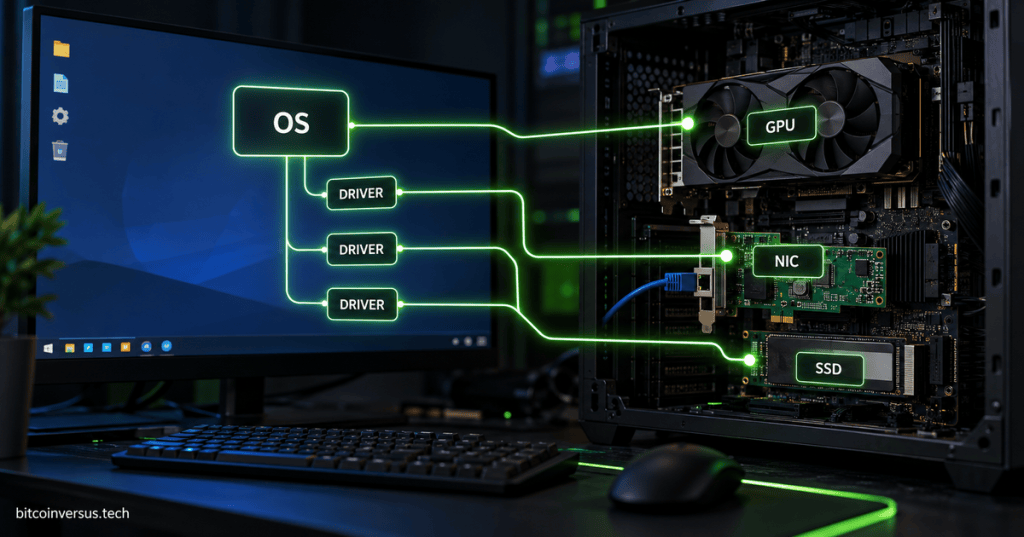
A computer can have a powerful CPU, fast SSD, modern network interface card, and capable GPU—but the operating system still needs a way to control all of that hardware. That is the job of a device driver.
The easiest mental model is simple: a driver is a translator between the operating system and a piece of hardware. The OS asks for something in a standard software language, and the driver turns that request into instructions the specific device understands.
A Driver Sits Between Software and Hardware
Suppose an application wants to draw a game frame. The application does not need to know the electrical details of a particular graphics card. It makes requests through the operating system and graphics software stack, and the GPU driver handles the hardware-specific work.
The same idea applies to storage, networking, sound, printers, USB devices, cameras, and many other components. Microsoft describes drivers as software that allows Windows and applications to communicate with a device, while the Linux kernel maintains a common driver model for matching devices with the software that controls them.
For the formal references, see Microsoft’s driver update documentation and the Linux kernel’s driver model documentation.
Why the Operating System Needs Drivers
Hardware from different manufacturers can perform the same general job while exposing different registers, commands, timings, interrupts, memory layouts, and capabilities. The kernel and operating system need an organized way to use that hardware without every application being rewritten for every device model.
A driver provides that layer. Windows can identify hardware using device IDs and match the device with a compatible driver package. Linux uses its own device and driver matching systems across buses such as PCIe, USB, and platform devices.
Common Examples of Device Drivers
Graphics drivers let the operating system and applications use the GPU for display output, 3D rendering, video acceleration, and compute workloads. A new GPU can physically fit into the motherboard, but without a suitable driver the OS may only expose basic functionality—or fail to use the device properly at all.
Network drivers control Ethernet and Wi-Fi hardware. The NIC moves packets on the wire, but the driver connects that hardware to the operating system’s networking stack. This is why a missing or broken network driver can leave a perfectly functional Ethernet port unable to connect.
Storage drivers help the operating system communicate with storage controllers and devices such as NVMe and SATA SSDs. The drive contains its own controller and NAND flash, while the system driver helps the OS send storage commands through the appropriate interface.
Audio, USB, printer, camera, and input-device drivers do the same basic job for their own hardware classes. Some use generic drivers already built into the operating system; others need a manufacturer-specific package for full features.
Drivers Are Not the Same as Firmware
A firmware image usually runs on or inside the device itself. A device driver normally runs as part of—or alongside—the operating system and tells the OS how to communicate with that device.
For example, an SSD can have firmware inside its controller while the computer also uses an NVMe driver in the operating system. A GPU has onboard firmware and also depends on a graphics driver. The two layers work together, but they are not the same thing.
What Happens When You Plug In New Hardware?
Modern operating systems try to make this process automatic. When hardware appears, the system identifies it, searches for a compatible driver, loads the driver, allocates the resources the device needs, and exposes the device to applications or system services.
That process connects directly to the startup chain we covered in What Happens When You Press the Power Button on a PC? Early UEFI and firmware stages initialize enough hardware to boot, then the operating-system kernel loads more drivers and brings the rest of the machine online.
Why Driver Updates Matter
Driver updates can add support for new hardware, improve performance, fix crashes, patch security problems, and correct compatibility issues. That is especially visible with graphics and networking hardware, where operating-system updates and new applications can expose problems that older drivers did not anticipate.
But “newer” is not automatically “better” in every situation. A stable production system may stay on a tested driver version until a newer release has been validated. In data centers, workstations, gaming PCs, and embedded systems, driver versions are part of the software stack and can affect reliability just like the operating system or firmware.
The Simple Mental Model
Application → Operating System → Driver → Hardware.
If the hardware is the machine and the operating system is the manager, the driver is the specialist who knows exactly how to operate that particular machine. Without the correct specialist, the manager may know what it wants done but not how to make that specific piece of hardware do it.
That is why drivers are one of the hidden layers that make modern computers feel simple. You plug in a device, the operating system finds the right software interface, and the hardware becomes usable without the application needing to understand the electronics underneath it.
BitcoinVersus.Tech
Advertisement
Editor’s Note
BitcoinVersus.Tech publishes technical explainers and reporting for informational and educational purposes.
BitcoinVersus.tech is not a financial advisor. Content is provided for informational purposes.


Leave a comment