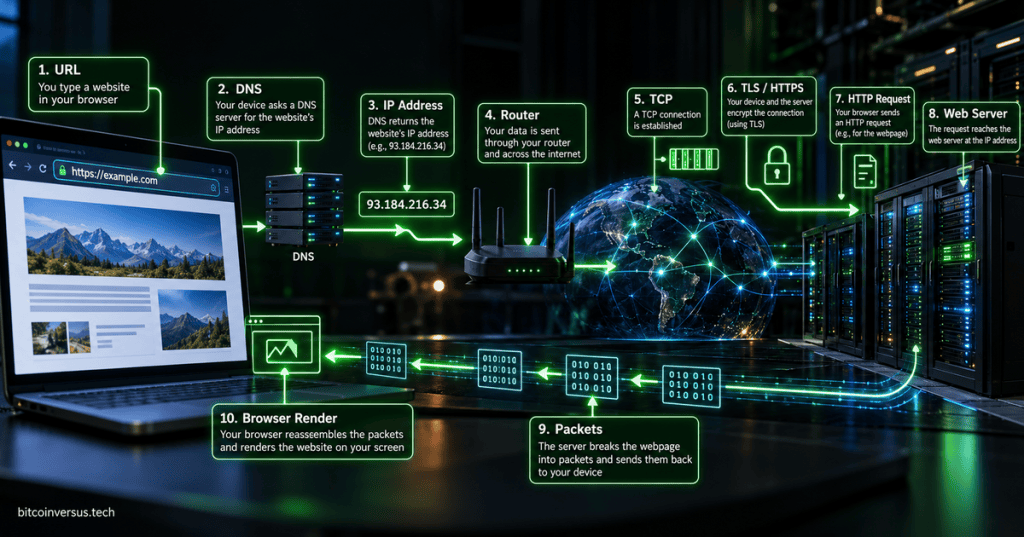
You type a website address into a browser, press Enter, and a page appears a moment later. Behind that simple action, your computer may perform a DNS lookup, find an IP address, send data through a router, create a transport connection, negotiate encryption, send an HTTP or HTTPS request, receive files, and render those files into the page you see.
The easiest mental model is: name → address → connection → secure request → response → rendered page.
1. The Browser Reads the URL
A web address such as https://example.com/news contains several pieces of information. https tells the browser which application protocol and security scheme to use, example.com identifies the host name, and /news identifies a resource or path on that server.
The browser may already have some information cached from an earlier visit. If not, it needs to find the network address of the server before it can contact it.
2. DNS Turns the Name Into an IP Address
Computers route traffic using network addresses, not just human-friendly domain names. The Domain Name System translates a name such as example.com into an IP address that the network can use.
The answer may come from a local DNS cache, your operating system, a resolver provided by your network, or another recursive DNS service. Large websites may return different addresses depending on geography, load balancing, content delivery, and whether the client uses IPv4 or IPv6.
3. Your Computer Sends Traffic Toward the Server
Once the destination address is known, the operating system checks its routing information. Traffic destined outside the local network normally goes toward the default gateway, usually a router.
Your network interface card sends the local traffic over Ethernet or Wi-Fi. On an Ethernet network, data travels in Ethernet frames; the system may use ARP or IPv6 neighbor discovery to identify the correct local next-hop hardware address.
On many home and office networks, the router also performs NAT or PAT, translating private local addressing into the public-facing connection used on the internet.
4. A Transport Connection Is Established
For traditional HTTP/1.1 and HTTP/2 over HTTPS, the browser normally establishes a TCP connection to the server. TCP uses a three-way handshake to establish a reliable session before application data is exchanged.
HTTPS commonly uses destination port 443. HTTP/3 works differently: it runs over QUIC, which uses UDP rather than TCP. That is why “the browser always opens TCP first” is a useful beginner model, but not universally true on the modern web.
5. HTTPS Adds TLS Encryption
If the URL uses HTTPS, the browser and server establish an encrypted session using TLS. During this process, the server presents a digital certificate, the browser verifies that certificate against trusted certificate authorities, and both sides establish cryptographic keys for protecting the connection.
This prevents ordinary network observers from simply reading the page request and response as plaintext. The same certificate ecosystem is why changes to web cryptography, including the move toward post-quantum systems, matter to browsers, servers, and infrastructure providers; BitcoinVersus recently covered Cloudflare’s work on a public certificate authority for the post-quantum web.
6. The Browser Sends an HTTP Request
After the connection is ready, the browser sends an HTTP request. A simple page load commonly begins with a GET request for a resource. The request can also contain headers describing the host, accepted content formats, cookies, caching information, and other context.
The request reaches a web server, reverse proxy, load balancer, content-delivery system, application server, or some combination of those systems. BitcoinVersus’ overview of services provided by networked hosts covers the larger idea: one networked machine can expose different services depending on the software and ports listening for traffic.
7. The Server Sends a Response
The server processes the request and sends an HTTP response. A successful request often includes a status such as 200 OK, response headers, and the requested content. Other familiar responses include redirects, authentication failures, missing-page errors, and server errors.
The data does not travel across the internet as one giant object. It is divided into smaller units and carried through the networking stack. Tools such as packet analyzers can inspect this traffic, which is why our packet capture explainer is useful when learning what these exchanges actually look like on a network.
8. The Browser Builds the Page
The first response is often an HTML document. The browser parses that HTML and may discover additional resources such as CSS stylesheets, JavaScript files, fonts, images, video, and data from APIs. Each additional hostname may require its own DNS work and additional connections, although modern browsers aggressively reuse connections and caches when possible.
Mozilla’s MDN documentation describes this process in detail: the browser resolves DNS, establishes the network connection, negotiates TLS for HTTPS, sends HTTP requests, receives responses, and then parses and renders the returned resources into the page the user sees.
Two useful external references are MDN’s How the Web Works guide and its deeper How Browsers Work performance guide.
The Operating System and Drivers Are Working Underneath It All
The browser does not directly manipulate the Ethernet controller or Wi-Fi radio by itself. The operating system, its networking stack, and the appropriate device driver connect browser software to the actual network hardware.
That connection between software layers and physical hardware is one reason a seemingly simple page load crosses so many parts of a computer: browser, operating system, driver, NIC, local network, router, internet routing, remote server, and then the same chain back again.
The Simple Mental Model
URL → DNS → IP address → router/internet → TCP or QUIC → TLS → HTTP request → web server → HTTP response → browser rendering.
Real websites can add caches, CDNs, proxies, load balancers, multiple servers, reused connections, HTTP/3, and many other optimizations. But the core idea stays the same: your browser has to find the destination, establish communication, request the resource, receive the response, and turn the returned files into something you can see and use.
BitcoinVersus.Tech
Advertisement
Editor’s Note
BitcoinVersus.Tech publishes technical explainers and reporting for informational and educational purposes.
BitcoinVersus.tech is not a financial advisor. Content is provided for informational purposes.


Leave a Reply