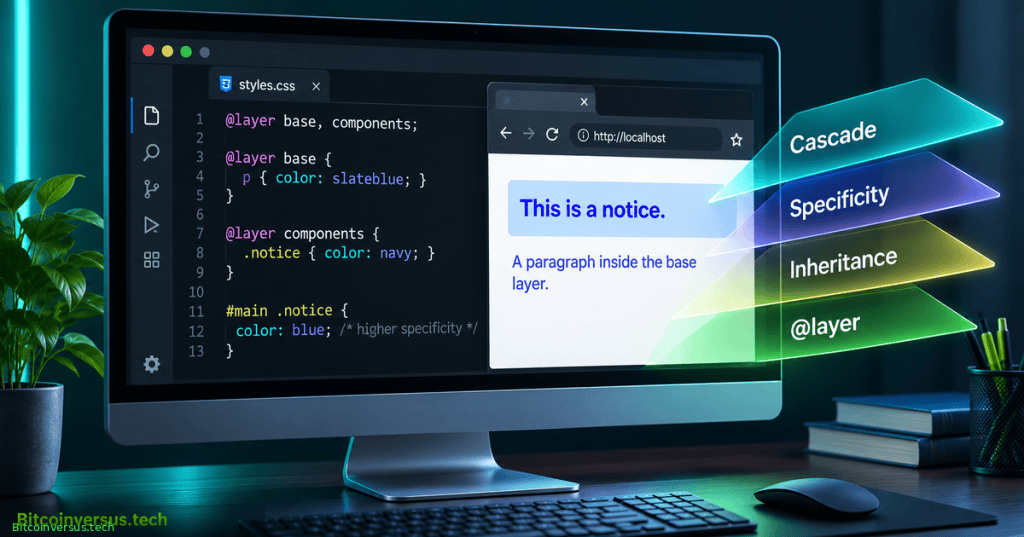
OSCSS.002 explains how browsers choose a CSS property value when several rules match the same HTML element. It continues OSCSS.001 on selectors. The cascade considers relevance, origin and importance, layers, specificity, scoping proximity and source order. Inheritance supplies values for selected properties when no winning declaration explicitly sets them.
Learning Objectives and Prerequisites
- Explain why matching selectors can produce competing declarations.
- Compare origin,
!important, cascade layers, specificity and source order. - Calculate ordinary selector specificity using ID–class–type tuples.
- Predict the result of layered and unlayered author styles.
- Distinguish naturally inherited properties from non-inherited properties.
- Check predicted results with browser developer tools and
getComputedStyle().
Prerequisites: HTML document structure, HTML elements, and basic CSS selectors. The lab requires only a modern browser and a plain-text editor. No network connection, libraries or privileged commands are required.
Elementary Overview
A web page can contain several instructions that set the same text color. The browser needs a consistent way to choose one instruction. CSS uses a sorting system called the cascade. Some instructions have higher priority because of where they came from or how they are organized; only after checking priority does the browser compare which selector is more specific.
Some visual properties can also pass from a parent element to its children. Text color normally works this way. That separate behavior is called inheritance. Understanding both ideas makes browser styling easier to predict.
@layer system; identity verified, embedded playback not independently confirmed.The Cascade Decision Process
The browser first filters declarations that do not apply, including selectors that do not match and conditional rules whose media queries do not pass. The applicable declarations are then ranked by origin and importance, including cascade layers. Only among the remaining comparable rules does selector specificity matter. Where applicable, @scope proximity breaks certain ties, followed by source order. A more specific selector cannot defeat a declaration from a higher-priority origin or layer. See the MDN cascade algorithm and W3C CSS Cascading and Inheritance Level 5.
Normal styles generally increase in priority from browser (user-agent) rules to user rules to author rules. Among important declarations, that origin ordering is reversed: browser-important can outrank user-important, which can outrank author-important. Animations and transitions have special cascade positions; in particular, active transitions can outrank important declarations. The exercises focus on author styles unless otherwise stated.
Specificity and Selector Weight
For ordinary selectors, calculate a three-part specificity tuple: ID selectors, class/attribute/pseudo-class selectors, and type/pseudo-element selectors. Examples: #message is 1-0-0, .notice is 0-1-0, and p.notice is 0-1-1. Compare columns from left to right. Do not treat them as decimal digits. Inline style attributes have their own priority treatment and are not simply ordinary ID selectors.
Consider one paragraph carrying both an ID and a class. Two matching unlayered normal author styles compete for its color:
<p id="message" class="notice">System status</p>

p.notice { color: teal; }  /* 0-1-1 */
#message { color: navy; }  /* 1-0-0 */
The predicted color is navy, because the ID selector is more specific when all earlier cascade steps are tied. Advanced functional pseudo-classes have special specificity behavior: :where() contributes zero specificity, while :is() and :not() use specificity derived from their arguments. See MDN Specificity.
Source Order Resolves Ties
A later declaration wins only when origin, importance, layer, specificity and any applicable scoping comparison are tied. For example, the following selectors are identical and both set the same property:
.notice { color: teal; }
.notice { color: purple; }
/* Expected color: purple */
Source order is a tie-breaker rather than the beginning of the cascade. Declaring a rule later does not guarantee priority over a stronger layer or important declaration.
Cascade Layers Set Author Priorities
The @layer rule explicitly orders groups of author styles. For normal declarations within an origin, later-declared layers outrank earlier layers, regardless of selector specificity across layers. Normal unlayered author styles outrank normal layered author styles. Layers allow projects to organize resets, components and utilities without inflating selector weight.
In this example, the lower-specificity class rule in the later utilities layer wins over an ID selector in the earlier base layer:
@layer base, utilities;

@layer base {
  #message { color: navy; }
}
@layer utilities {
  .notice { color: teal; }
}
/* Expected color: teal */
An ordinary unlayered rule changes the result once more. Add this declaration after the preceding rules:
.notice { color: purple; }
/* Expected color: purple */
The unlayered normal author declaration wins despite its modest specificity. Inside any single layer, specificity still matters among otherwise equal declarations. The MDN @layer reference documents layer creation and ordering.
Important Rules Reverse Layer Order
The !important flag changes the cascade priority. Within one origin, important declarations reverse the normal order of named layers: earlier layers outrank later layers, and important layered author declarations outrank important unlayered declarations. Important inline author styles have their own high priority within the author origin, but user-important or user-agent-important rules can still outrank them. Avoid using !important as the default response to style conflicts.
Both competing declarations below are author-important. The earlier base layer wins:
@layer base, components;
@layer base {
  .notice { color: red !important; }
}
@layer components {
  .notice { color: blue !important; }
}
/* Expected color: red */
Inheritance Is Not the Cascade
After a declaration is chosen, the browser resolves property values. Properties such as color and font-family normally inherit from the parent; box-model properties such as border, margin and padding normally do not. A child can override an inherited value with its own declaration. Inheritance does not copy every style from a parent.
The paragraph inherits the text color of its section, but does not automatically inherit the parent border or padding:
<section class="panel"><p>Inherited text</p></section>

.panel {
  color: darkgreen;
  border: 2px solid gray;
  padding: 16px;
}
The keywords inherit, initial, unset, revert, and revert-layer are distinct. unset acts like inherit for inherited properties and like initial for others. revert and revert-layer roll back declarations at different cascade boundaries; neither simply means “erase every style.”
Hands-On Browser Lab
Create a local file named cascade-lab.html containing this complete example. The browser can open the file without an HTTP server:
<!doctype html>
<html lang="en">
<head>
  <meta charset="utf-8">
  <meta name="viewport" content="width=device-width, initial-scale=1">
  <title>CSS Cascade Lab</title>
  <style>
    @layer base, components, utilities;
    @layer base {
      body { font-family: system-ui, sans-serif; }
      .notice { color: #1f2937; }
    }
    @layer components {
      #message { color: #0057b8; }
    }
    @layer utilities {
      .notice { color: #087f5b; }
    }
    .notice { color: #7c2d12; }
  </style>
</head>
<body>
  <main>
    <p id="message" class="notice">Cascade experiment</p>
  </main>
</body>
</html>
Open the file in a current browser and inspect the paragraph. The unlayered normal declaration should win with computed color equal to rgb(124, 45, 18), representing #7c2d12. In the developer-tools console, query the actual result:
getComputedStyle(document.querySelector("#message")).color
// Expected: "rgb(124, 45, 18)"
Delete only the final unlayered .notice declaration, save, and refresh. Now the later utilities layer should win with rgb(8, 127, 91), despite the ID selector in components. The expected outputs are spec-derived predictions, not claimed runtime results from the authoring environment.
Troubleshooting and Common Mistakes
- No visual change: check stylesheet loading, selector matching, valid syntax, and refreshed content.
- A specific rule loses: inspect origin, importance and layer before comparing specificity.
- A late rule loses: source order resolves only genuine ties.
- An inherited property surprises you: inspect the child’s declarations and the property definition.
- An important layer behaves backward: important layer priority reverses normal priority.
- Layout overflows: inspect the rendered code examples on narrow screens; avoid boxed or fixed-width code components.
Exercises and Assessment
- Predict the winning color for
p.noticeversus#messagein one normal unlayered author stylesheet. - Remove the unlayered declaration in the lab. Which layer wins and why?
- Mark the color declaration in the
baselayer!important. Predict the result. - Give the parent
maina font family and a border. Which values normally inherit? - Propose an ordering for reset, components and utilities, then explain the advantage of simple class selectors.
Answer key: The ID selector wins an equal-priority specificity comparison. With the unlayered rule removed, the utilities layer wins because normal later layers outrank earlier layers. An important base-layer color outranks all remaining normal author declarations. A child normally inherits font-family, not border. An order such as @layer reset, components, utilities; gives later normal utility styles predictable priority.
Authoritative References
- W3C — CSS Cascading and Inheritance Level 5.
- MDN — CSS Cascade.
- MDN — Specificity.
- MDN — @layer.
- MDN — Cascade Layers.
Elementary Conclusion
The CSS cascade decides which styling instruction wins when several apply to the same property. It checks priority groups before it compares selector specificity or order. Layers help developers organize priorities, and inheritance allows some values, such as text color, to pass from parent to child. A browser inspection shows which value actually wins.
Editor’s Note: OSCSS.002 follows the published OSCSS.001 curriculum. Code outcomes are predictions derived from the cited standards; the authoring environment did not independently execute a browser test. The original featured image is a conceptual editorial illustration, not a screenshot of a verified browser session. Video identities were checked; successful live playback has not yet been independently established.

We volunteer daily to ensure the information on this platform is Verifiably True. If you would like to support the research, please scan the QR code. Verify the recipient and amount in your wallet before sending funds.


Leave a Reply