
Learning Objectives and Prerequisites
CSS selectors identify which HTML elements a stylesheet should affect. Learners will distinguish type, class, ID, attribute, and relationship selectors; read a CSS rule; inspect which elements match; and complete a browser-tested lab. Review HTML document structure and HTML attributes first. Only a modern browser and text editor are required.
Elementary Overview
A web page contains headings, paragraphs, links, buttons, and other pieces. HTML tells the browser which pieces exist. CSS adds their appearance. A selector is a pattern that tells the browser which pieces should receive a style. Imagine a librarian choosing books by category labels: one instruction might find every book, another only books marked as reference materials.
CSS selectors can choose all paragraphs, one named element, every member of a class, or elements with a particular parent. A selector does not change HTML meaning; it determines which declarations are eligible to style matching elements. Selection is the foundation for future lessons on the cascade, layout, and accessibility.
Anatomy of a CSS Rule
A CSS ruleset begins with a selector, followed by a declaration block enclosed in braces. Each declaration contains a property and a value separated by a colon. Browsers match the selector against the document, then consider those declarations alongside other applicable rules. Here is the basic rule:
p {
  color: navy;
  line-height: 1.5;
}
Here p is a type selector. The properties color and line-height control the text color and line spacing. If no paragraph matches, the rule is still valid but changes nothing visible. When multiple rules affect the same property, the CSS cascade determines which declaration wins; the next lesson develops the full ordering rules.
Type, Class, and ID Selectors
A type selector names an HTML element such as p, h2, or button. A class selector begins with a period and matches an element’s class attribute. A class can be shared by many elements. An ID selector begins with a number sign and matches the id attribute. IDs should be unique within a well-formed HTML document. Use these simple type, class, and ID selector examples:
/* All paragraphs */
p { color: #344054; }

/* Every element carrying class="notice" */
.notice { color: #087f5b; }

/* The element with id="summary" */
#summary { font-weight: 700; }

/* Paragraphs also carrying the notice class */
p.notice { text-decoration: underline; }
Classes describe reusable roles such as notices and status messages. Document-unique IDs work well for anchors and label associations, but excessive ID styling can make future overrides harder. A compound selector such as p.notice matches only an element meeting both conditions.
Attribute Selectors and Selector Lists
An attribute selector uses brackets to match the presence of an HTML attribute or a particular value. For example, [data-role] matches any element carrying that attribute, while [data-role="example"] matches the specified value. Case matching depends on the attribute definition, and an optional i flag requests ASCII case-insensitive value matching. The following CSS applies attribute selectors and a selector list:
input[required] { border-color: #d97706; }
button[type="submit"] { font-weight: 700; }
[data-role="example"] { outline: 1px solid teal; }

/* Commas combine independent selectors. */
h1, h2, h3 { font-family: system-ui, sans-serif; }
Attribute selection is often useful when styling HTML forms. A selector can select a form field, but CSS cannot replace an actual HTML label, a keyboard-accessible interaction, or a visible focus indicator. Keep semantic HTML intact. A selector list separated by commas independently matches any listed selector; in an ordinary selector list, one invalid selector can invalidate the entire list.
Descendants, Children, and Siblings
Combinators express relationships between HTML elements. A space means descendant, so main p selects paragraphs anywhere inside main, including those nested several levels down. A greater-than sign means direct child: main > p selects only paragraphs whose immediate parent is main. A plus sign selects the next sibling, while a tilde selects later siblings sharing the same parent. Compare the relationship selectors directly:
main p { color: #334155; }       /* Any descendant p */
main > p { margin-top: 1rem; }   /* Direct child p */
h2 + p { font-style: italic; }   /* Adjacent sibling p */
h2 ~ p { line-height: 1.5; }   /* Later siblings p */
CSS relationships follow the HTML document tree, not visual proximity on a screen. Understanding structure prevents accidental global styling and makes a stylesheet easier to maintain. Pseudo-classes such as :hover, :focus-visible, and :checked select elements in particular states; detailed state selectors are covered in a later lesson.
The Browser-Tested Selector Lab
The example contains four paragraphs. Three are immediate children of main; the fourth is nested inside section. The class selector matches the notice paragraph and the ID selector matches the summary paragraph. A local Chromium run checked match counts, text colors, and font weight, confirming the distinction between descendant and direct-child selectors.
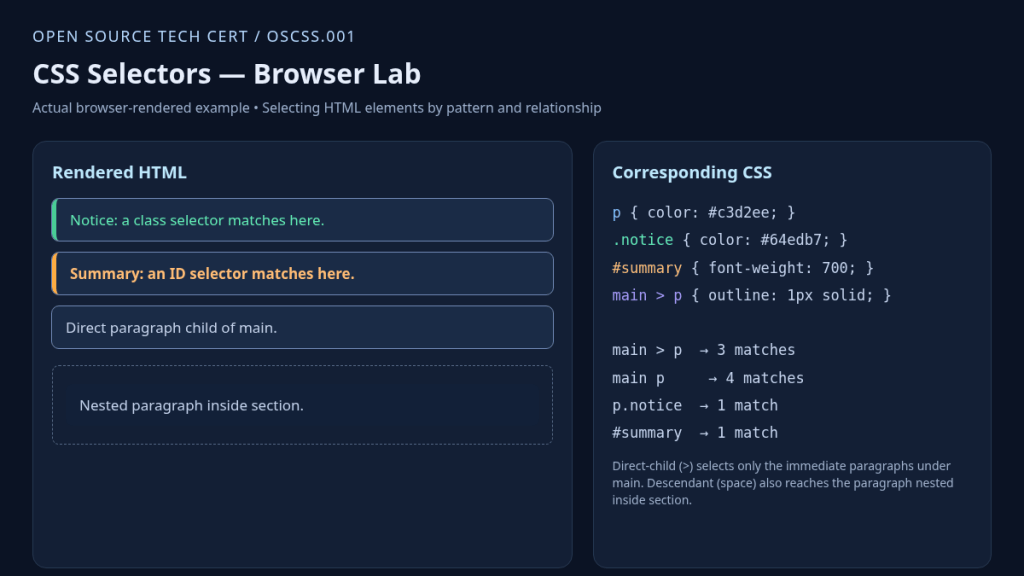
main p matched four elements, main > p matched three, and p.notice and #summary matched one each.Create two files named index.html and styles.css in the same disposable folder. The HTML establishes the tree; the CSS applies style rules. Open the HTML file in a browser and compare the matches. The image above shows the same document relationships rendered by Chromium, with additional diagnostic labels for teaching.
Complete Reproducible HTML and CSS
Save the following document as index.html. The link element connects a stylesheet named styles.css. Keep four paragraph elements and preserve their nesting, because moving a paragraph changes the selector match counts. The complete HTML for the lab is:
<!DOCTYPE html>
<html lang="en">
<head>
  <meta charset="utf-8">
  <title>Selector Lab</title>
  <link rel="stylesheet" href="styles.css">
</head>
<body>
  <main>
    <p class="notice" data-role="example">Notice</p>
    <p id="summary">Summary</p>
    <p>Direct paragraph</p>
    <section><p>Nested paragraph</p></section>
  </main>
</body>
</html>
Now save the CSS declarations below into styles.css. The rules are intentionally short enough to test by inspection. The selector section p affects only paragraphs nested in a section. The class and ID declarations affect one of the paragraphs each. The matching stylesheet is:
p { color: #344054; }
.notice { color: #087f5b; }
#summary { font-weight: 700; }
main > p { outline: 1px solid #64748b; }
section p { background: #eff6ff; }
Inspecting Matches in Browser Developer Tools
Open the browser developer tools, usually with F12 or the Inspect context menu. Select a paragraph in the Elements or Inspector panel. The Styles pane lists matching rules; the Computed pane reports resulting values. Inspect the notice element and check that its class rule supplies the intended color. CSS editing inside developer tools may be temporary, so apply lasting edits in the original stylesheet.
In the JavaScript console, the read-only method document.querySelectorAll() uses CSS selector syntax to retrieve matching nodes. The following counts were executed against the same HTML tree using Chromium. The example uses no network requests or system modifications. Check the exact matches in the browser console:
document.querySelectorAll('p').length;         // 4
document.querySelectorAll('main > p').length; // 3
document.querySelectorAll('main p').length;   // 4
document.querySelectorAll('p.notice').length; // 1
document.querySelectorAll('#summary').length; // 1
If the console reports an unexpected count, check whether a paragraph was moved under section, the class or id value changed, or a selector prefix is missing. HTML nesting is part of the logic, not merely indentation. For broader context, read how browsers load and display web pages.
Troubleshooting and Common Mistakes
- Use
.for class names and#for IDs. Without either prefix, a name is normally treated as a type selector. - Keep each ID unique within the document. Duplicated IDs can break anchors, scripting assumptions, and label associations even when CSS matches multiple elements.
- Do not confuse a space with
>: descendant matching includes nested generations, but direct-child matching requires an immediate parent. - Prefer meaningful, reusable classes over long selector chains that depend on incidental nesting.
- Matching a selector does not guarantee a declaration wins; cascade origin, importance, layers, specificity, and order also matter.
Practice and Knowledge Check
Add another paragraph with class="notice" inside the section. Predict each of the five selector counts before rerunning the console expressions. The total paragraph count increases to five, the direct-child count stays at three, the descendant count increases to five, and the notice class match count becomes two. The ID selector still matches one element.
Question: What selects every paragraph? Answer: p. Question: What selects an element carrying class notice? Answer: .notice. Question: What selects the summary ID? Answer: #summary. Question: How is main p different from main > p? Answer: The former selects descendants at any depth; the latter selects only direct children.
Code editors may use syntax highlighting to make selector punctuation visible, but editor color preferences have no effect on browser matching. Next, study the CSS cascade to explain why several matching declarations may produce just one final property value.
Authoritative References
- MDN — CSS selectors module
- MDN — CSS selectors and combinators
- MDN — CSS selector structure
- MDN — CSS specificity
- W3C — Selectors Level 4 specification
Elementary Conclusion
CSS selectors are patterns that tell a browser which elements should receive styling rules. Type selectors match HTML tag names, classes identify reusable groups, and IDs identify elements by document-specific labels. Relationship selectors care about where elements live in the HTML tree. By checking actual matches in a browser, a beginner can understand exactly why a style affects one element but not another.
Editor’s Note: We volunteer daily to ensure the credibility of the information on this platform is Verifiably True. If you would like to support our work and help further secure the integrity of our research initiatives, please scan the QR code below to donate 5,000 sats.

For mobile scanning, open this lesson on a larger screen and use a compatible Bitcoin wallet to scan the original QR code. Verify the address before sending 5,000 sats: 3C9o19EH5HSiwEPyCTmEKzxhNCbo2X6TTb.
BitcoinVersus.tech is not a financial advisor. This media platform reports on financial subjects purely for informational purposes.


Leave a Reply