
Key Takeaways
- An HTML element is more than a tag. Most elements include a start tag, content, and an end tag.
- Some elements are void elements. They do not have end tags because they cannot contain child content.
- Elements can nest inside other elements. Correct nesting creates the document tree that browsers, accessibility tools, CSS, and JavaScript work with.
In OSHTML.001, we built the outer structure of an HTML document with <!DOCTYPE html>, <html>, <head>, and <body>. This lesson focuses on the building blocks placed inside that structure: HTML elements.
HTML is a markup language, not a programming language. Its job is to describe the structure and meaning of content so a browser can construct a document tree. That broader history is covered in HTML History and Overview.
What Is an HTML Element?
An HTML element represents a part of a document. The MDN HTML element reference catalogs the standard elements available to authors. A typical non-void element contains three parts: a start tag, content, and an end tag.
<p>Hello, world!</p><p>is the start tag.Hello, world!is the element’s text content.</p>is the end tag.- The whole structure is the
pelement.
A tag is syntax that marks the beginning or end of an element. The element is the complete node represented in the document. Beginners often use “tag” and “element” as if they are identical, but learning the distinction becomes useful once you work with the DOM, CSS selectors, browser developer tools, and JavaScript.
Start Tags and End Tags
For most elements, the start tag opens the element and the end tag closes it. The end tag repeats the element name with a leading slash.
<h1>Main Heading</h1>
<p>A paragraph of text.</p>
<strong>Important text</strong>
<a href="https://example.com">A link</a>
Attributes such as href appear in the start tag. The attribute adds information or behavior to the element but is not itself the element’s visible text content.
Elements Can Contain Other Elements
HTML elements can be nested. A nested element becomes a child of the element around it. This parent-child structure is one of the most important ideas in web development because the browser turns HTML into a tree of nodes.
<p>This is <strong>important</strong> text.</p>The strong element is inside the p element. The paragraph is the parent; the strong element is one of its children.
Close Nested Elements in the Correct Order
When elements nest, close the innermost element first. Think of nesting like opening and closing containers.
<p>This is <strong>correct</strong> HTML.</p>A crossed structure such as opening p, then strong, then closing p before strong is malformed. Browsers include error-recovery rules and may repair malformed markup, but you should not rely on recovery behavior when writing clean HTML.
Void Elements Do Not Have End Tags
Some HTML elements cannot contain child nodes and therefore do not use end tags. The HTML specification calls these void elements. Common examples include img, input, br, hr, meta, and link.
<img src="photo.jpg" alt="Example">
<input type="text" name="username">
<br>
<hr>
<meta charset="UTF-8">
In HTML syntax, writing a slash before the closing angle bracket—such as <br />—does not make the element “more closed.” HTML parsers treat the slash as unnecessary syntax on void elements. This differs from XML and XHTML rules.
The img Element Is a Good Void-Element Example
<img src="miner.jpg" alt="Bitcoin mining computer">The image itself is not written between start and end tags. Instead, the src attribute tells the browser where to obtain the image, while alt supplies alternative text for cases where the image cannot be seen or loaded. The element remains a single void element in the document tree.
Element Names Describe Structure and Meaning
Some HTML elements exist primarily to give content meaning. A nav element identifies navigation. An article element represents a self-contained composition. A main element identifies the document’s main content. A button is an interactive control. This is one reason semantic elements are usually better than using a generic div for everything.
Generic Elements Still Have a Purpose
The div and span elements are generic containers. They are useful when no more meaningful element applies or when you need a grouping hook for styling or scripting. The problem is not that div is bad. The problem is using generic markup where a more meaningful built-in element already expresses the content’s purpose.
HTML Creates a Tree
<body>
  <main>
    <article>
      <h1>Repairing a Laptop Screen</h1>
      <p>Diagnose before replacing parts.</p>
    </article>
  </main>
</body>
Here, body contains main; main contains article; and article contains a heading and paragraph. That hierarchy becomes part of the DOM after the browser parses the page.
The browser workflow discussed in What Happens When You Type a Website Into Your Browser? eventually reaches this parsing stage: downloaded HTML is converted into structured nodes that can be rendered, styled, queried, and changed.
Formatting Helps Humans See the Tree
Browsers do not require your source indentation to match the nesting tree, but humans benefit from consistent indentation. Code editors often make this even clearer with syntax highlighting.
<ul>
  <li>One</li>
  <li>Two</li>
  <li>Three</li>
</ul>
Indentation is a readability convention. The actual parent-child relationships come from the markup itself.
Common Beginner Mistakes
- Calling every element a tag: tags are part of the syntax; the full node is the element.
- Adding end tags to void elements: elements such as
imgandbrdo not have end tags. - Crossing nested tags: close the innermost open element first.
- Using div for everything: prefer semantic built-in elements when they match the content’s purpose.
- Assuming indentation changes structure: indentation helps humans, but tags determine the tree.
- Omitting useful attributes: elements such as
imgdepend on attributes likesrc, and meaningful alternative text is important for accessibility.
Practice
- Create an HTML file with one
h1, twopelements, and onestrongelement nested inside a paragraph. - Add an
imgelement and explain why it has no end tag. - Add a
mainelement containing anarticleelement. - Inside the article, add a heading and paragraph with correct indentation.
- Intentionally cross two tags, load the page, and inspect how the browser repairs the markup in developer tools.
- Replace one generic
divwith a semantic element that better describes its purpose.
Knowledge Check + Answers
- What are the three common parts of a non-void HTML element? A start tag, content, and an end tag.
- Is a tag the same thing as an element? Not exactly. Tags mark element boundaries; the full node is the element.
- What is a void element? An element that cannot contain child content and therefore has no end tag.
- Name three void elements. Examples include
img,input,br,hr,meta, andlink. - What is nesting? Placing one element inside another so it becomes a child of that parent element.
- How should nested elements close? Close the innermost open element first.
- What is a semantic element? An element whose name communicates something about the role or meaning of its content.
- Are div and span useless? No. They are useful generic containers when no more meaningful element is appropriate.
Elementary Review
HTML pages are trees made from elements. Most elements have a start tag, content, and an end tag. Void elements do not. Correct nesting creates parent-child relationships, and choosing meaningful elements gives the document better structure.
Next HTML Lesson
OSHTML.003: Attributes — Names, Values, Global Attributes, Boolean Attributes, and Element-Specific Configuration will focus on the extra information placed inside start tags.
Editor’s Note
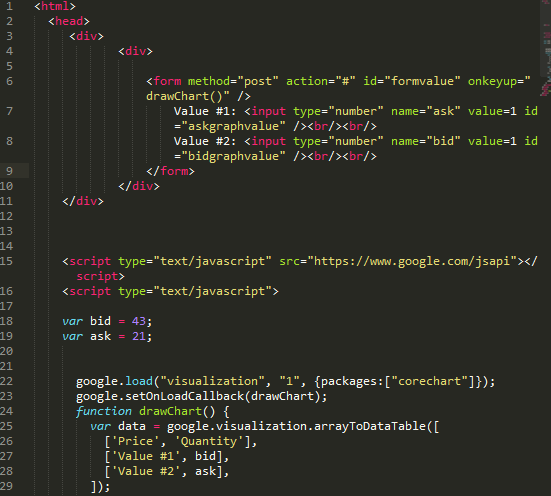
The featured image is the user-selected 1200×630 laptop-focused HTML artwork created specifically for OSHTML.002 and is not reused inside the lesson. The separate body image is real HTML source code from Wikimedia Commons.
BitcoinVersus.Tech content is provided for informational and educational purposes.


Leave a Reply