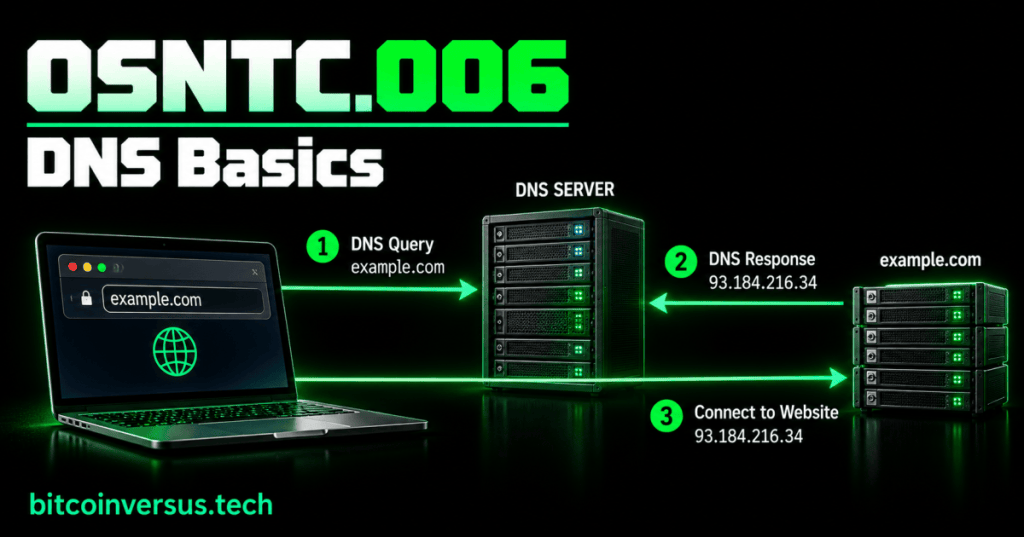
DNS stands for Domain Name System. Its basic job is to help devices turn easy-to-remember names such as example.com into IP addresses that computers can use to communicate.
This lesson follows OSNTC.005: DHCP Basics. DHCP can give a device its network settings, including DNS-server addresses. DNS then helps that device find services by name.
Names and IP Addresses
People usually remember names better than long numeric addresses. DNS connects those two ideas. You enter a name; a DNS lookup can return the IP address associated with that name.
A Simple DNS Lookup
- You enter a domain name.
- Your device asks its configured DNS resolver for an answer.
- The DNS system finds or retrieves the appropriate record.
- The resolver returns the answer to your device.
- Your device can then contact the destination using the returned address.
Video: How DNS Works
This PowerCert Animated Videos lesson gives a beginner-friendly visual explanation of DNS resolution, including resolvers, root servers, domain servers, and authoritative name servers.
DNS Resolver
A DNS resolver is the DNS server your device asks for help. Your laptop, phone, server, or mining-management computer may receive the resolver address automatically through DHCP or use one that was configured manually.
A and AAAA Records
An A record maps a name to an IPv4 address. An AAAA record maps a name to an IPv6 address. There are many other DNS record types, but these two make the basic name-to-address idea easy to see.
Test DNS With nslookup
nslookup example.comnslookup can ask DNS for information about a name. A technician can use it to separate a name-resolution problem from a more general network-connectivity problem.
Simple Troubleshooting Example
Imagine a computer can reach its default gateway but a website name will not resolve. Check the computer’s DNS-server setting, then try nslookup. If DNS fails while basic IP connectivity works, the problem may be related to name resolution rather than the Ethernet link itself.
Data Center Example
A technician may be able to ping a server by IP address but fail to reach it by hostname. That difference is a useful clue: the network path may be working while DNS configuration or records need attention.
Bitcoin Mining Example
A mining machine may be configured with a pool hostname instead of a numeric IP address. DNS must resolve that hostname before the miner can connect to the destination. A DNS failure can therefore look like a pool-connectivity problem even when the local network is otherwise online.
Practice
- Explain DNS in one sentence.
- Find the DNS-server address configured on your computer.
- Run
nslookup example.com. - Identify the name you queried and the address returned.
- Explain why reaching an IP address but not a hostname can point toward DNS.
Key Takeaway
DNS translates human-friendly names into network information such as IP addresses. For a technician, the essential skills are knowing what DNS does, identifying the configured resolver, testing a lookup, and recognizing when a problem is specifically about name resolution.


Leave a Reply