
What It Means
127.0.0.1is the IPv4 loopback address most people know aslocalhost: it points back to the same computer making the connection.- Loopback traffic stays inside the host’s networking stack instead of traveling through the Ethernet or Wi-Fi interface to a router or another device.
- Binding a service to loopback can make it reachable only from the local machine, while binding to a LAN address or all interfaces can expose it to other devices.
When a browser opens http://127.0.0.1, the request is not being sent across your home network and it is not going out to the public internet. The computer is effectively talking to itself through its own TCP/IP stack.
That behavior is called loopback. It gives operating systems and applications a predictable way to reach network services running on the same machine. Developers use it constantly for local web servers, databases, APIs, dashboards, containers, debugging tools, and test environments.
The concept is simple, but it explains a surprising number of real troubleshooting problems: why an app works at localhost but not from another computer, why a service can listen on a port without being exposed to the LAN, and why 127.0.0.1 in logs often means the source was the same host rather than a remote device.
Localhost Means “This Computer”
localhost is a special hostname representing the machine you are currently using. The standards for special-use domain names specify that localhost and names under .localhost should resolve to the local loopback address instead of being treated like ordinary public DNS names.
For IPv4, the address you see most often is 127.0.0.1. For IPv6, the loopback address is ::1. Modern software may use either one depending on the operating system, application, address family, and resolver behavior.
The RFC 6761 special-use domain rules say users can assume localhost names resolve to the respective IPv4 or IPv6 loopback address. Microsoft likewise documents modern *.localhost behavior as mapping to 127.0.0.1 or ::1 for local development.
127.0.0.1 Is Only One Address in the Loopback Block
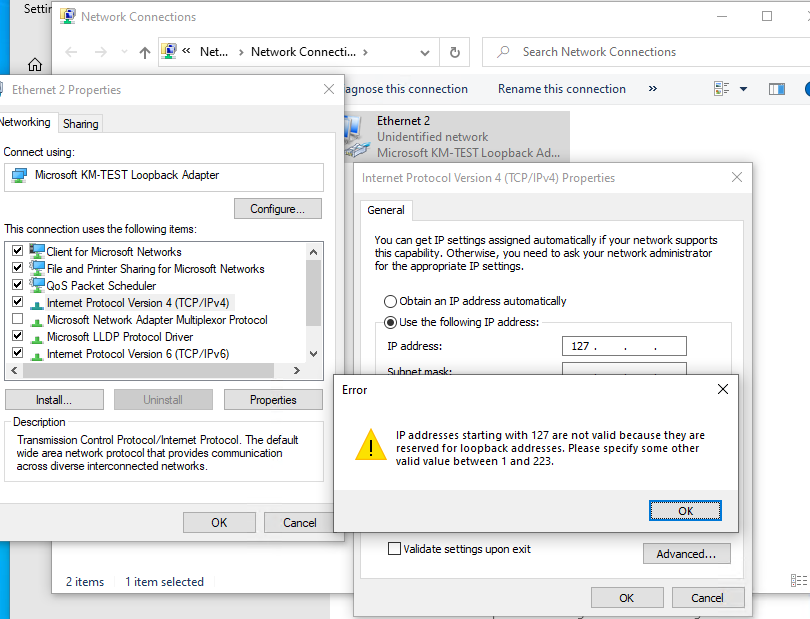
The familiar address is 127.0.0.1, but IPv4 reserves the entire 127.0.0.0/8 block for loopback behavior. That means addresses beginning with 127 are not ordinary LAN addresses that should be assigned to physical hosts or routed across the internet.
In practical day-to-day work, 127.0.0.1 is the conventional choice. The larger reserved block can still be useful in advanced local testing because software can bind different services to different loopback addresses while keeping everything on one computer.
Loopback Does Not Mean Your Network Card
One of the most useful ideas to remember is that loopback is a logical networking path inside the operating system. It does not require your Ethernet cable to be connected, your Wi-Fi to be associated with an access point, or your router to be online.
If a local web server is listening correctly on loopback, you can often reach it at 127.0.0.1 even when the machine has no working path to the outside network. That is why loopback tests can help separate a local application problem from a physical-network or router problem.
This is also why loopback is different from the physical network interface card. A NIC moves frames between your computer and an external network. Loopback keeps the traffic on the host.
A Port Still Matters on Localhost
An IP address identifies the host-side networking destination, while a port identifies the service endpoint. So 127.0.0.1:3000, 127.0.0.1:5432, and 127.0.0.1:8080 can all point to different applications running on the same computer.
This is the same basic reason ports matter elsewhere on a network. BitcoinVersus.Tech’s explanation of Bitcoin port 8333 shows the broader idea: an IP address gets traffic to a host, while the port helps direct the connection to the intended service.
http://127.0.0.1:3000
http://localhost:8080
postgresql://127.0.0.1:5432
If nothing is listening on the requested port, the connection can be refused even though loopback itself is working perfectly.
Binding Determines Who Can Reach the Service
This is where localhost becomes operationally important. A server that binds only to 127.0.0.1 accepts IPv4 connections from the same host. Another computer on the LAN normally cannot connect to that loopback listener.
A service that binds to the computer’s actual LAN address—such as 192.168.1.50—can potentially accept connections from other devices on that network, depending on routing and firewall rules. A service bound to 0.0.0.0 commonly means “listen on all available IPv4 interfaces.”
Those choices are not equivalent. A developer may intentionally bind an unfinished dashboard or database only to loopback so it is not directly reachable by nearby devices.
Localhost Is Not Your LAN Address
Suppose your laptop has the LAN address 192.168.1.50. These two destinations represent different paths:
127.0.0.1→ this host’s loopback stack192.168.1.50→ this host as addressed on the local network
That distinction explains a classic troubleshooting symptom: “It works on localhost, but my other computer cannot connect.” The server may be listening only on loopback, the firewall may block the LAN connection, or the application may be configured for a local-only address.
For broader context on how routers track ordinary outbound LAN traffic, see What Is a NAT Table? Loopback traffic generally never reaches that home-router NAT process because it never leaves the host.
Try the Loopback Address Yourself
On Windows, Linux, or macOS, a basic ping is an easy first demonstration:
ping 127.0.0.1Depending on the operating system, you can also test the hostname:
ping localhostThe second command may resolve to 127.0.0.1, ::1, or both depending on the system. That is normal.
Check Which Address a Service Is Listening On
When troubleshooting a local application, do not stop at “the process is running.” Verify the listening address and port.
On Windows, PowerShell can show listening TCP endpoints:
Get-NetTCPConnection -State ListenOn many Linux systems, ss is the standard tool:
ss -lntpLook for the local address. A listener on 127.0.0.1:8080 is local-only over IPv4. A listener on a LAN address or a wildcard address may be reachable more broadly.
Why Developers Use Localhost Constantly
Local development frequently involves multiple networked programs running on one machine. A browser might talk to a frontend development server on one port, that frontend may call an API on another port, and the API may reach a database on a third.
Using loopback allows these applications to exercise real TCP or HTTP behavior without requiring separate physical computers. That is one reason the idea appears everywhere from web development to containers, local AI tools, game servers, test databases, and automation systems.
If you want the wider browser-to-server picture, BitcoinVersus.Tech’s What Happens When You Type a Website Into Your Browser? explains DNS, connections, HTTP, and rendering. Localhost uses many of the same application-level concepts while keeping the destination on the same machine.
The Security Lesson: Local-Only Is a Boundary, Not Magic
Binding a sensitive development service to loopback can reduce its network exposure because remote hosts cannot normally address your machine’s loopback interface directly. But localhost should not be treated as a complete security system.
Software already running on the same host may be able to connect to local services. Browsers and operating systems are also adding increasingly explicit protections around web pages attempting to reach local-network or loopback resources. Microsoft, for example, documents browser policies that distinguish requests to 127.0.0.1, ::1, and localhost from ordinary remote requests.
The practical rule is simple: bind only where the service actually needs to be reachable, authenticate sensitive services, keep software patched, and do not assume “it is on localhost” makes every other security control unnecessary.
Common Misunderstandings
- “127.0.0.1 is my router.” No. It refers to the local machine.
- “Localhost is my private LAN IP.” No. A private address such as
192.168.x.xor10.x.x.xrepresents a host on a private network; loopback represents the host to itself. - “If localhost works, my Ethernet cable is good.” Not necessarily. Loopback can work without using the physical NIC.
- “If localhost fails, the internet must be down.” No. A failed localhost service often points to a local process, port, binding, firewall, or application problem.
- “127.0.0.1 is the only IPv4 loopback address.” It is the conventional one, but the entire
127.0.0.0/8block is reserved for loopback. - “localhost always means IPv4.” Modern systems may resolve it to IPv6
::1as well.
Bottom Line
127.0.0.1 is a path back into the same machine. It lets applications use normal networking APIs while keeping the connection local to the host. That makes loopback essential for development, testing, local services, troubleshooting, and secure-by-default service binding.
Once you understand that one idea, a lot of networking behavior becomes easier to read: localhost versus LAN IPs, ports, service bindings, connection-refused errors, browser development servers, local databases, and why a program can be “networked” without sending a single packet through your router.
Primary References
- RFC 6761 — Special-Use Domain Names
- Microsoft Learn — Support for the .localhost top-level domain
- Microsoft Learn/Q&A — Loopback address example
Editor’s Note
The featured image is an original 1200×630 realistic color-pencil illustration created specifically for this story and is not reused inside the body. The body image is a separate Microsoft-sourced networking screenshot. The YouTube and Reddit embeds are directly relevant and separated by substantive editorial material. Standard responsive Gutenberg blocks are used throughout with no text boxes.
BitcoinVersus.Tech content is provided for informational and educational purposes.


Leave a Reply