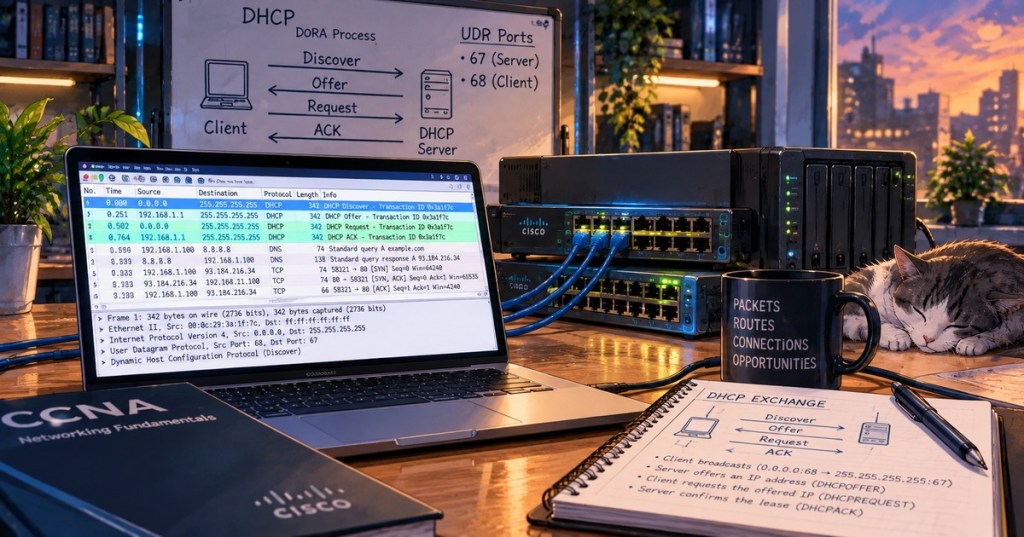
DHCP problems are easiest to solve when the troubleshooting process follows the packet path instead of guessing. A client must first reach the correct Layer 2 network, send a DHCP request, receive a valid response, and install the offered addressing information. This lesson advances beyond OSNTC.005: DHCP Basics by focusing on failure isolation, relay behavior, packet capture, and field verification.
Learning Objectives
- Trace the DHCP Discover, Offer, Request, and Acknowledge sequence.
- Recognize common symptoms of a failed lease.
- Verify UDP ports 67 and 68.
- Separate Layer 1, Layer 2, routing, relay, and server-side failures.
- Explain why DHCP broadcasts normally need a relay to cross a routed boundary.
- Configure and verify a Cisco
ip helper-address. - Use packet capture to identify the exact stage where DHCP fails.
- Troubleshoot exhausted pools, incorrect options, ACLs, VLAN errors, and missing return routes.
Start With the Four DHCP Messages
The common memory aid is DORA: Discover, Offer, Request, Acknowledge. A client without an address begins by broadcasting a DHCPDISCOVER. A server responds with an offer. The client requests the selected lease, and the server acknowledges it. RFC 2131 defines DHCP over UDP, with client-to-server traffic using destination port 67 and server-to-client traffic using destination port 68.
A useful troubleshooting question is not simply “Is DHCP working?” but “Which DHCP message is missing?” If a Discover leaves the client and no Offer returns, the problem is usually upstream of the client. If an Offer returns but the client never completes the Request/Acknowledge exchange, attention shifts to the client, server policy, relay path, or intervening network controls.
A 169.254.x.x Address Is a Strong Clue
On many systems, an automatically assigned address in the 169.254.0.0/16 IPv4 link-local range is a strong sign that the device did not obtain a normal DHCP lease. Windows commonly refers to this behavior as APIPA. The address proves that the interface has an IP configuration of some kind; it does not prove that the DHCP server is reachable.
Before changing router configuration, verify the client. On Windows, ipconfig /all shows the current address, DHCP status, lease information, default gateway, and DNS servers. ipconfig /release and ipconfig /renew can force a new lease attempt. On Linux, tools such as ip addr, nmcli device show, and the system journal can reveal the active address and lease behavior.
Check the Network From the Bottom Up
- Physical link: confirm the NIC, cable, switch port, and link LEDs are active.
- Switch port: confirm the access VLAN is correct and the port is not err-disabled or blocked.
- Trunk path: if multiple switches or router-on-a-stick are involved, confirm the client VLAN is allowed across each trunk.
- Client configuration: confirm the interface is actually configured to obtain an address automatically.
- Broadcast domain: verify the DHCP server is local or a relay exists on the client’s routed gateway.
- Routing: verify the relay can reach the DHCP server and that the server has a valid return path.
- Server scope: verify a pool exists for the client subnet and still contains free addresses.
- DHCP options: verify the gateway, DNS servers, lease time, and subnet mask are correct.
- Security controls: verify ACLs, firewalls, DHCP snooping, or other controls are not dropping the exchange.
This troubleshooting order connects directly to OSNTC.023: Inter-VLAN Routing. A DHCP server on another VLAN is not reached by a normal client broadcast simply because routing exists between the networks.
Why DHCP Relay Exists
A DHCP client begins without enough information to unicast directly to a remote DHCP server, so its initial request is broadcast on the local subnet. Routers normally do not forward that broadcast into another subnet. A DHCP relay agent receives the local request and forwards it toward the remote server. Cisco documentation describes the relay as inserting gateway information so the server can determine which client subnet should receive an address.
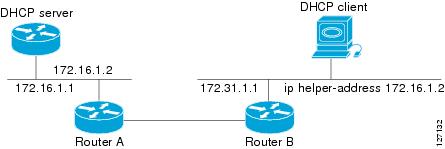
On Cisco IOS, the helper is placed on the Layer 3 interface that receives the client broadcast. That might be a router subinterface, a routed interface, or an SVI on a multilayer switch. A typical interface configuration includes ip helper-address 10.10.10.10, where 10.10.10.10 is the remote DHCP server.
The Helper Address Must Be on the Client-Facing Layer 3 Interface
One common mistake is placing the helper command on an interface merely because that interface points toward the server. The important location is the interface where the client’s DHCP broadcast enters the router or multilayer switch. In a VLAN design, that commonly means the SVI or router subinterface acting as that VLAN’s default gateway.
ip helper-address belongs reinforces the practical rule: configure it where the client broadcast is received, pointing to the DHCP server’s reachable address.Routing Still Matters After the Relay Is Configured
A helper command does not create end-to-end routing. The relay must have a route to the server, and the server-side network must have a valid route back toward the client subnet. This follows the same return-path principle covered in OSNTC.024: Static Routing and Routing Tables.
Useful Cisco checks include show ip interface brief, show ip route, and the running configuration for the client-facing interface. When a Cisco device is also the DHCP server, show ip dhcp pool and show ip dhcp binding can help reveal scope usage and active leases. Command availability varies by platform and role.
Packet Capture Removes Guesswork
Wireshark or another packet analyzer can show the actual exchange. A reliable display filter is udp.port == 67 || udp.port == 68. Start a capture, force the client to renew its lease, and observe which DHCP messages appear.
- Discover only: the client is transmitting, but no valid Offer is returning. Check VLANs, relay configuration, routing, ACLs, and the server.
- Discover and Offer: the server path is working at least partially. If the process stops here, inspect the client Request, server policy, duplicate-address detection, and security controls.
- Full DORA but bad connectivity: DHCP itself probably succeeded. Verify the leased subnet mask, default gateway, DNS servers, and routing.
- No Discover at all: focus on the client interface, local operating-system configuration, driver state, and physical or Layer 2 connectivity.
Scope Exhaustion Can Look Like a Network Failure
A perfectly connected client may still fail if the DHCP pool has no usable addresses left. Check the scope size, excluded addresses, reservations, active leases, and lease duration. A small pool combined with long lease times can exhaust quickly in labs, guest networks, conference spaces, or environments where devices frequently change.
Also verify that the server is selecting the correct scope. In a relayed design, the server uses relay information—including the gateway address inserted by the relay—to determine which subnet the requesting client belongs to. A wrong relay interface or incorrect addressing can therefore cause the server to select the wrong pool or no pool at all.
Hands-On Lab
Create a client in VLAN 20 using subnet 192.168.20.0/24. Place the DHCP server at 10.10.10.10 on a different routed network. Use the VLAN 20 Layer 3 gateway as the relay point.
On the client-facing Layer 3 interface, configure ip helper-address 10.10.10.10. Verify a route exists from the relay to 10.10.10.10 and a route exists from the server side back to 192.168.20.0/24.
Capture UDP ports 67 and 68 while the client renews. Record the Discover, Offer, Request, and Acknowledge messages. Then deliberately remove the helper address and repeat the capture. Restore it, remove the return route, and repeat again. Comparing those three failures teaches more than memorizing the command alone.
Troubleshooting Checklist
- Link up?
- Correct VLAN?
- Correct trunk allowance?
- Client set for DHCP?
- Discover visible?
- Server local or remote?
- Helper on the correct client-facing Layer 3 interface?
- Relay route to server?
- Return route to client subnet?
- Pool exists and has free leases?
- Correct subnet mask, gateway, and DNS options?
- ACL, firewall, or DHCP snooping blocking traffic?
Knowledge Check
- What four messages are represented by DORA?
- Which UDP ports are used by DHCPv4 clients and servers?
- Why does a remote DHCP server usually require a relay?
- Where should
ip helper-addressnormally be configured? - What does a
169.254.x.xaddress often suggest? - If Discover is visible but no Offer returns, which side of the exchange deserves attention first?
- Can a correct helper address compensate for a missing route to the server?
- What packet-capture filter can isolate the standard DHCPv4 UDP ports?
Answers
- Discover, Offer, Request, Acknowledge.
- UDP 67 for the server side and UDP 68 for the client side.
- Because the initial client request is a local broadcast that routers normally do not forward across subnets.
- On the Layer 3 interface that receives the client DHCP broadcast, such as the client VLAN SVI or router subinterface.
- The client failed to obtain a normal lease and fell back to IPv4 link-local addressing.
- The relay path, VLAN path, routing, ACLs, and DHCP server.
- No. End-to-end routing is still required.
udp.port == 67 || udp.port == 68.
Key Sources
- PowerCert Animated Videos — DHCP Explained
- Professor Messer — DHCP, CompTIA Network+ N10-009
- Cisco — How DHCP Relay Works
- RFC 2131 — Dynamic Host Configuration Protocol
BitcoinVersus.Tech Editor’s Note: DHCP troubleshooting should follow observed packet behavior and network state. Command syntax and relay implementation vary by platform.
Support independent BitcoinVersus.Tech technical education with Bitcoin: 3C9o19EH5HSiwEPyCTmEKzxhNCbo2X6TTb
BitcoinVersus.Tech is not a financial advisor. This lesson is for informational and educational purposes.


Leave a Reply