
Elementary Overview
A router needs a set of instructions for deciding where an IP packet goes next. Those instructions are stored in a routing table. A route normally identifies a destination network or prefix and tells the router which next hop or outgoing interface can move traffic closer to that destination.
This lesson follows OSNTC.023: Inter-VLAN Routing. Inter-VLAN routing showed why a Layer 3 device is required when traffic crosses IP networks. Static routing now explains how that Layer 3 device learns where remote networks are located when they are not directly attached.
What You Should Learn
- What a routing table represents.
- The difference between connected, local, static, and default routes.
- What a next-hop IP address means.
- How
ip routecreates a static route on Cisco IOS. - Why return routes are required for two-way communication.
- How longest-prefix matching determines which installed route forwards a packet.
- Why administrative distance and longest-prefix match solve different problems.
- How to verify routes with
show ip route,ping, andtraceroute. - How to troubleshoot a static route that appears correct but still does not pass traffic.
A Routing Table Is a Set of Forwarding Instructions
Routers do not normally forward a packet by remembering every individual destination host on the internet. They work primarily with network prefixes. RFC 1812 describes the route database—also called the routing table or forwarding table—as the information a router uses to choose an appropriate next hop. When overlapping prefixes match the same destination, IPv4 routers use the most specific matching prefix.
On Cisco IOS, a basic routing table can be displayed with:
show ip route
A simplified table might contain entries such as:
C 192.168.1.0/24 is directly connected, GigabitEthernet0/0L 192.168.1.1/32 is directly connected, GigabitEthernet0/0S 10.20.0.0/16 [1/0] via 192.168.1.2S* 0.0.0.0/0 [1/0] via 203.0.113.1
The letters are route-source codes. C means connected, L means local, and S means static. The asterisk beside S* marks a candidate default route in common Cisco output.
Connected and Local Routes Appear Automatically
When a router interface is configured with an address such as 192.168.1.1/24 and the interface is operational, the router knows two important facts. First, the 192.168.1.0/24 network is directly attached. Second, 192.168.1.1 is the router’s own interface address. Cisco IOS commonly represents these as connected and local routes.
This connects to Router Basics and Subnet Masks. A router can identify directly attached networks because the interface address and prefix length tell it which addresses belong to that local subnet.
A Static Route Teaches the Router About a Remote Network
Suppose Router R1 is attached to LAN 10.10.0.0/16. R1 connects to Router R2 across 192.168.1.0/24, and R2 is attached to LAN 10.20.0.0/16. R1 knows its directly connected networks automatically, but it does not automatically know that 10.20.0.0/16 exists behind R2.
A static route can provide that instruction:
R1(config)# ip route 10.20.0.0 255.255.0.0 192.168.1.2
The command means: to reach 10.20.0.0/16, forward toward next-hop 192.168.1.2. Cisco’s current IOS XE routing documentation describes static routes as user-defined paths and identifies ip route as the global configuration command used to create them.
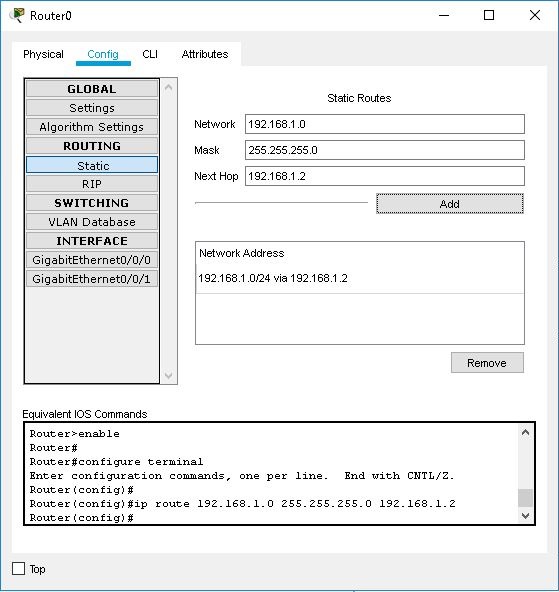
ip route command for a static route.The Next Hop Is the Next Router, Not the Final Host
A next-hop address normally identifies another Layer 3 device that can move the packet farther toward the destination. R1 does not need to know every Ethernet segment inside the remote site if an appropriate route points it toward R2. At each routed hop, the IP packet continues toward the destination while the Layer 2 frame is rebuilt for the next local link.
This is why routing is different from switching. A switch forwards a local Ethernet frame using MAC-address information. A router examines the destination IP network and selects a route toward the next Layer 3 hop.
A Return Route Is Just as Important
One of the most common beginner mistakes is configuring only the forward path. If R1 knows how to reach 10.20.0.0/16 but R2 has no route back to 10.10.0.0/16, an ICMP echo request might arrive successfully while the echo reply has no valid return path.
R2 therefore needs a route such as:
R2(config)# ip route 10.10.0.0 255.255.0.0 192.168.1.1
Routing must work in both directions for normal request-and-response traffic. A correct forward route does not automatically create a return route on another router.
Default Routes Handle “Everything Else”
A default route matches destinations for which no more-specific route exists. In IPv4 it is written as 0.0.0.0/0. A branch router might use a default route toward an upstream firewall or ISP instead of maintaining explicit routes to every public internet network.
R1(config)# ip route 0.0.0.0 0.0.0.0 203.0.113.1
This route does not override more-specific routes. It is the least-specific possible IPv4 prefix, so it is used only when no longer matching prefix wins. Cisco documentation describes static routes as useful for defining a gateway of last resort.
Longest-Prefix Match Comes First During Forwarding
Consider a packet addressed to 10.20.30.40 and a routing table containing:
10.0.0.0/8 via 192.0.2.110.20.0.0/16 via 192.0.2.210.20.30.0/24 via 192.0.2.30.0.0.0/0 via 192.0.2.254
All four prefixes mathematically match the destination, but 10.20.30.0/24 is the most specific. RFC 1812 requires routers to use the most specific matching route—the longest matching network prefix—for forwarding. Cisco’s current administrative-distance documentation makes the same distinction: longest-prefix match is applied during packet forwarding after candidate routes have already been installed.
Administrative Distance Is Not the Same as Longest-Prefix Match
Administrative distance helps a router decide which route source to trust when multiple route sources offer the same destination prefix. Longest-prefix match is used later when forwarding a packet among installed routes that overlap. Mixing these two decisions is a common certification-exam mistake.
For example, a router can have a default route 0.0.0.0/0 with a low administrative distance and an OSPF route for 10.20.30.0/24 with a higher administrative distance. Traffic to 10.20.30.40 still follows the /24 because it is the longer matching prefix. Administrative distance does not make a default route override a more-specific installed route.
Three Common Static-Route Forms
On Cisco IOS, a route can identify a next-hop address, an outgoing interface, or both. The most intuitive beginner form usually specifies the next hop:
ip route 10.20.0.0 255.255.0.0 192.168.1.2
An interface-only form can look like:
ip route 10.20.0.0 255.255.0.0 GigabitEthernet0/1
A fully specified route can include both:
ip route 10.20.0.0 255.255.0.0 GigabitEthernet0/1 192.168.1.2
The best form depends on the link type and platform behavior. Cisco documentation allows the static route to point to a next-hop IP address, an outgoing interface, or both. For beginner Ethernet labs, using the reachable next-hop IP makes the intended Layer 3 path easy to read.
Verification: Never Stop at “The Command Was Accepted”
A configuration line appearing in the running configuration is not proof that end-to-end routing works. Verify the routing table first:
show ip routeshow ip route staticshow ip route 10.20.0.0
Then test reachability with ping:
ping 10.20.1.10
Use traceroute when the destination is remote and the path matters:
traceroute 10.20.1.10
Also check interface state and addressing:
show ip interface briefshow running-config | include ^ip route
A Practical Troubleshooting Order
- Verify the host IP address, subnet mask, and default gateway.
- Verify the router interfaces are up/up and use the expected IP addresses.
- Confirm the destination prefix and subnet mask in the static route.
- Confirm the next-hop address is reachable through a connected network.
- Check that the route actually appears in
show ip route. - Check the remote router for a valid return route.
- Ping hop by hop instead of testing only the final destination.
- Use traceroute to identify where forwarding stops.
- Check ACL, firewall, NAT, or policy rules only after the basic Layer 3 path is understood.
A frequent error is entering the wrong destination mask. Another is pointing the route at a next-hop address that the local router cannot itself reach. A third is configuring only one direction. Static routing is simple because nothing is hidden—but that also means the administrator must explicitly build the necessary path.
Hands-On Exercise
Build this simple topology in Packet Tracer, GNS3, EVE-NG, a virtual lab, or physical routers:
PC-A --- R1 -------- R2 --- PC-BLAN-A LAN-BLAN-A: 10.10.0.0/16R1-R2: 192.168.1.0/24LAN-B: 10.20.0.0/16
Configure R1 as 192.168.1.1 on the transit network and R2 as 192.168.1.2. Add one static route on each router so LAN-A and LAN-B can communicate.
Expected routing commands:
R1(config)# ip route 10.20.0.0 255.255.0.0 192.168.1.2R2(config)# ip route 10.10.0.0 255.255.0.0 192.168.1.1
After the routes are installed, verify with show ip route, then ping from a host in LAN-A to a host in LAN-B. Finally run traceroute and identify the router hops.
Knowledge Check
- What information does a routing table provide?
- What does the next-hop IP address represent?
- What Cisco IOS command creates a basic IPv4 static route?
- Why does a network often need a return route?
- What IPv4 prefix represents the default route?
- If
10.0.0.0/8,10.20.0.0/16, and10.20.30.0/24all match10.20.30.40, which one forwards the packet? - Does a lower administrative distance on a default route make it override a longer matching prefix?
- Which command displays the IPv4 routing table on Cisco IOS?
- What two basic tools can test reachability and reveal the path through routers?
Answers
- Destination prefixes and the forwarding information used to reach them, such as next hop or outgoing interface.
- The next Layer 3 device that should receive the packet on its way toward the destination.
ip routein global configuration mode.- Because replies need a valid route back toward the original source network.
0.0.0.0/0.10.20.30.0/24, because it is the longest and most-specific matching prefix.- No. Administrative distance influences route-source selection for the same destination prefix; forwarding among installed overlapping routes uses longest-prefix match.
show ip route.pingandtraceroute.
Key Sources
- PowerCert Animated Videos — Routing Tables | CCNA – Explained
- Professor Messer — Static Routing, CompTIA Network+ N10-009
- Cisco IOS XE 17.x — IP Routing Protocol-Independent Features
- Cisco — Administrative Distance and Longest-Prefix Match
- RFC 1812 — Requirements for IPv4 Routers
BitcoinVersus.Tech Editor’s Note: Vendor command syntax varies. The Cisco IOS examples in this lesson teach general routing concepts through one widely used CLI.
Support independent BitcoinVersus.Tech technical education with Bitcoin: 3C9o19EH5HSiwEPyCTmEKzxhNCbo2X6TTb
BitcoinVersus.Tech is not a financial advisor. This lesson is for informational and educational purposes.


Leave a Reply