
Network Address Translation, or NAT, changes IP addressing information as packets cross a network boundary. In most enterprise and home networks, NAT allows hosts using private IPv4 addresses to communicate with the public Internet. Port Address Translation, or PAT, extends that idea by allowing many private hosts to share one public IPv4 address by tracking transport-layer port numbers.
This lesson continues the Open-Source Networking Technician sequence after OSNTC.024 on static routing, OSNTC.025 on DHCP troubleshooting, and OSNTC.026 on DNS troubleshooting. NAT sits directly after those topics because successful Internet access depends on correct addressing, routing, name resolution, and translation working together.
Cisco’s NAT for Beginners walkthrough covers private-to-public translation, dynamic NAT, PAT, and basic configuration.
Learning Objectives
- Explain why private IPv4 addressing requires translation for ordinary Internet access.
- Distinguish inside local, inside global, outside local, and outside global addresses.
- Compare static NAT, dynamic NAT, static PAT, and dynamic PAT.
- Configure basic static NAT and PAT overload on Cisco IOS.
- Verify translations with routing, NAT, interface, and ACL commands.
- Troubleshoot common failures caused by direction, ACL, routing, or translation errors.
Private and Public IPv4 Addresses
RFC 1918 reserves three IPv4 ranges for private networks: 10.0.0.0/8, 172.16.0.0/12, and 192.168.0.0/16. These addresses can be reused independently by millions of networks because they are not globally routed across the public Internet.
A host such as 192.168.10.25 can communicate normally inside its local routed network, but an Internet router does not treat that private source address as a globally reachable endpoint. NAT solves this by replacing the private source address with an address that is valid on the public side of the translating router.
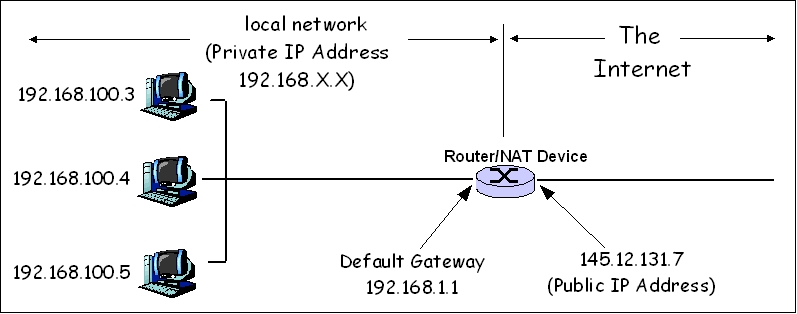
The original technical behavior is standardized in documents including RFC 3022. Cisco also documents the operational commands and translation behavior in its NAT configuration and verification guidance.
The Four NAT Address Terms
Cisco terminology becomes easier when you separate location from representation. “Inside” refers to the network under your control. “Outside” refers to the remote network. “Local” is the address as seen from the inside. “Global” is the address as represented in the globally reachable network.
- Inside local: the private address assigned to the internal host, such as
192.168.10.25. - Inside global: the translated public address representing that internal host, such as
203.0.113.10. - Outside global: the real globally routable address of the remote host.
- Outside local: the remote host address as seen by the inside network; in ordinary deployments this is usually identical to the outside global address.
Static NAT
Static NAT creates a permanent one-to-one mapping between an inside local address and an inside global address. It is useful when an internal server must always be reachable through the same public IPv4 address.
Example mapping: 192.168.10.50 → 203.0.113.50. On a Cisco router, the core translation command is ip nat inside source static 192.168.10.50 203.0.113.50. The LAN-facing interface also needs ip nat inside, while the Internet-facing interface needs ip nat outside.
Practical Networking demonstrates static NAT packet flow and verifies the translation with show ip nat translations.
Dynamic NAT
Dynamic NAT maps inside hosts to addresses drawn from a public address pool. A translation is created when traffic needs it and can be removed after the session expires. Unlike PAT, one public address normally serves one translated inside host at a time.
A simplified configuration requires three elements: an ACL or route-map that identifies inside addresses, a NAT pool containing public addresses, and a rule connecting the matched sources to that pool.
access-list 10 permit 192.168.10.0 0.0.0.255ip nat pool PUBLIC 203.0.113.100 203.0.113.110 netmask 255.255.255.0ip nat inside source list 10 pool PUBLIC
Dynamic NAT is less common for ordinary outbound Internet access because it can consume public IPv4 addresses quickly. PAT is usually more efficient.
PAT: Many Hosts Sharing One Address
Port Address Translation, sometimes called NAT overload, allows multiple internal hosts to share one public address. The router distinguishes simultaneous sessions using Layer 4 port numbers and protocol information.
Suppose 192.168.10.20 opens a TCP connection using source port 49152, while 192.168.10.21 opens another connection using source port 49153. Both can be translated to the same public address because the router maintains separate translation-table entries.
Practical Networking separates NAT from PAT and static from dynamic behavior, which is essential for interpreting translation tables correctly.
A common Cisco PAT configuration uses an ACL to identify private sources and overloads the public interface address:
access-list 10 permit 192.168.10.0 0.0.0.255ip nat inside source list 10 interface GigabitEthernet0/1 overloadinterface GigabitEthernet0/0→ip nat insideinterface GigabitEthernet0/1→ip nat outside
How the Translation Table Changes a Packet
An inside packet might begin as 192.168.10.20:49152 → 198.51.100.80:443. After PAT, the public-facing packet could become 203.0.113.5:30001 → 198.51.100.80:443. The destination remains the remote HTTPS server, but the source address and possibly the source port are rewritten.
When the reply returns to 203.0.113.5:30001, the router checks its translation table and restores the destination to 192.168.10.20:49152. This state is why a return packet can reach the correct internal host even though hundreds of devices may share one external address.
Verification Commands
Use verification commands in a deliberate order. First confirm Layer 3 reachability and interface state, then inspect the NAT configuration and active translations.
show ip interface brief— confirm inside and outside interfaces are up/up.show ip route— confirm the router has a route toward the Internet and toward the inside subnet.show running-config | section ip nat— inspect the actual NAT rules.show access-lists— verify the source ACL matches the intended internal subnet.show ip nat translations— inspect current address and port mappings.show ip nat statistics— inspect hit counters, misses, interfaces, pools, and active translations.clear ip nat translation *— remove dynamic translations when a controlled lab reset is necessary.
A Practical Troubleshooting Order
Do not begin by assuming NAT is the problem. A failed Internet connection can be caused by an incorrect host gateway, a missing default route, failed DNS resolution, an ACL, a down interface, or a translation rule that never matches.
- Verify the client address, mask, gateway, and DNS settings.
- Ping the default gateway from the client.
- Verify the router’s outside interface and default route.
- Test a public IP address before testing a DNS name.
- Confirm the inside interface is marked
ip nat inside. - Confirm the outside interface is marked
ip nat outside. - Verify the source ACL actually matches the private subnet.
- Generate traffic, then inspect
show ip nat translations. - Inspect NAT statistics for hits and misses.
- Use packet capture or debug tools only after safer checks are complete.
Common NAT Failures
- Inside and outside reversed: the correct translation rule exists, but interfaces are labeled incorrectly.
- ACL mismatch: the NAT ACL permits the wrong subnet or wildcard mask.
- No default route: translation succeeds but the router cannot forward the packet toward the ISP.
- No return route: an upstream device does not know how to return traffic to the translated public range.
- Pool exhaustion: dynamic NAT runs out of public addresses.
- Stale translations: old entries interfere with a changed lab configuration until they expire or are cleared.
- DNS confusion: users report “the Internet is down” when NAT works but name resolution does not.
NAT Is Not a Firewall
NAT changes addressing information. A firewall enforces a security policy. Although PAT often prevents unsolicited inbound sessions from reaching internal hosts because no translation exists, that behavior should not be treated as a replacement for a stateful firewall, ACL policy, endpoint security, or network segmentation.
Security design should explicitly define what traffic is permitted. NAT should be considered an addressing and connectivity function first.
A Cisco Networking Academy learner highlights Networking Basics as part of the practical path into network operations. NAT and PAT belong in that same foundational skill set.
Hands-On Exercise
Build a small lab with one router, one inside LAN, and one simulated ISP. Use 192.168.10.0/24 internally. Assign the router an outside address such as 203.0.113.5/30. Configure PAT so all inside hosts use the outside interface address.
- Configure inside and outside interface IP addresses.
- Mark the interfaces with
ip nat insideandip nat outside. - Create an ACL matching
192.168.10.0/24. - Create the overload rule using the outside interface.
- Add a default route toward the simulated ISP.
- Generate ICMP and HTTPS traffic from two inside hosts.
- Use
show ip nat translationsand record the inside local, inside global, and port values. - Remove or break one configuration element and use the troubleshooting order above to identify the failure.
Knowledge Check
- Why can the same private IPv4 address appear in many unrelated organizations?
- What is the difference between an inside local address and an inside global address?
- How does PAT allow hundreds of hosts to share one public IPv4 address?
- When would static NAT be preferable to dynamic PAT?
- Which Cisco command shows active translations?
- Why should you verify routing before blaming NAT?
- Why is NAT not a substitute for a firewall?
Answer Guide
- RFC 1918 private addresses are not globally routed, so separate private networks can reuse them independently.
- The inside local address is the internal host’s original private address; the inside global address is the translated address representing that host externally.
- PAT tracks sessions using address, protocol, and port information so many private flows can map to one public address.
- Static NAT is appropriate when a specific inside host must always map to the same public address, such as a published server.
show ip nat translations.- A correct translation cannot compensate for a missing route; the packet still has to be forwarded toward its destination and the reply must return.
- NAT rewrites addressing information. A firewall explicitly evaluates and permits or denies traffic according to security policy.
Key Takeaway
NAT is best understood as controlled address rewriting at a network boundary. Static NAT provides predictable one-to-one mappings. Dynamic NAT allocates mappings from a pool. PAT adds transport-layer ports so large numbers of private hosts can share limited public IPv4 space. Effective troubleshooting requires treating NAT as one stage in a larger packet path that also depends on interfaces, routing, ACLs, DNS, and return traffic.
BitcoinVersus.Tech
Editor’s Note: Commands in this lesson use common Cisco IOS syntax for instruction. Exact syntax and platform behavior can vary by operating system, software release, firewall architecture, and deployment design.
We volunteer daily to improve the credibility of the information on this platform. If you would like to support the research, please donate here: 3C9o19EH5HSiwEPyCTmEKzxhNCbo2X6TTb
BitcoinVersus.tech is not a financial advisor. This media platform reports on technical and financial subjects purely for informational purposes.


Leave a Reply