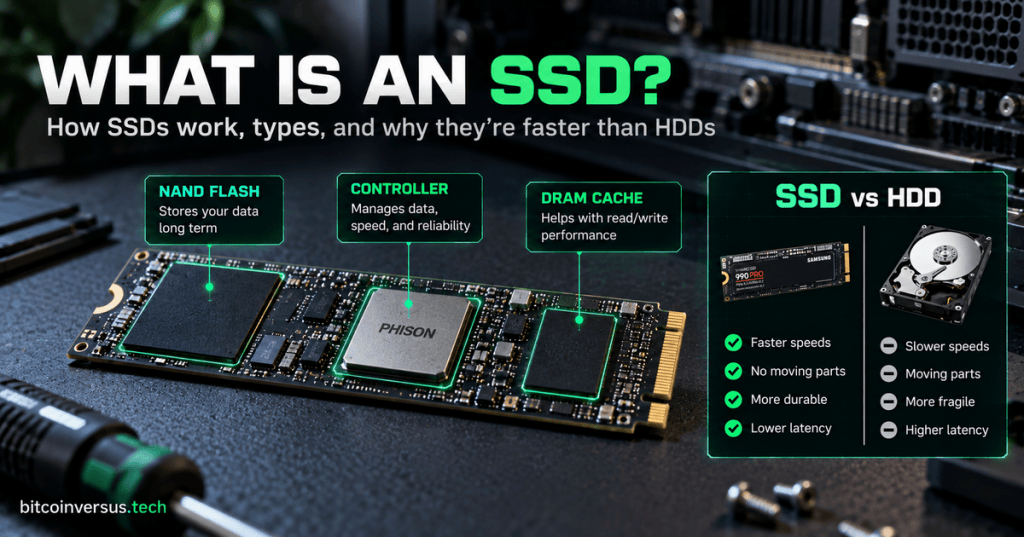
A solid-state drive looks simple from the outside, but inside it is a small computer dedicated to storing and moving data.
The easiest way to understand an SSD is to break it into three main jobs: NAND flash stores the data, the controller manages the drive, and DRAM cache can help the controller work faster.
NAND Flash Is Where Your Data Lives
NAND flash memory is the non-volatile memory that stores your files even when the computer is turned off. Your operating system, games, photos, applications, and documents ultimately live in these flash-memory cells.
Unlike cache memory or normal system RAM, NAND does not need continuous electrical power to remember what was written to it.
Kingston explains that SSDs use NAND flash as the persistent storage medium, while the SSD controller reads from and writes to those NAND chips. NAND cells also wear gradually as they are programmed and erased, so the drive has to manage where new data is written rather than repeatedly hammering the same cells.
The Controller Is the SSD’s Traffic Manager
The SSD controller is the chip that decides how data moves between the computer and the flash memory. It handles reads, writes, address mapping, error correction, wear leveling, garbage collection, and other housekeeping work.
Think of the controller as the drive’s dispatcher. Your operating system asks for a file, but the controller figures out which physical NAND cells contain the data and how to retrieve it efficiently.
Kingston’s SSD documentation notes that every SSD uses a controller, regardless of whether the drive uses a 2.5-inch, add-in-card, or M.2 form factor. The controller is the bridge between the host system and the NAND.
DRAM Cache Gives the Controller a Fast Scratchpad
Some SSDs include a small amount of DRAM. This is not where your files are permanently stored. Instead, the SSD can use DRAM as a very fast temporary workspace.
One important use is holding mapping information that helps the controller translate the logical addresses the computer uses into the physical NAND locations where data actually sits.
Crucial describes the basic layout of an NVMe SSD as a controller chip, a DRAM chip, and NAND flash memory chips: the controller manages reads and writes, the DRAM works as cache, and the NAND stores the data long term.
Not Every SSD Has Separate DRAM
DRAM is useful, but it is not mandatory. Some lower-cost SSDs are DRAM-less. Their controllers may store mapping information in internal SRAM, reserve part of the NAND itself, or use host-system memory depending on the design and protocol.
That means “DRAM-less” does not automatically mean “bad.” It means the drive is using a different architecture. Performance differences become more noticeable during sustained writes, heavy multitasking, or workloads where the controller has to manage a large amount of address information.
NVMe and SATA Describe the Connection, Not the NAND
NVMe and SATA are not types of flash memory. They describe how the SSD communicates with the rest of the computer.
An NVMe SSD usually connects over PCI Express, giving the controller access to much more bandwidth and lower-latency command handling than older SATA designs. Both can still use NAND flash internally.
Why SSDs Feel Faster Than Hard Drives
A hard disk drive has to move a mechanical read/write head across spinning magnetic platters. An SSD has no moving read head. The controller can request data electronically from flash memory.
That is a major reason SSDs provide much lower access latency and far better random-read performance than mechanical drives. The speed difference is not just about one headline MB/s number—it comes from changing the entire way data is physically accessed.
The Simple Mental Model
NAND flash = the warehouse. It stores your data after the power is off.
SSD controller = the warehouse manager. It decides where data goes and how it is retrieved.
DRAM cache = the manager’s fast desk. It temporarily keeps frequently needed mapping or working information close at hand.
Put those pieces together and an SSD becomes much easier to understand: flash cells hold the data, the controller manages the flash, and cache can help the controller do its job faster.
Sources: Kingston Technology — SSD data transfers and controller architecture; Crucial — controller, DRAM, and NAND components inside NVMe SSDs.
BitcoinVersus.Tech
Advertisement
Editor’s Note
BitcoinVersus.Tech publishes technical explainers and reporting for informational and educational purposes.
BitcoinVersus.tech is not a financial advisor. Content is provided for informational purposes.


Leave a comment