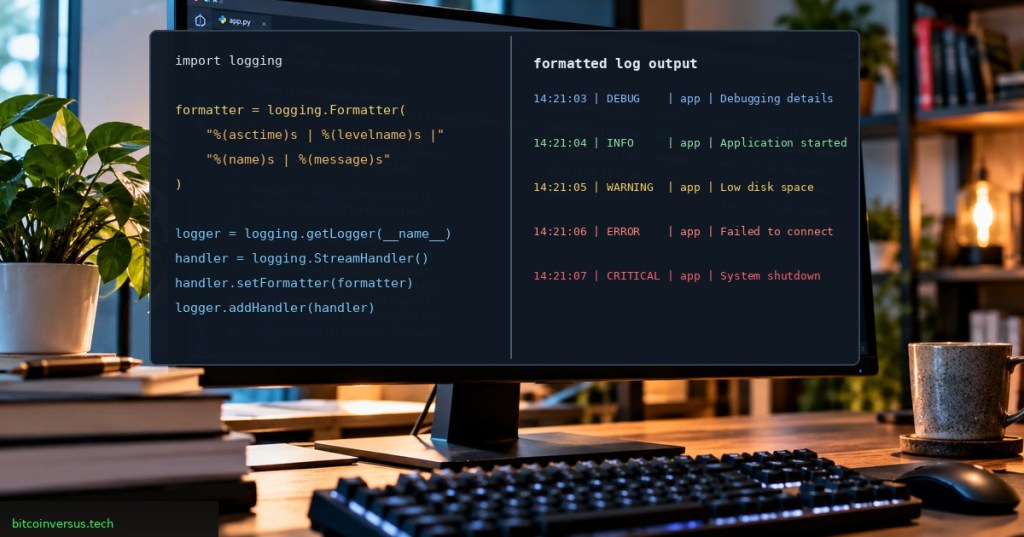
Elementary overview: Python’s logging.Formatter controls the final layout of a log line. The logger creates the event, a handler sends it to a destination, and the formatter turns the record into readable text.
This lesson continues the logging sequence from OSPython.028: Python Logging Basics, OSPython.029: Logging to Files with FileHandler, OSPython.030: Rotating Log Files, and OSPython.031: Time-Based Log Rotation. Here, the focus is simple: make each log line easy to scan, sort, and troubleshoot.
What You Should Learn
- What a
Formatterdoes—and what it does not do. - How to show timestamps, severity, logger names, and messages.
- How to attach a formatter to a handler.
- How
datefmtand formatter styles work. - How to keep console and file logs readable without overloading each line.
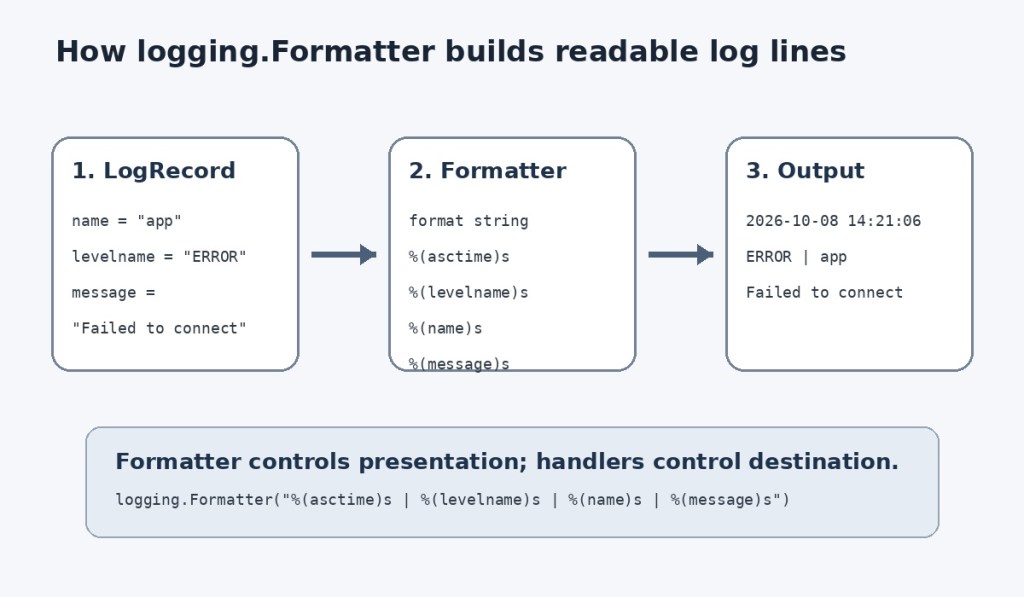
The Mental Model: Logger → Handler → Formatter → Output
A logger creates a LogRecord. A handler decides where that record goes, such as the terminal or a file. The formatter decides how that accepted record looks when the handler emits it.
Formatter means presentation. It does not decide the event’s severity, and it does not choose the destination.
Build a Useful First Format
import loggingformatter = logging.Formatter( "%(asctime)s | %(levelname)s | %(name)s | %(message)s")
That format asks Python to include four pieces of context: the event time, severity level, logger name, and final message. A line might look like this:
Example output: 2026-10-08 19:22:41,104 | ERROR | app.database | Connection failed.
The Fields Worth Learning First
| Field | Meaning | Why it helps |
|---|---|---|
%(asctime)s | Event time | Shows when the event occurred |
%(levelname)s | DEBUG, INFO, WARNING, ERROR, or CRITICAL | Shows severity |
%(name)s | Logger name | Shows which subsystem produced the record |
%(message)s | Final event message | Shows what happened |
%(lineno)d | Source line number | Useful when tracing where a record originated |
Python exposes many more LogRecord fields, including filename, funcName, process, and threadName. Add them only when they improve diagnosis. A log line overloaded with fields can become harder to read than a smaller, consistent format.
Attach the Formatter to a Handler
import logging

logger = logging.getLogger("api")
logger.setLevel(logging.INFO)

handler = logging.StreamHandler()

formatter = logging.Formatter(
    "%(asctime)s | %(levelname)-8s | %(name)s | %(message)s",
    datefmt="%Y-%m-%d %H:%M:%S",
)

handler.setFormatter(formatter)
logger.addHandler(handler)

logger.info("Server started")
logger.warning("Response time is high")
The key line is handler.setFormatter(formatter). The formatter belongs to the handler that emits the record. That means two handlers attached to the same logger can use different layouts.
Control Timestamps with datefmt
datefmt changes how %(asctime)s is displayed. Without a custom date format, Python’s default formatter uses a date-and-time representation with milliseconds. Python uses local time by default for formatter timestamps unless you deliberately change the formatter’s time converter.
formatter = logging.Formatter( "%(asctime)s | %(levelname)s | %(message)s", datefmt="%Y-%m-%d %H:%M:%S",)
For operations work, consistency matters more than decoration. Pick a timestamp format that is easy to compare across terminal output, log files, services, and incident timelines.
Choose a Formatter Style
logging.Formatter supports three template styles: percent (%), brace ({), and dollar ($). Percent style is the default and remains the most common in Python logging examples.
# Percent style — default
logging.Formatter(
    "%(levelname)s | %(name)s | %(message)s"
)

# Brace style
logging.Formatter(
    "{levelname} | {name} | {message}",
    style="{",
)

# Dollar style
logging.Formatter(
    "$levelname | $name | $message",
    style="$",
)
The style option changes the formatter template, not the way arguments passed to calls such as logger.info() are merged into the event message.
For Small Scripts: basicConfig
import logging

logging.basicConfig(
    level=logging.INFO,
    format="%(asctime)s | %(levelname)s | %(message)s",
    datefmt="%Y-%m-%d %H:%M:%S",
)

logging.info("Application started")
For a small script, logging.basicConfig() can define the format directly. Once an application has several destinations or different severity requirements, explicit logger, handler, and formatter objects are easier to reason about.
One Logger, Two Different Formats
A console usually benefits from a compact format, while a file may need more troubleshooting context. Because formatters attach to handlers, both can receive the same record and present it differently.
console_handler = logging.StreamHandler()
file_handler = logging.FileHandler("app.log")

console_handler.setFormatter(
    logging.Formatter("%(levelname)s | %(message)s")
)

file_handler.setFormatter(
    logging.Formatter(
        "%(asctime)s | %(levelname)s | %(name)s | %(message)s",
        datefmt="%Y-%m-%d %H:%M:%S",
    )
)
This pattern connects directly to FileHandler, RotatingFileHandler, and TimedRotatingFileHandler. Rotation controls how files are managed; the formatter controls what each line looks like.
Common Formatter Mistakes
- Creating a formatter but never attaching it: use
handler.setFormatter(). - Expecting Formatter to filter records: filtering and formatting are separate jobs.
- Mixing template styles: brace syntax requires
style="{"; dollar syntax requiresstyle="$". - Leaving out
message: a custom format can accidentally hide the event text. - Adding too much context: every extra field increases visual noise.
- Adding handlers repeatedly: duplicate handlers can create duplicate log lines.
Troubleshooting Checklist
- Confirm the handler is actually attached to the logger.
- Confirm the formatter is attached to the handler.
- Check logger and handler levels separately.
- Verify that every placeholder exists on the
LogRecord. - Check that the chosen
stylematches the template syntax. - If lines are duplicated, inspect logger hierarchy and repeated handler setup.
- Test the real emitted output instead of assuming the configuration is correct.
Lab
- Create a logger named
inventory. - Add a
StreamHandler. - Create a formatter with
asctime,levelname,name, andmessage. - Add
datefmt="%Y-%m-%d %H:%M:%S". - Attach the formatter with
setFormatter(). - Emit INFO, WARNING, and ERROR messages.
- Add
filenameandlineno, then decide whether the extra detail improves readability. - Create a second handler with a shorter format and compare the two outputs.
Knowledge Check + Answers
- What does logging.Formatter control? The final rendered layout of a log record.
- Where is a formatter normally attached? To a handler with
handler.setFormatter(formatter). - What does %(asctime)s show? A formatted timestamp for the record.
- What does %(levelname)s show? The textual severity level.
- What does %(name)s show? The name of the logger that produced the record.
- Does formatter style change logger.info() message interpolation? No. It changes the formatter template.
- Can two handlers use different formatters? Yes.
- Why might logs appear twice? One common cause is duplicate handlers or logger propagation, which is covered more deeply in the next lesson.
Primary Technical References
- Python Documentation — Formatter Objects
- Python Documentation — Logging HOWTO
- Python Documentation — Logging Cookbook
- PEP 282 — A Logging System
Elementary Review
Logger creates the record. Handler chooses the destination. Formatter chooses the presentation. For a strong beginner format, start with time, severity, logger name, and message. Keep it consistent before adding more fields.
Next Python Lesson
OSPython.033: Logger Hierarchy and Propagation will explain parent and child logger names, propagation, handler inheritance, and why duplicate log lines sometimes appear.
Editor’s Note
The featured artwork is a unique 1200×630 realistic programming scene created specifically for OSPython.032 and is not reused inside the lesson body. The separate body diagram explains the LogRecord → Formatter → output flow. Neon green is limited to the small bitcoinversus.tech tag at bottom-left.
BitcoinVersus.tech is not a financial advisor. Content is provided for informational purposes.


Leave a Reply