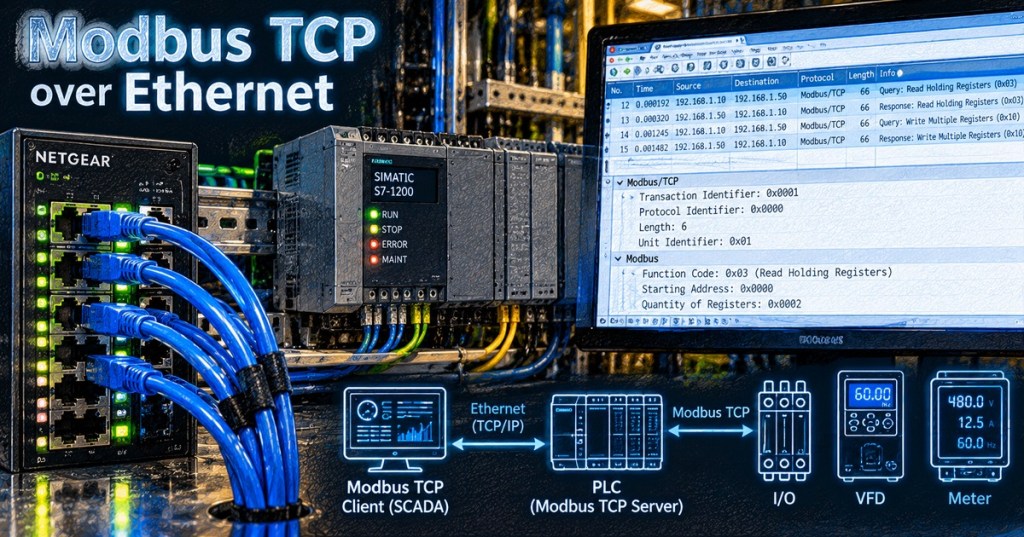
Modbus TCP carries the familiar Modbus request-and-response model over standard Ethernet and TCP/IP instead of an RS-485 serial bus. The register map and function-code concepts remain recognizable, but the transport changes completely: devices are addressed by IP, TCP manages the connection, and each Modbus TCP message begins with a seven-byte MBAP header.
This lesson follows OSETC.032: Modbus RTU Over RS-485. The goal is to separate what stays the same at the Modbus application layer from what changes when the traffic moves onto Ethernet.
Learning Objectives
- Explain how Modbus TCP differs from Modbus RTU.
- Identify TCP port 502 and the client/server connection model.
- Read the seven-byte MBAP header.
- Explain the purpose of the Transaction Identifier and Unit Identifier.
- Relate Modbus function codes and registers to Ethernet transport.
- Use basic network tools to troubleshoot timeouts and connection failures.
- Recognize the security limitations of traditional Modbus TCP.
Ethernet, TCP/IP, and Modbus Are Different Layers
Ethernet provides the local network link. IP provides logical addressing and routing. TCP provides a reliable byte stream between endpoints. Modbus defines the industrial application messages carried inside that connection. Keeping those layers separate is one of the fastest ways to troubleshoot a failed system.
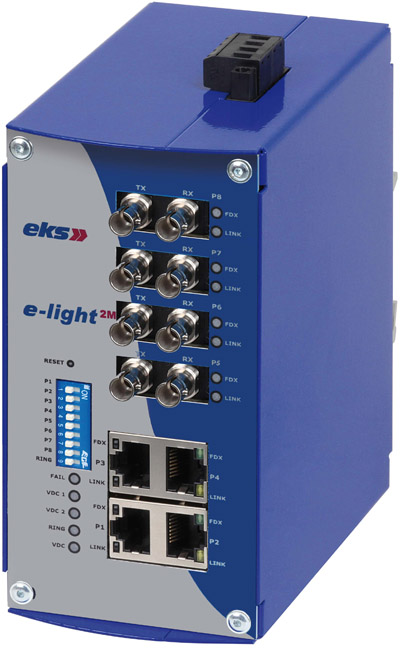
A device can have a perfectly good Ethernet link while Modbus still fails because the wrong IP address, TCP port, function code, register offset, or application setting is being used. Conversely, no amount of register-map troubleshooting can fix a broken Ethernet path.
Modbus TCP Normally Uses TCP Port 502
The Modbus Organization identifies TCP port 502 as the well-known port for Modbus TCP/IP. A Modbus client opens a TCP connection to the server’s IP address and port 502, sends requests, and receives responses over that connection.
Client: 192.168.10.20
Server: 192.168.10.50
TCP port: 502

Connection target:
192.168.10.50:502The MBAP Header Replaces the RTU Address-and-CRC Framing
A Modbus TCP Application Data Unit starts with a seven-byte MBAP header before the normal Modbus function code and data. MBAP stands for Modbus Application Protocol. The header contains four fields:
- Transaction Identifier — 2 bytes: chosen by the client and copied into the matching response.
- Protocol Identifier — 2 bytes: normally
0x0000for Modbus. - Length — 2 bytes: the number of bytes that follow, including the Unit Identifier and Modbus PDU.
- Unit Identifier — 1 byte: especially useful when a TCP gateway is forwarding the request to a downstream Modbus device.
MBAP Header (7 bytes)

Transaction ID   2 bytes
Protocol ID      2 bytes
Length           2 bytes
Unit ID          1 byte

Then:
Function Code + Data
Unlike Modbus RTU, Modbus TCP does not append the Modbus RTU two-byte CRC field to every application message. Error detection and reliable delivery are handled by the Ethernet/TCP/IP stack. That distinction is useful when reading packet captures because the TCP frame is not simply an RTU frame copied byte-for-byte onto Ethernet.
Transaction IDs Let the Client Match Responses
The Transaction Identifier is one of the most useful fields when analyzing traffic. The client assigns an identifier to a request, and the server copies that value into the corresponding response. In Wireshark or another packet analyzer, matching transaction IDs help determine whether a request received the correct response.
If requests leave the client but no response with the matching transaction ID returns, the next question is whether the server received the request, rejected it, timed out, or sent a response that was lost or blocked on the network.
The Unit Identifier Matters Most at Gateways
On a direct Ethernet connection, the server is already identified by its IP address and TCP connection. The Unit Identifier becomes especially important when one IP endpoint represents a gateway to several downstream Modbus devices. The gateway can use the Unit ID to choose which serial or internal device should receive the request.
Do not assume every device treats the Unit Identifier identically. Some direct Modbus TCP servers ignore most Unit ID values, while gateways may require an exact downstream address. Use the device manual rather than guessing.
Function Codes and Registers Still Matter
Moving to Ethernet does not eliminate Modbus coils and registers. Function 03 still reads holding registers, Function 04 still reads input registers, Function 06 still writes one holding register, and Function 16 still writes multiple holding registers. The register map remains device-specific.
Example request concept

Server IP: 192.168.10.50
Port: 502
Unit ID: 1
Function: 03 Read Holding Registers
Start offset: 100
Quantity: 2
The same address-offset trap from Modbus RTU still applies. A manual may display a reference such as 40101 while the protocol request expects a zero-based offset such as 100. Software tools vary, so confirm whether the field expects a raw PDU offset or a human-readable register reference.
Troubleshoot the Network Before the Register Map
- Link: verify the Ethernet port has link and activity where expected.
- IP configuration: confirm IP address, subnet mask, and gateway.
- Reachability: use
pingwhen the device permits ICMP, but remember a failed ping does not always prove the device is offline. - ARP: confirm the expected MAC address is being learned for a local-subnet device.
- TCP port: test whether port 502 is reachable with an approved network tool.
- Application role: confirm which endpoint is the Modbus client and which is the server.
- Unit ID: confirm the correct value, especially through a gateway.
- Function and offset: verify the exact manufacturer register map.
- Packet capture: inspect TCP handshakes, requests, responses, exception codes, retransmissions, and transaction IDs.
Useful Technician Commands
Windows
ping 192.168.10.50
arp -a
PowerShell: Test-NetConnection 192.168.10.50 -Port 502

Linux
ping 192.168.10.50
ip neigh
nc -vz 192.168.10.50 502

Packet capture filter
modbus || tcp.port == 502
Use tools only on networks you are authorized to troubleshoot. A port test proves TCP reachability, not that the correct register data exists. A successful TCP handshake followed by a Modbus exception response is an application-layer clue, not a cabling failure.
Read Modbus Exception Responses
A Modbus server can respond with an exception when it understood the request framing but cannot perform the requested operation. Common examples include illegal function, illegal data address, and illegal data value. These responses are valuable because they prove communication reached the application layer.
If there is no TCP connection at all, stay focused on addressing, routing, firewall rules, server availability, and port configuration. If the server returns an exception, move upward to function codes, offsets, quantities, access permissions, and device state.
Field Discussion: TCP Versus RTU
Traditional Modbus TCP Is Not Automatically Secure
Traditional Modbus TCP was designed for interoperability and simplicity, not modern authentication and encryption. Do not expose port 502 directly to untrusted networks. Industrial deployments should use appropriate segmentation, firewall policy, access control, monitoring, and vendor-supported security architecture.
The Modbus Organization also publishes a Modbus Security specification that adds TLS and certificate-based authentication and uses port 802. Device support must be verified before assuming that a given PLC, drive, gateway, or SCADA package implements it.
Practice Lab
- Build or use an authorized lab with one Modbus TCP client and one server.
- Record both IP addresses, subnet masks, and the server’s TCP port.
- Verify Ethernet link and IP reachability.
- Test TCP port 502.
- Read one known holding register with Function 03.
- Capture the transaction in Wireshark.
- Identify the Transaction ID, Protocol ID, Length, Unit ID, Function Code, and register offset.
- Intentionally query an unused register and record the returned exception, if the device provides one.
- Change only one variable at a time and document the result.
Knowledge Check
- What TCP port is normally used by Modbus TCP?
- How many bytes are in the MBAP header?
- What does the Transaction Identifier do?
- When is the Unit Identifier especially important?
- Does Modbus TCP append the Modbus RTU CRC field?
- Does Function 03 change meaning when the transport changes from RTU to TCP?
- What does a successful TCP connection prove?
- What does a Modbus exception response prove?
Answer Guide
- TCP port 502.
- Seven bytes.
- It lets the client associate a response with the request that generated it.
- When a TCP gateway represents multiple downstream Modbus devices.
- No. Traditional Modbus TCP uses the MBAP header and relies on the underlying Ethernet/TCP/IP stack rather than the RTU CRC field.
- No. Function 03 still means Read Holding Registers.
- That the client reached a listening TCP endpoint; it does not prove the requested register exists or is correct.
- That the request reached the Modbus application layer and the server understood enough of it to reject the operation with a defined exception.
Key Takeaway
Modbus TCP is easiest to troubleshoot when you separate the layers. First prove Ethernet and IP. Then prove TCP port 502. Then inspect the MBAP header, Unit ID, function code, register offset, and device response. Do not jump straight to register scaling when the TCP connection itself is failing.
References
Primary references: Modbus Organization — Specifications and Implementation Guides, MODBUS Messaging on TCP/IP Implementation Guide V1.0b, and MODBUS Application Protocol Specification V1.1b3.
Advertisement
BitcoinVersus.Tech Editor’s Note:
We volunteer daily to ensure the credibility of the information on this platform is Verifiably True. If you would like to support our independent technical education work, please donate Bitcoin here: 3C9o19EH5HSiwEPyCTmEKzxhNCbo2X6TTb
BitcoinVersus.tech is not a financial advisor. This lesson is for informational and educational purposes.


Leave a Reply