
Firmware is software stored inside hardware that helps a device start, communicate, and perform its basic functions. It sits closer to the hardware than most applications or operating systems, which is why updating it can fix deep problems—but also why a bad update can cause a device to stop working.
Routers, SSDs, graphics cards, motherboards, cameras, printers, embedded controllers, and Bitcoin miners all rely on firmware. Some devices use a tiny amount of it. Others run complex firmware that behaves almost like a miniature operating system.
Firmware lives closer to the hardware
A normal application usually lives on a drive and runs on top of an operating system. Firmware is different. It is commonly stored in non-volatile memory such as flash memory, EEPROM, or ROM so it remains available when the device loses power.
NIST defines firmware as computer programs and data stored in hardware, while AWS describes firmware as software embedded within hardware to control basic device operations and hardware-software communication.
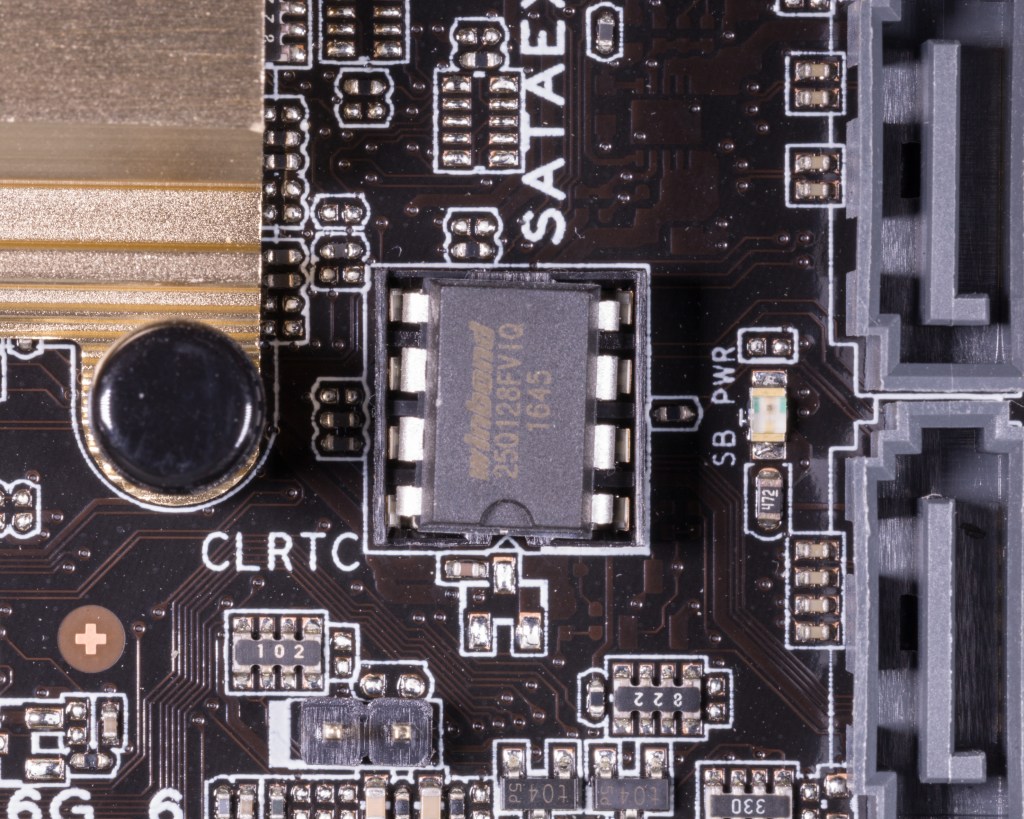
BIOS and UEFI are firmware
One of the easiest firmware examples to understand is a PC motherboard. The motherboard firmware starts before Windows or Linux. It initializes hardware, performs early checks, and prepares the machine to load an operating system.
BitcoinVersus covered that foundation in our 2025 BIOS overview. Modern systems usually use UEFI instead of legacy BIOS, but people still commonly use the word “BIOS” when referring to motherboard firmware.
Firmware can control an entire device
On embedded systems, firmware may control far more than startup. A router’s firmware can manage networking, Wi-Fi, firewall rules, and its web interface. An SSD’s firmware manages flash translation, wear leveling, error handling, and communication with the host. A mining control board can use firmware to manage fans, frequency, voltage, temperature limits, tuning, and communication with hashboards.
That hardware-software relationship was visible in our 2024 Bitmain control-board overview. The control board is physical hardware, but much of what it actually does depends on the firmware running on it.
A firmware update can change behavior without changing hardware
This is why the same physical device can behave differently after an update. Firmware can change fan logic, add hardware support, modify power limits, fix security bugs, improve stability, adjust memory compatibility, or change how a controller talks to other components.
We saw that directly in our 2024 coverage of a LuxOS update, where new firmware changed autotuning behavior, power estimation, voltage profiles, and miner initialization. The ASIC hardware did not need to be replaced for those operating characteristics to change.
Firmware is not the same thing as a driver
A device driver normally runs as part of the operating system and tells the OS how to communicate with hardware. Firmware normally runs on or very close to the hardware itself.
A network card is a useful example. The card may contain its own firmware, while Windows or Linux also loads a driver for that card. The firmware controls low-level behavior inside the device; the driver gives the operating system a way to use it.
Firmware updates can fix bugs and security problems
Manufacturers release firmware updates for many of the same reasons software developers release application patches: bugs are discovered, security weaknesses are found, new hardware needs support, or existing behavior needs improvement.
The difference is that a failed firmware update can be more serious. If an ordinary application update fails, the operating system may still boot. If firmware responsible for booting or initializing the device becomes corrupted, the hardware may no longer reach a state where normal recovery tools work.
Why people say a device is “bricked”
A device is commonly called bricked when its software or firmware is damaged badly enough that the device can no longer perform its intended function. It may appear dead even though the physical electronics are still intact.
That is why firmware updates should come from trusted sources and should not be interrupted unnecessarily. Many modern systems include recovery modes, dual firmware slots, signed images, rollback protection, or dedicated flashing interfaces specifically because firmware recovery matters so much.
Firmware can be open or proprietary
Some firmware is closed and controlled entirely by a manufacturer. Other projects expose source code, configuration, or build systems so users can inspect or modify how the device operates.
Open firmware can improve transparency and extend the useful life of hardware, but openness does not automatically make firmware safe or stable. A firmware image still needs to match the correct device, board revision, flash layout, bootloader, and security requirements.
The simple version
Hardware is the physical device. An operating system manages a complete computing environment. Applications perform user-facing tasks. Drivers help the operating system communicate with hardware. Firmware is the low-level software inside the hardware that tells the device how to be itself.
That is why a router, SSD, motherboard, camera, mining control board, or graphics card can gain new behavior without changing a single physical component: the hardware stayed the same, but the instructions stored inside it changed.
BitcoinVersus.Tech Editor’s Note: Firmware architectures differ widely between devices. Always use firmware intended for the exact device and hardware revision, and follow the manufacturer or project’s recovery instructions before flashing an update.
Follow BitcoinVersus.Tech for firmware, Linux, networking, data-center, semiconductor, and Bitcoin-mining technology.
Support independent technology reporting: Bitcoin donations help fund BitcoinVersus.Tech research and publishing.
Disclaimer: BitcoinVersus.Tech provides technology news and education for informational purposes only.


Leave a Reply