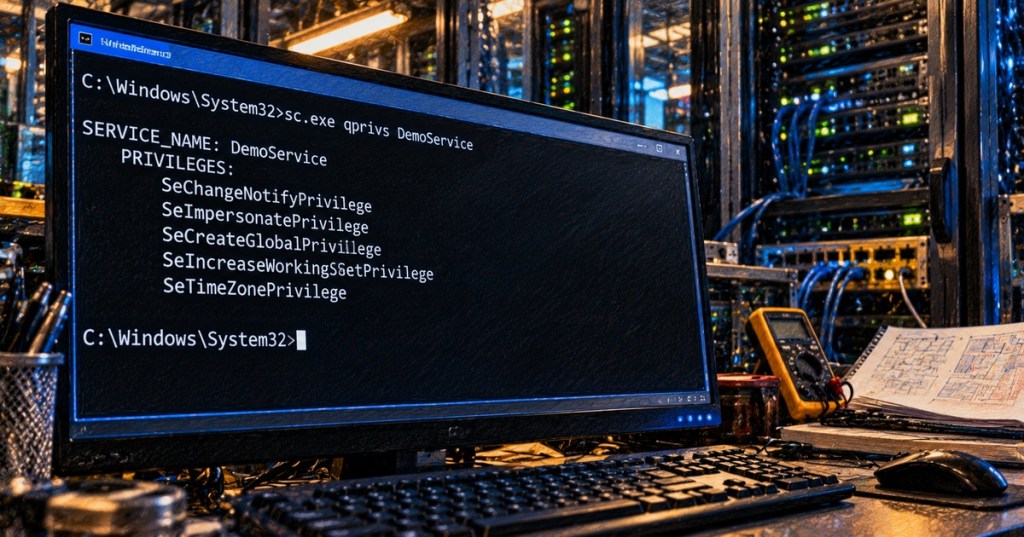
sc.exe qprivs queries the required-privileges configuration for a Windows service. It is a read-only Service Control Manager command: it shows which Windows privileges a service declares that it needs when its process starts, without changing the service.
This continues the Service Control Manager sequence after Windows Command #45 – sc qfailureflag. The command that changes this setting is sc.exe privs; this lesson focuses only on inspecting the current configuration safely.
What required privileges mean
Windows services run inside a security context. That account may possess many operating-system privileges, but Windows Service Hardening lets a service declare a smaller required set. When that list is configured, the Service Control Manager removes privileges that the service did not request from the process token when the process starts. This reduces the power available to the service if it is compromised.
Basic syntax
sc.exe qprivs SERVICE_NAMEReplace SERVICE_NAME with the service name, not necessarily the friendly display name. For a disposable example service:
sc.exe qprivs DemoServiceA successful query can return privilege names such as SeImpersonatePrivilege, SeCreateGlobalPrivilege, or SeIncreaseWorkingSetPrivilege. The exact list depends on the service. Do not assume that every service should have the same privileges.
An empty list does not mean no privileges
This is the most important interpretation rule. Microsoft documents that if no required-privilege list is configured, the Service Control Manager uses the privileges normally available to the service process token. In other words, an empty qprivs result can mean that no privilege-reduction list has been configured—not that the service runs with zero privileges.
For compatibility, SeChangeNotifyPrivilege is never removed from a service process token by this mechanism, even when it is not explicitly listed.
Shared-process services need extra care
Many Windows services share a host process such as svchost.exe. When multiple services share one process, Windows computes the union of the privileges required by every service in that process. One service can therefore cause a privilege to remain available to the shared process even when another service does not request it.
This is why qprivs should be interpreted alongside the service type and hosting model. Use sc.exe qc SERVICE_NAME and sc.exe queryex SERVICE_NAME when you need more context about configuration and process identity.
Query a remote system
sc.exe \\SERVER01 qprivs DemoServiceRemote queries require network connectivity and sufficient Service Control Manager permissions on the target computer. An access-denied response means the query was not authorized; it does not prove that the service has no required-privilege configuration.
Why this matters for security
Privileges are powerful operating-system capabilities. Some allow a process to impersonate another security context, back up protected data, restore files, change system time, or perform other sensitive operations. A service that does not need a capability should not retain it merely because the underlying account has it.
The goal is least privilege: enough rights for the service to function, but no more. qprivs gives administrators a fast way to audit the configured list before making changes.
Related social discussion: r/sysadmin discussion on Windows privilege requirements, including SeTcbPrivilege, SeIncreaseQuotaPrivilege, and SeAssignPrimaryTokenPrivilege.
Do not change service privileges casually
qprivs is safe because it only reads configuration. The companion sc.exe privs command changes the required-privilege list and can prevent a service from working if a needed privilege is removed. Microsoft explicitly recommends determining the minimum required set and testing changes thoroughly in an isolated environment.
Required privileges also cannot magically grant a service rights that its configured account does not possess. The mechanism is designed to reduce available privileges, not to elevate the account.
Useful verification commands
sc.exe qprivs SERVICE_NAME— read the required-privilege list.sc.exe qc SERVICE_NAME— inspect the service configuration and account.sc.exe queryex SERVICE_NAME— inspect status plus process information.sc.exe qsidtype SERVICE_NAME— inspect the service SID type.whoami /priv— inspect privileges in the current interactive process token; this is not the same as the service’s configured required-privilege list.
Practice lab
- Open an elevated Command Prompt on a lab Windows system.
- Choose a noncritical service and record its service name.
- Run
sc.exe qc SERVICE_NAMEand note the service account and process type. - Run
sc.exe qprivs SERVICE_NAMEand record the output exactly. - If the list is empty, explain why that does not mean the process has no privileges.
- Run the same query against a second service and compare the results.
- Do not modify the privilege list during this exercise.
Knowledge check
- What does
sc.exe qprivsquery? - Does an empty result prove that the service has no privileges?
- What happens to unneeded privileges when a required list is configured?
- How does Windows handle required privileges when multiple services share one process?
- Which privilege is retained for compatibility even when it is not explicitly requested?
- Does
qprivschange the service?
Answer guide
- The service’s configured required-privilege list.
- No. It can mean no required-privilege restriction has been configured, so the account’s normal process privileges may be used.
- The Service Control Manager removes privileges that are not required from the process token when the process starts.
- It computes the union of the privileges required by all services sharing that process.
SeChangeNotifyPrivilege.- No. It is a read-only query command.
Key takeaway
sc.exe qprivs is an audit command for Windows Service Hardening. It shows the privilege-reduction list a service has declared, but the output must be interpreted carefully—especially when the list is empty or the service shares a process with other services.
References
Primary references: Microsoft Learn — SERVICE_REQUIRED_PRIVILEGES_INFO, Microsoft Learn — Configuring a Service Using SC, and Microsoft — Windows Service Hardening.
Advertisement
BitcoinVersus.Tech Editor’s Note:
We volunteer daily to ensure the credibility of the information on this platform is Verifiably True. If you would like to support our independent technical education work, please donate Bitcoin here: 3C9o19EH5HSiwEPyCTmEKzxhNCbo2X6TTb
BitcoinVersus.tech is not a financial advisor. This lesson is for informational and educational purposes.


Leave a Reply