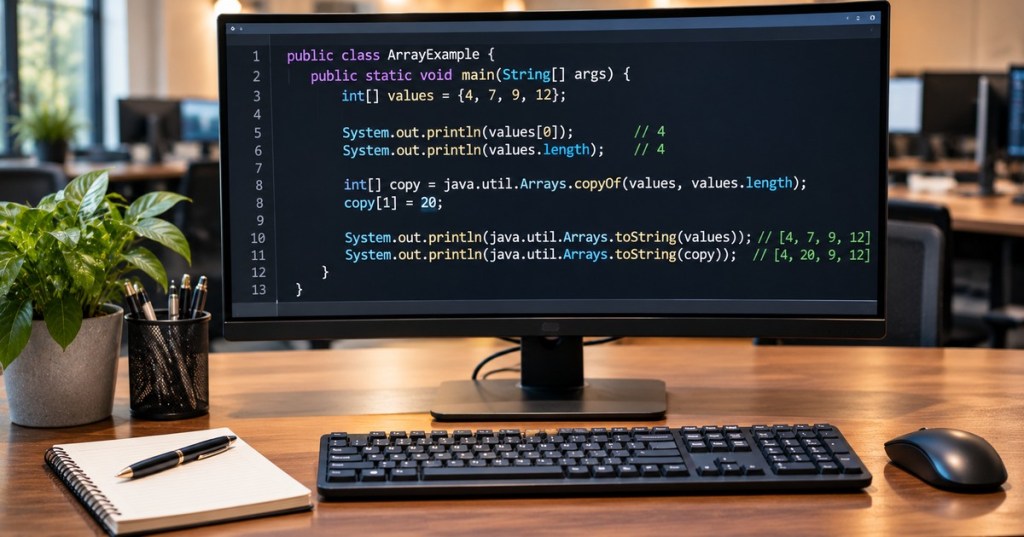
OSJava.006 introduces Java arrays as fixed-length containers for values of a single component type. Each array has a defined length, zero-based indexes, and a runtime-checked boundary. Understanding how to declare arrays, traverse elements, and make genuine copies prevents errors in small programs and in larger data-processing systems. The lesson also distinguishes an alias, which refers to the same array, from an independent copy and shows why out-of-range access must be handled deliberately.
The lesson follows OSJava.005 on immutable Strings, which introduced accessing text but not storing many independent values in an array. Earlier OSJava.004 on control flow supplied the loop syntax used here. Review OSJava.002 on types and variables and OSJava.001 on the JDK and compiler when needed. The core syntax is documented in the open dev.java arrays tutorial.
Learning Objectives and Prerequisites
- Declare and initialize one-dimensional Java arrays of primitive or reference types.
- Explain zero-based element indexing and the legal range 0 through length – 1.
- Use an indexed for loop and an enhanced for loop appropriately.
- Distinguish an array alias from a new array created by Arrays.copyOf.
- Copy a half-open range and interpret the inclusive start and exclusive end.
- Describe jagged arrays and use each row’s actual length.
- Recognize invalid index access, null arrays, arithmetic overflow, and unsafe assumptions.
- Run the example with OpenJDK, verify nine test cases, and distinguish correct output from unmeasured performance.
Prerequisites: int, variables, if, loops, methods, and basic command-line use. The sample was compiled and run with OpenJDK 21.0.12.1 on Linux. Use an installed JDK or the officially maintained Java downloads and documentation; no external dependencies, network credentials, or elevated privileges are required.
Creating a Fixed-Length Array
A declaration such as int[] values; names a variable that can refer to an array; it does not create the array. values = new int[4]; allocates an array with four integer slots, initially all zero. The initializer syntax int[] values = {4, 7, 9, 12}; creates and fills the array in one expression. Its length is values.length, a field—not a method call such as values.length(). Once an array is allocated, its length cannot be resized; a new array can be created and references reassigned.
Elements are accessed with square brackets. For four values, the valid indexes are 0, 1, 2, and 3. Index 0 holds 4 and index 2 holds 9. Attempting index 4 or index -1 throws an ArrayIndexOutOfBoundsException during execution. Iterating with for (int i = 0; i < values.length; i++) prevents a common off-by-one error, provided that the array reference is non-null.
An enhanced for (int value : values) loop visits each element without exposing its index. Use it when the current position does not matter. An indexed loop remains useful when examining neighboring elements, assigning to a particular element, or recording an element’s position. Java array elements of reference types default to null when initialized with new; using one without first assigning a suitable object can cause a NullPointerException.
Bro Code, “Learn Java arrays in 9 minutes! 🍎,” December 5, 2024. A publicly identified Java tutorial covering fixed-length arrays, element access, iteration, and basic array operations. Official video page. Embedding is present in WordPress, but independent end-to-end playback has not been tested.
Copying an Array Is Not the Same as Aliasing
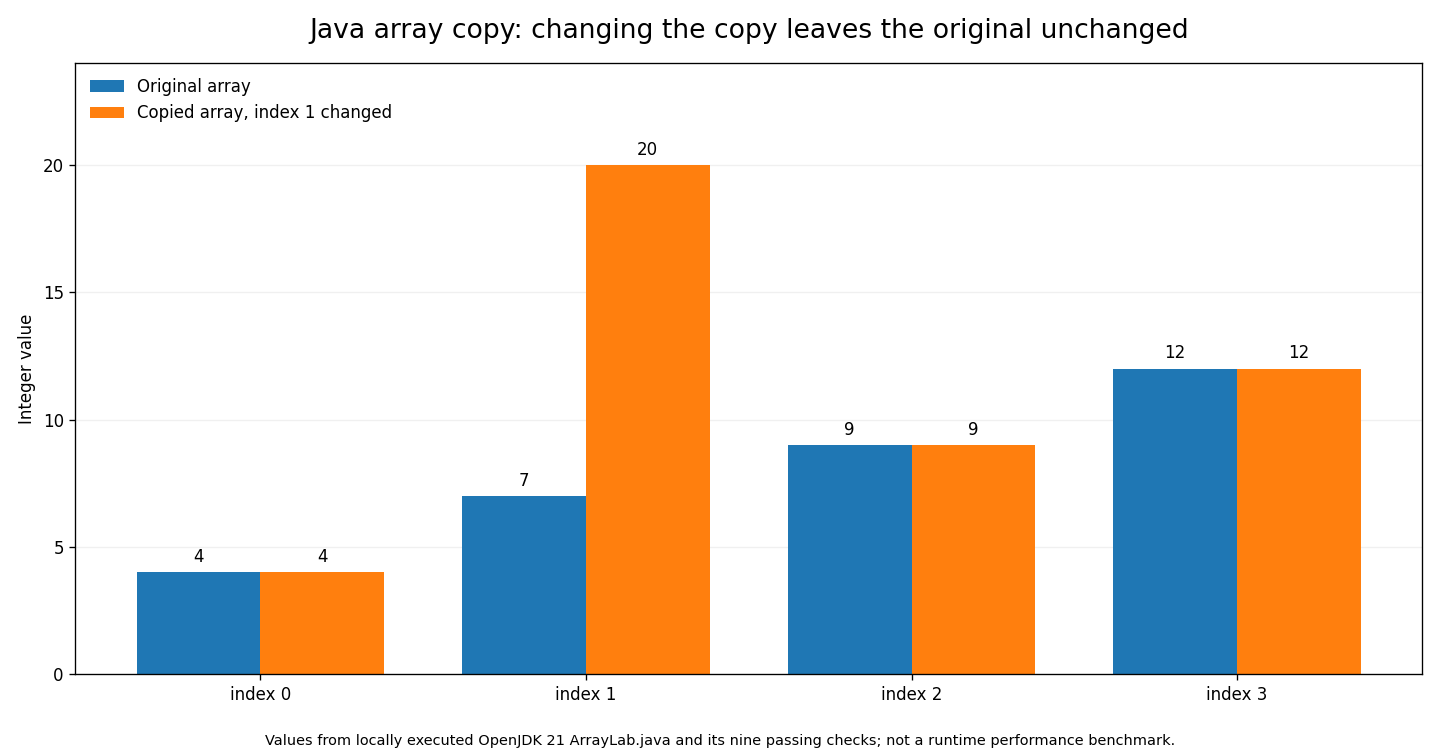
Assignment such as int[] alias = values; copies the reference to an array, not its entire contents. Mutating an element using either variable changes the same underlying object. To create an independent one-dimensional array of integers, Arrays.copyOf(values, values.length) allocates a new array and copies the element values. After copy[1] = 20, the copied array is [4, 20, 9, 12], while the original remains [4, 7, 9, 12].
The distinction depends on element type. Copying an array of primitive values copies those primitive values. Copying an array of references copies references to the same underlying objects: the result is a shallow copy, not a deep clone of all referenced objects. This matters for arrays of mutable custom objects. Refer to Oracle’s Java SE 21 Arrays class documentation for exact method semantics.
Half-Open Ranges and Standard Array Utilities
The call Arrays.copyOfRange(values, 1, 3) copies indexes 1 and 2, yielding [7, 9]. It uses the half-open interval [from, to): the first index is included and the last index is excluded. The returned array has length to – from. For some primitive overloads, a valid to beyond the source length pads with a primitive zero value; the method is not a universal substitute for strict range validation.
Arrays.toString(values) returns a human-readable representation of a one-dimensional array. Arrays.equals(a, b) compares corresponding primitive elements, unlike a == b, which compares array references. Arrays.sort(values) sorts an array in place, so use a copy to preserve the original order. Arrays.binarySearch requires the searched range to be sorted according to its documented ordering; a matching element’s index is returned, while a missing element yields a negative result encoding the insertion point. Binary search on an unsorted array is not a reliable way to find an element.
Arrays of Arrays and Unequal Row Lengths
Java supports an int[][] value as an array whose elements are references to int[] row arrays. The example {{4, 7}, {9}, {12, 15, 18}} has row lengths 2, 1, and 3. It is therefore called jagged, or irregular. It is not necessary for each row to have equal length. When iterating rows, use rows[i].length after ensuring the row is non-null, rather than assuming the first row’s length applies to every row.
For a rectangular numeric grid, it can be useful to enforce equal row lengths as an application-level contract, but the Java language does not require the property. These nested arrays are distinct objects; clone() or Arrays.copyOf() of the outer array does not deep-copy every inner array.
Complete Executable Example
Save the complete source below as ArrayLab.java. It uses only the Java standard library. readAt applies an explicit index check and throws an informative exception when a caller requests an invalid position. sum uses Math.addExact, allowing integer overflow to be detected rather than silently wrapping in the exercise.
The complete executable program is available as ArrayLab.java in the OpenCert GitHub archive. It includes array indexing, independent copying, checking bounds, summing values, jagged arrays, and binary search. The source remains available to read, copy, and download without a boxed code display.
From a terminal in the source file’s directory, compile and execute the file:
Compile the downloaded file in a terminal with javac -Xlint:all ArrayLab.java. Run it with java ArrayLab. The filename and the public Java class name must match.
The locally observed output under OpenJDK 21.0.12.1 is:
Verified output: the original array is [4, 7, 9, 12]; the independent copy is [4, 20, 9, 12]; the alias comparison is true; index 2 contains 9; the sum is 32; the half-open range [1, 3) contains [7, 9]; the jagged row lengths are [2, 1, 3]; and the binary search for 9 returns index 2.
Each line reinforces a specific concept: copying does not mutate the original, aliases refer to a shared object, indexes start at zero, sum is 32, the second position is excluded from a half-open range’s end, and jagged rows have different lengths. The binary-search result is valid because the copied array was sorted before searching. These are locally executed example outputs, not simulated performance results.
Nine Reproducible Array Checks
Save the second file as ArrayLabTest.java in the same directory. Its independent assertions cover unchanged source data after copying, modified copied data, a successful index access, sum, range selection, two out-of-bounds positions, null input, and integer overflow. It does not require JUnit or an external test runner.
The complete standalone test program is available as ArrayLabTest.java in the OpenCert GitHub archive. It verifies that the original remains unchanged, copying works, valid and invalid index accesses behave correctly, and null input and integer overflow are handled explicitly.
Compile both files and enable Java assertions with -ea:
To run the nine checks, save both Java files in the same folder, compile with javac -Xlint:all ArrayLab.java ArrayLabTest.java, then execute java -ea ArrayLabTest. The -ea option enables standard Java assertions.
Observed test output:
Locally verified result: PASS: 9 array checks. The provided test file contains all nine checks and can be extended for the exercises below.
All nine assertions passed locally. The test program explicitly throws AssertionError when a requirement fails, rather than hiding a failure. Standard Java assertions also depend on the runtime’s -ea flag; the explicit check helper and exception checks remain active, but the documented command deliberately enables assertions for clarity.
Chart of Original Versus Copied Values
At indexes 0 through 3, the original array contains [4, 7, 9, 12]. The copy is created with Arrays.copyOf, then only its element at index 1 is changed to 20, producing [4, 20, 9, 12]. The following original chart plots those exact test-case values. It visualizes element data rather than memory layout, a conceptual schematic, or program speed.
Kunal Kushwaha, “Introduction to Arrays and ArrayList in Java,” August 10, 2021. A public independent programming education lesson with timestamped sections covering array indexes, input, looping and multidimensional arrays. ArrayList is discussed as a separate, dynamically resizable collection type and is not equivalent to the fixed-length arrays taught here.
Troubleshooting, Safety, and Performance Boundaries
- ArrayIndexOutOfBoundsException: an index is negative or at least the array’s length. Print or log the index and length in a development environment, then correct the loop condition or input validation.
- NullPointerException: the array variable or a referenced element is null. Initialize before use and validate external inputs rather than assume non-null values.
- ArrayStoreException: an array with a reference-element runtime type receives an incompatible object. Arrays are covariant in Java; such stores may compile through a broader reference type but fail at runtime.
- Unexpected changes: determine whether two variables alias one array or whether a shallow copy still shares mutable elements.
- Incorrect search results: sort the searched range before calling Arrays.binarySearch and interpret a negative result as an insertion-point code, not necessarily an ordinary -1.
- Overflow: a sum of many integers can exceed 32-bit range. The exercise uses Math.addExact to fail visibly; a production system may need a long, exact arithmetic, or explicit bounds.
Do not convert out-of-range access into blanket exception suppression. It is usually better to validate an untrusted position before reading the array and to treat impossible internal indexes as programming defects. Check input sizes before allocating large arrays to prevent resource exhaustion. A fixed number of elements does not imply a fixed memory footprint for arrays of reference types or nested arrays. This lesson measures values and behavior only, not allocation overhead, execution timing, or garbage-collector performance.
Guided Exercises
- Declare double[] temperatures = {22.5, 23.0, 24.25}; and display its length and the value at index 2. Explain why index 3 is invalid.
- Change only the copied integer array’s index 0 to 99. Predict both arrays before running the program.
- Replace an indexed loop with an enhanced for loop to calculate a sum. Explain when the enhanced loop would be less useful.
- Evaluate Arrays.copyOfRange(original, 0, 2) and Arrays.copyOfRange(original, 2, 4). Identify included and excluded indexes.
- Add a fourth row of length zero to the jagged array, then print the length of every row safely.
- Extend the tests to cover an empty array, a value exactly at the last valid index, and a null row in a two-dimensional array.
- Modify the sum method to return a long. Explain which overflow risks change and which remain possible for extreme input.
Knowledge Check and Answer Key
- What is the first legal index of a Java array? Zero.
- What is the last legal index when the array length is 4? Three.
- Does an array resize when assigned a longer sequence? No. Its length is fixed; create another array.
- Does int[] b = a make an independent copy? No. It assigns another reference to the same array object.
- Does Arrays.copyOf deep-copy referenced objects? No. It creates another array and copies element values, which can be references.
- What does Arrays.copyOfRange(a, 1, 3) include? Indexes 1 and 2, with 3 excluded.
- Why can jagged arrays have different row lengths? Each row is a separate array and may have its own length.
- What must be true before calling Arrays.binarySearch? The searched range must be sorted according to the relevant ordering.
- How many local array test checks passed? Nine, using OpenJDK 21.0.12.1 and the explicitly supplied test harness.
- Does the chart establish Java array-copying speed? No. It only plots the tested values.
Official and Educational References
Oracle Java Learning — Creating Arrays in Your Programs; Java SE 21 — java.util.Arrays API; Java Language Specification, Chapter 10 — Arrays; Java Learning — Exceptions; Microsoft Learn — Java for Beginners; and two attributed educational YouTube lessons from Bro Code and Kunal Kushwaha. All example outputs were captured from the locally executed OpenJDK source code, not copied from a theoretical document.
Conclusion
Java arrays are fixed-length objects with predictable typed element access and runtime-checked indexes. The most important beginner distinctions are zero-based positions, the difference between an alias and a real copy, and the proper treatment of array lengths and bounds. Combining verified examples with explicit error tests prepares students for collections, data processing, sorting, and safe application input handling.
Editor’s Note: OSJava.006 follows the verified published OSJava.005. The 1200 × 630 featured cover is original AI-generated educational editorial art of a Java development workstation, not a real software screenshot, and contains no person because the lesson is about code rather than a human instructor. The in-story chart was generated from actual Java example values with nine passing checks on OpenJDK 21.0.12.1; it is not a benchmark or an engineering schematic. The two video references are publicly identifiable educational lessons from Bro Code and Kunal Kushwaha, but independent end-to-end playback and visual mobile inspection require separate verification. The full sample program and standalone test harness were compiled and executed locally with javac -Xlint:all and java -ea. No enterprise deployment, security certification, or production performance testing occurred.

For mobile scanning, display the original QR on a second screen or use a compatible wallet’s saved-image reader. Confirm the intended recipient and 5,000-sat amount before sending funds.
We volunteer daily to ensure the information on this platform is Verifiably True. If you would like to support the research, please scan the QR code.
BitcoinVersus.Tech publishes technical educational material, not a substitute for your own testing and release validation.


Leave a Reply