
Key Takeaways
WHEREfilters rows. Only rows whose condition evaluates as true remain in the result.- Comparison operators create conditions. Common operators include
=,<>,>,<,>=, and<=. AND,OR, andNOTcombine or reverse conditions.- Parentheses make mixed conditions safer and clearer.
NULLneedsIS NULLorIS NOT NULL, not ordinary equality.
In OSSQL.002: SELECT, we learned how to choose columns and read rows from a table. The next foundation is controlling which rows are allowed into the result. SQL does that with the WHERE clause.
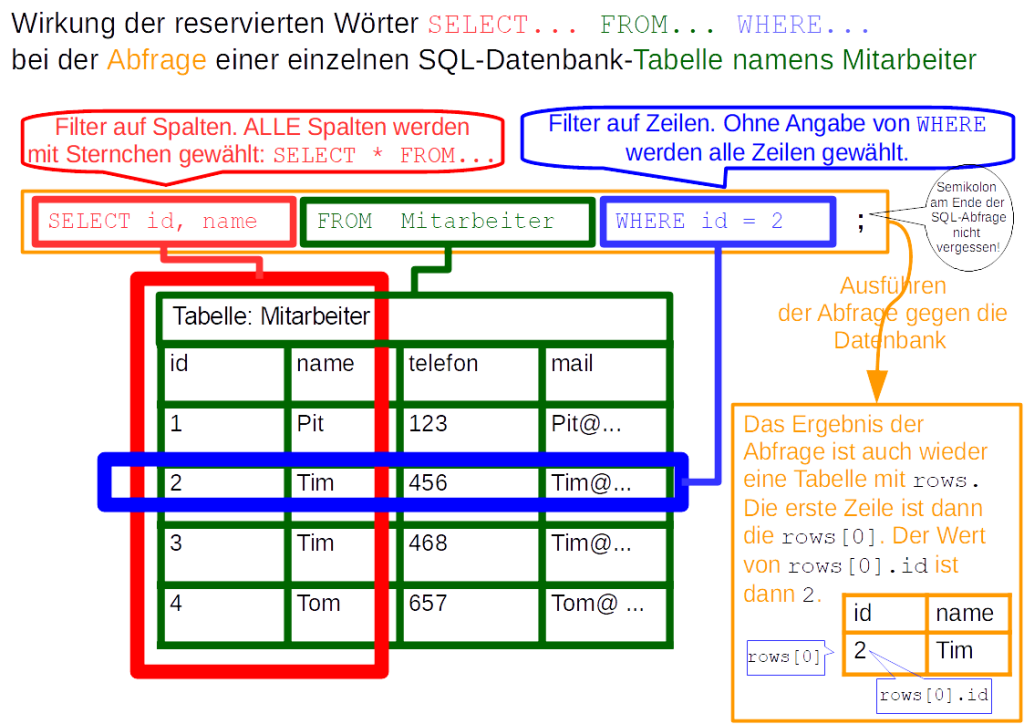
A useful beginner mental model is simple: SELECT chooses columns; FROM identifies the table; WHERE keeps only rows that satisfy a condition. The official PostgreSQL documentation describes the WHERE clause as a filter applied to rows produced by the table expression.
The Basic WHERE Pattern
SELECT column_name
FROM table_name
WHERE condition;
Suppose a table named miners contains many machines, but you only want the rows for machines that are online.
SELECT model, hashrate_th
FROM miners
WHERE status = 'online';
The database examines each candidate row. If the expression status = 'online' is true for that row, the row survives the filter. If it is false, the row is excluded.
Use = for Equality
SQL normally uses a single equals sign for equality tests inside a condition.
SELECT name, city
FROM technicians
WHERE city = 'Tacoma';
This is different from languages where = performs assignment and == performs comparison. SQL syntax depends on context: inside this WHERE condition, = asks whether two values are equal.
Comparison Operators Filter Numeric and Ordered Values
| Operator | Meaning | Example |
|---|---|---|
= | Equal | WHERE rack = 4 |
<> | Not equal | WHERE status <> 'offline' |
> | Greater than | WHERE temperature_c > 80 |
< | Less than | WHERE power_kw < 4 |
>= | Greater than or equal | WHERE efficiency >= 95 |
<= | Less than or equal | WHERE errors <= 2 |
Some database systems also accept != for “not equal,” but <> is the standard SQL form and is a good portable default for beginners.
Text Values Usually Need Quotes
Character strings are normally written in single quotes.
SELECT model
FROM miners
WHERE manufacturer = 'Bitmain';
Numbers generally do not use quotes when the underlying column is numeric:
SELECT model, hashrate_th
FROM miners
WHERE hashrate_th > 200;
AND Requires Multiple Conditions to Be True
Use AND when a row must satisfy more than one requirement.
SELECT model, hashrate_th, power_kw
FROM miners
WHERE hashrate_th >= 200
  AND power_kw < 4;
A row appears only if both comparisons are true. If the hashrate condition passes but the power condition fails, the row is filtered out.
OR Requires at Least One Condition to Be True
SELECT name, role
FROM staff
WHERE role = 'Technician'
   OR role = 'Engineer';
This keeps rows matching either role. OR expands a filter because more than one condition can qualify a row.
NOT Reverses a Condition
NOT negates a Boolean condition.
SELECT model, status
FROM miners
WHERE NOT status = 'offline';
For a simple inequality, status <> 'offline' is often clearer. NOT becomes especially useful later with operators such as IN, BETWEEN, and LIKE.
Use Parentheses When AND and OR Mix
Mixed Boolean conditions are one of the easiest places for beginners to write a query that runs successfully but returns the wrong rows. Parentheses make your intent explicit.
SELECT name, role, shift
FROM staff
WHERE (role = 'Technician' OR role = 'Engineer')
  AND shift = 'Night';
This query means: keep night-shift rows, but only when the role is Technician or Engineer. Without parentheses, operator precedence can produce a different interpretation than the one you intended.
NULL Is Not Tested With =
NULL represents a missing or unknown value, so ordinary equality is not the correct test. Use IS NULL or IS NOT NULL.
SELECT name, phone
FROM technicians
WHERE phone IS NULL;
SELECT name, phone
FROM technicians
WHERE phone IS NOT NULL;The SQLite SELECT documentation also describes WHERE as filtering input rows based on the result of its expression. SQL’s three-valued logic around NULL becomes more important as queries grow, so learning the correct test now prevents many confusing results later.
WHERE Filters Rows, Not Columns
This distinction connects directly to OSSQL.002. SELECT determines which columns appear in the result, while WHERE determines which rows survive.
SELECT name, city
FROM technicians
WHERE certification = 'OSNTC';
The certification column does not have to appear in the final SELECT list for SQL to use it as a filter. A query can filter on one column while returning different columns.
Start With a Simple Condition and Add One Piece at a Time
When a filter becomes confusing, reduce it. Run one condition first. Check the result. Add the next condition. This method is usually faster than staring at a long WHERE clause and guessing which part is wrong.
SELECT *
FROM miners
WHERE status = 'online';
Then add another condition:
SELECT *
FROM miners
WHERE status = 'online'
  AND temperature_c < 80;
If your editor colors SQL keywords, identifiers, strings, and numbers differently, that is syntax highlighting. The color does not change SQL behavior, but it can make a long condition easier to inspect.
Common Beginner Mistakes
- Using
==for equality: ordinary SQL equality uses=. - Forgetting quotes around text: string literals normally use single quotes.
- Quoting every number automatically: numeric columns should normally be compared with numeric literals.
- Mixing AND and OR without parentheses: the query may be valid but mean something different.
- Writing
= NULL: useIS NULL. - Assuming WHERE chooses columns: it filters rows.
- Adding many conditions before testing: build complex filters incrementally.
Practice
- Start with the sample table structure from OSSQL.001: Relational Databases and Tables or create a small table with at least five rows.
- Write a query that filters one text column with
=. - Write a query that filters one numeric column with
>. - Combine two conditions with
AND. - Combine two conditions with
OR. - Write a mixed
AND/ORfilter and add parentheses. - Add one row containing
NULLand find it withIS NULL. - Filter on a column that you do not include in the
SELECTlist.
Knowledge Check + Answers
- What does WHERE filter? Rows.
- Which operator tests ordinary equality?
=. - What does AND require? All combined conditions must be true.
- What does OR require? At least one combined condition must be true.
- Why use parentheses? To make grouping and intended Boolean logic explicit.
- How do you test for a missing SQL value? With
IS NULLorIS NOT NULL. - Does a column used in WHERE have to appear in SELECT? No.
- What is a reliable debugging method for a long filter? Start with one condition and add conditions one at a time while checking results.
Elementary Review
WHERE is SQL’s basic row filter. Write a condition, use comparison operators to test values, combine conditions with AND, OR, or NOT, and use parentheses when logic becomes mixed. Remember that NULL requires its own IS NULL syntax.
Next SQL Lesson
The next SQL lesson will continue filtering with ORDER BY, showing how to sort the rows that survive a query.
Editor’s Note
The featured image is a unique 1200×630 photorealistic SQL workspace created specifically for OSSQL.003 and is not reused inside the lesson. The separate body image is a real SQL teaching image from Wikimedia Commons.
BitcoinVersus.Tech content is provided for informational and educational purposes.


Leave a Reply