
Linux kernel developers have merged a FAT32 allocation improvement for Linux 7.4 that accelerated one file-space reservation benchmark by 265.4 times. The change, developed by Matheus Alves de Almeida and reported by Phoronix on October 29, targets a narrow but costly path in a filesystem still widely used on removable storage and boot partitions.
FAT32 normally tracks files through chains of disk clusters. Under the previous implementation, the Linux fallocate() path could allocate those clusters one at a time when applications reserved space using FALLOC_FL_KEEP_SIZE, which keeps the visible file size unchanged. The upstream patch series permits multiple clusters to be assigned in a single operation.
What the 265× Benchmark Actually Measured
In benchmarks published by the patch author, a loop reserving space for 16 files of 16 MiB each on synchronously mounted FAT32, using 4,096-byte clusters, fell from 92.489 seconds to 0.348 seconds. Tests ran in QEMU/KVM with virtio-blk storage and cache=none. Other configurations showed smaller gains, including 5.3× for one nonsynchronous test.
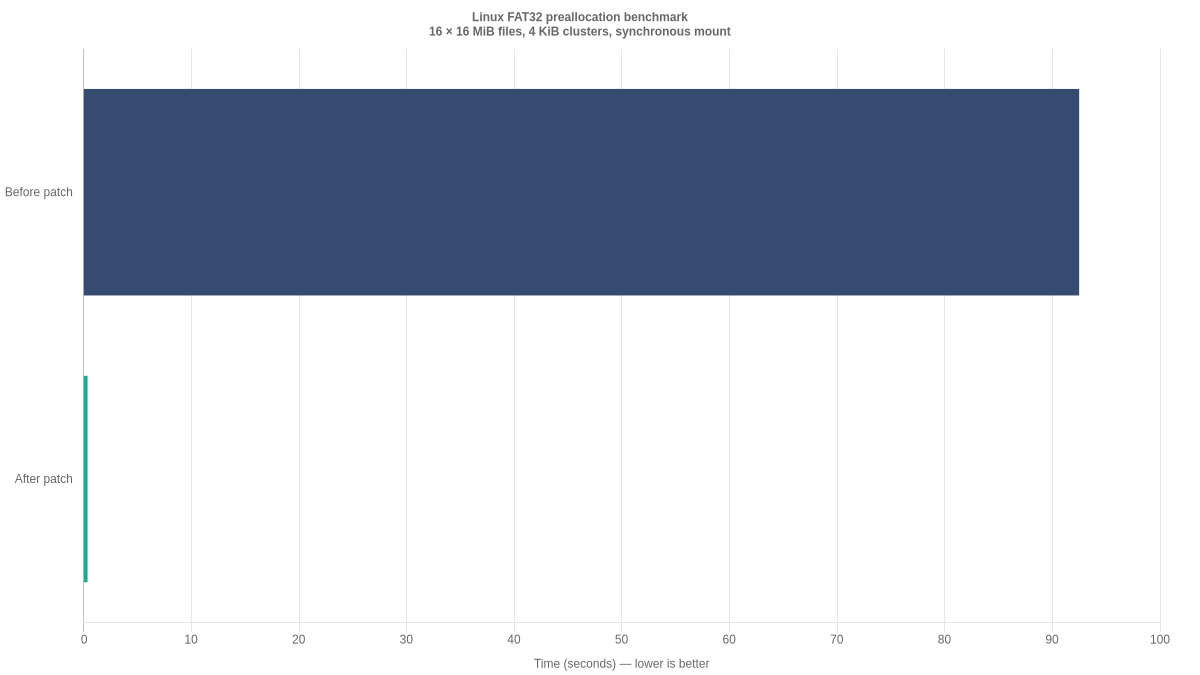
That distinction matters: the 265.4× result is not a universal increase in USB transfer, read or write speed. It measures a particular preallocation operation. Applications that do not use this code path may see little or no benefit. The improvement also does not remove FAT32’s roughly 4 GiB maximum individual-file size or give it the recovery features described in our filesystem journaling explainer.
Why an Old Filesystem Still Matters
FAT32 remains relevant to USB drives, memory cards and the EFI startup environment discussed in our guide to how Linux boots. Administrators can compare formatting options using our mkfs lesson and GParted walkthrough; Linux also has separate mechanisms for caching file data and tracking file metadata.
The kernel change is particularly relevant to developers working with disk images and virtualized systems where space reservation can dominate an operation. The reported figures are developer benchmarks, not independent end-user tests. As Linux 7.4 reaches downstream distributions, administrators should check their vendor kernel version and benchmark their own workloads rather than expect every FAT32 device to become hundreds of times faster.
BitcoinVersus.Tech
BitcoinVersus.Tech Editor’s Note: We volunteer daily to ensure the credibility of the information on this platform is Verifiably True. If you would like to support to help further secure the integrity of our research initiatives, please scan the QR code to donate (For the best results, scan the QR code on a Laptop or larger screen).

Reference donation: 5,000 sats. Bitcoin address: 3C9o19EH5HSiwEPyCTmEKzxhNCbo2X6TTb. On a mobile device, open the QR image on another screen to scan it, or copy and verify the address in your wallet. On desktop, scan the QR code with your phone wallet and verify the recipient before sending.
BitcoinVersus.tech is not a financial advisor. This media platform reports on financial subjects purely for informational purposes.


Leave a Reply