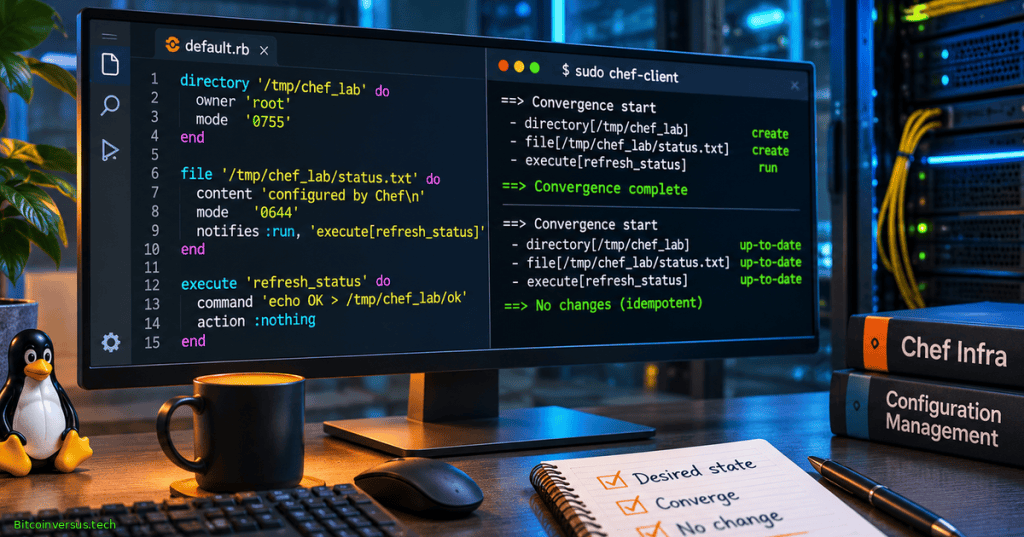
Chef Infra manages the desired state of computers through cookbooks and recipes. A recipe declares resources such as directories, files, services, and packages; Chef Infra Client then compares those declarations with a node’s observed state and takes corrective action where needed. OSChefInfra.002 follows OSChefInfra.001 on workstations, cookbooks and nodes, introducing the resource lifecycle, idempotence, guards, notifications, and a small test cookbook. The curriculum identifier refers to Progress Chef Infra automation, not the unrelated Chef esoteric programming language.
Learning Objectives and Prerequisites
- Read a Ruby-based Chef Infra recipe and distinguish resource type, name, property, and action.
- Explain the compile phase, converge phase, desired state, idempotence, and drift correction.
- Use the built-in
directory,file, andlogresources in an isolated Linux lab. - Explain why
notifiestriggers dependent work only when an originating resource updates. - Distinguish
not_ifandonly_ifguards from declarative state checks. - Predict first-run, second-run, and deliberately drifted outcomes, then inspect real logs before declaring success.
- Describe code review, privilege boundaries, version selection, and the deprecation of legacy Chef Infra Server.
Prerequisites: the prior Chef Infra architecture lesson, elementary Linux shell commands, basic filesystem permissions, and an isolated Linux virtual machine or container designed for administration labs. Chef Workstation and Chef Infra Client must already be legitimately installed and licensed as required by their respective terms. Do not run the cookbook on a production workstation or an unknown shared host.
Elementary Overview
Imagine keeping ten classroom computers organized. Each needs a particular folder, a settings file, and the correct permissions. Instead of checking and repairing every machine by hand, an administrator writes down the desired conditions in a recipe. Chef Infra Client reads the recipe, checks the machine, and applies changes only when a managed resource differs from the intended state.
A recipe is not necessarily a line-by-line script that runs every command every time. Most standard Chef resources are designed to be idempotent: repeating them when the desired state already exists should not create additional changes. If a managed file changes, a notification can tell another resource to perform a related action. The two key ideas are defining the destination and checking whether a change is necessary.
Historical Background and Supported Components
Chef originated during the growth of infrastructure-as-code systems, which made server configuration versionable and repeatable instead of relying only on handwritten operations. Modern Chef products distinguish authoring and testing tools, local client convergence, and central enterprise platforms. According to Progress Chef’s supported-version register checked November 8, 2026, Chef Infra Client 19.x and Chef Workstation 26.x are generally available, while Infra Client 18.x is deprecated. Version ranges are not interchangeable with feature compatibility; verify the release and OS platform for any real deployment.
The older Chef Infra Server 15.x is deprecated with an announced November 30, 2026 end-of-life date; Progress directs customers toward Chef 360 Platform. The cookbook exercise below uses local mode, which does not require a running Infra Server or a Chef 360 deployment. Learning the resource model does not constitute a recommendation to install a nearly end-of-life server.
Anatomy of a Chef Resource
The Chef Infra language is Ruby-based. A resource block identifies a managed object, the properties that specify its desired state, and an action that Chef should execute if that object needs correction. The following example manages one directory in a disposable Linux environment:
directory '/tmp/opencert-chef-lab' do
  mode '0755'
  action :create
end
Here directory is the resource type, the quoted path identifies its target, mode specifies POSIX permission bits, and :create is the action symbol. A quoted mode such as 0755 gives owner read/write/execute and other users read/execute. Directory access also depends on the enclosing directory permissions and operating-system security controls. The official Chef directory resource reference documents actions, properties, and platform differences.
Compile and Converge Phases
Chef Infra Client processes a run in conceptually separate phases. During compilation, it loads recipes and builds a collection of resource declarations; during convergence, it evaluates and executes the collected resources to satisfy their intended states. Ruby expressions in recipes can run at compile time, but most standard resource actions occur during the converge phase. Confusing these phases can cause incorrect dynamic values or resource ordering assumptions.
An idempotent resource should leave an already compliant object unchanged. If a managed file contains the correct bytes and permissions, a second convergence should normally not rewrite the file. This property is essential for scheduled management of large fleets, where unnecessary writes or restarts would impose operational cost. Idempotence is a behavior of the whole resource action in its actual environment, not proof that every Ruby statement or shell command is harmless.
Managing Files and Triggering Notifications
The file resource checks a file’s existence, content, and declared properties. It can create a missing file or replace content that differs. A notification can trigger a related log resource when the file updates. This deliberately small example avoids privileged service restarts and demonstrates delayed event handling:
directory '/tmp/opencert-chef-lab' do
  mode '0755'
  action :create
end

file '/tmp/opencert-chef-lab/status.txt' do
  content "managed by Chef Infra\n"
  mode '0644'
  action :create
  notifies :write, 'log[status_file_changed]', :delayed
end

log 'status_file_changed' do
  message 'Status file was created or updated'
  level :info
  action :nothing
end
The directory resource runs before the file resource, ensuring the parent path exists. The file is created with one line of sample content and mode 0644. When the file resource reports an update, it queues a delayed log[status_file_changed] action, ordinarily executed toward the end of the run. On a subsequent compliant run the file resource should report no update and therefore send no such notification. The official file resource, log resource, and notification reference define the behavior.
An optional real-world variation would notify a service resource to reload configuration after a template changes. Service reload and restart actions can interrupt application sessions and should be tested in staging with backups and rollback procedures. The introductory lab intentionally logs a message instead of touching a service.
Guards and Imperative Operations
A guard adds a condition to a resource action. only_if permits the action when its predicate succeeds; not_if blocks the action when its predicate succeeds. Guards can be Ruby blocks or shell commands, with differing evaluation semantics. They are particularly important around resources that launch commands, because an arbitrary execute resource does not automatically know whether a shell command has already accomplished its job.
The following toy example demonstrates a Ruby-block guard for a log entry, not an application configuration change:
log 'demo_status_exists' do
  message 'Managed status file is present'
  level :info
  only_if { ::File.exist?('/tmp/opencert-chef-lab/status.txt') }
end
The guard is evaluated when Chef considers running the resource. If the file does not exist, the log action is skipped. The guard does not create the file; the earlier file resource does that. A manually added Ruby guard is not a replacement for a resource’s built-in state comparison. Prefer standard declarative resources to custom shell commands whenever the desired state can be expressed directly.
Hands-On Local-Mode Cookbook Lab
Use a disposable Linux VM or container. First confirm the installed tools and review the vendor license notice. Chef Workstation provides chef generate cookbook, while Chef Infra Client 19 provides the documented -z local-mode and -c custom-config options. From your own user account, create a new lab cookbook; avoid running these instructions on systems that manage real services or sensitive files:
chef --version
chef-client --version
mkdir -p "$HOME/chef-course/cookbooks"
cd "$HOME/chef-course/cookbooks"
chef generate cookbook oc_demo
The generated cookbook includes recipes/default.rb and a metadata.rb file. Depending on the workstation release, the generator may also create Policyfile and testing scaffolds. Replace only the generated recipes/default.rb with the complete directory/file/log example above. Inspect the generated metadata name and make sure it is oc_demo; the test command uses that cookbook name.
For an explicit local-mode cookbook path, create $HOME/chef-course/client.rb with the following Ruby configuration. The sample keeps Chef’s local data within the disposable project directory rather than relying on a global production configuration:
chef_repo_path File.expand_path('~/chef-course')
cookbook_path [File.expand_path('~/chef-course/cookbooks')]
file_cache_path File.expand_path('~/chef-course/.cache')
node_path File.expand_path('~/chef-course/nodes')
In a Linux terminal, return to the chef-course directory. The first command uses the Chef Infra Client why-run planning mode; then, only after reviewing the proposed changes on your disposable VM, run the local recipe for real:
cd "$HOME/chef-course"
chef-client -z -c "$HOME/chef-course/client.rb" -o 'recipe[oc_demo::default]' -W
chef-client -z -c "$HOME/chef-course/client.rb" -o 'recipe[oc_demo::default]'
cat /tmp/opencert-chef-lab/status.txt
stat /tmp/opencert-chef-lab/status.txt
The expected first successful convergence creates the lab directory and text file, then emits a delayed change notification. A second local-mode run using the same recipe should ordinarily report the directory and file as already compliant, with no file-change log notification. These are expected results, not observed Chef Infra execution results in the authoring environment. Review the actual exit code, resource summary, permissions, and log before recording a pass. The vendor chef-client command reference documents the local and why-run options.
Testing Idempotence and Configuration Drift
Repeat the local-mode command without changing any files. Write down how many resources report an update. Then, in the disposable lab only, change the contents of /tmp/opencert-chef-lab/status.txt and rerun the same Chef recipe. The client should restore the declared text and queue the notification because the file no longer matches the desired state.
printf 'deliberately modified\n' > /tmp/opencert-chef-lab/status.txt
chef-client -z -c "$HOME/chef-course/client.rb" -o 'recipe[oc_demo::default]'
cat /tmp/opencert-chef-lab/status.txt
Compare three states: initial creation, unchanged rerun, and recovery after deliberate drift. State the expected update counts only after you have real client output, because exact resource summaries can vary with environment, package version, permissions, and generated cookbook scaffolding. Tests should also verify that only the intended disposable paths changed.
Security, Platform Limits and Operational Safety
- Privilege control: Chef can make privileged filesystem and service changes. Use a throwaway VM, audited code, least privilege, and a narrowly scoped target path.
- Trust and provenance: review cookbooks, dependencies, downloaded archives and package sources before running them; do not execute unreviewed infrastructure code from strangers.
- Secrets: never place real passwords, private keys or authentication tokens in plain recipes, logs, examples or Git repositories.
- Idempotence: inspect custom commands and side effects; executing a script repeatedly can remain destructive even when adjacent Chef resources are idempotent.
- Version and lifecycle: target supported Infra Client and Workstation releases; do not assume a legacy Infra Server deployment remains appropriate after its published end-of-life date.
- Rollback: test failure paths, retain snapshots/backups and confirm that removing a cookbook does not automatically undo all changes it previously made.
Chef can manage both server networking configuration and local operating-system resources, but changing production network or identity settings could cause lockout. For cross-platform context, review PowerShell variable and scope fundamentals; Chef recipes use Ruby semantics, not PowerShell syntax.
Troubleshooting
- Unknown cookbook: check the directory name,
metadata.rbcookbook name andcookbook_pathlocation. - Permission denied: run in a correctly provisioned disposable VM, verify ownership, and do not escalate privileges on a production host merely to suppress errors.
- Notification not emitted: confirm the source file resource actually reported an update; a compliant file will not notify on every run.
- Surprising update on every run: inspect current content, file mode, encodings, ownership rules and other processes that may be changing the file.
- License/version error: use the vendor-supported installer and a valid entitlement; do not bypass licensing.
- Legacy server instructions: identify whether the guide predates the November 2026 deprecation boundary and consult current Progress Chef documentation.
Practice and Knowledge Check
- Explain the difference between a recipe’s declared desired state and the observed current state.
- Name the resource type, name, two properties and action in the status-file example.
- Why does the log notification normally run on creation but not on an unchanged second pass?
- What distinguishes
:immediatefrom:delayednotifications? - Why is a raw
executeresource often harder to make idempotent than a native file resource? - What risk arises if a cookbook changes a production network or SSH configuration without a rollback path?
- Which client and workstation major versions are listed as GA by Progress as of November 8, 2026?
Answers: Desired state is the configuration described by resources; current state is what the node actually has. The file resource identifies a path, declares content and mode, and applies :create. Notifications are triggered when a source resource updates. Immediate notifications run during convergence as the source resource changes; delayed notifications run toward the end of the Chef Client run. Arbitrary commands may have hidden or recurring side effects; native resources can compare managed state. Network misconfiguration can disconnect administrators or workloads. Progress lists Chef Infra Client 19.x and Chef Workstation 26.x as generally available.
References and Further Study
- Progress Chef — Supported Versions and Lifecycle (checked November 8, 2026).
- Progress Chef — Platform Overview.
- Progress Chef — Cookbook Structure.
- Progress Chef — Directory Resource; File Resource; Log Resource.
- Progress Chef — Common Resource Functionality and Notifications.
- Progress Chef — chef-client CLI and Local Mode.
- Progress Chef — Chef Workstation 26 CLI.
- Progress Chef — Legacy Infra Server Lifecycle Warning.
Elementary Conclusion
A Chef Infra cookbook explains how a computer should be configured. Resources describe folders, files and other parts of the machine, while Chef Infra Client decides whether they need changes. Idempotence helps keep repeated runs safe when nothing has changed. Notifications coordinate dependent actions, and guards provide extra conditions. By testing an isolated cookbook twice and then deliberately changing a sample file, learners can see the basic logic behind automated configuration management.
Editor’s Note: OSChefInfra.002 follows the verified published OSChefInfra.001 lesson. The separate OSChef.001–.003 series describes an unrelated esoteric language. Official release and deprecation information was consulted November 8, 2026. The Ruby recipe was checked for syntax using Ruby, but Chef Infra Client is not installed in the authoring runtime and the sample convergence, why-run, idempotence and drift tests were not executed. Embedded video identities are sourced; playable website iframes and mobile layout require post-publication inspection. The original 1200 × 630 branded artwork is a conceptual illustration, not an actual screenshot of executed Chef logs.

We volunteer daily to ensure the information on this platform is Verifiably True. If you would like to support the research, please scan the QR code. For mobile scanning, display the QR on another screen or use a compatible wallet’s saved-image scanner.


Leave a Reply