Learning Objectives and Prerequisites
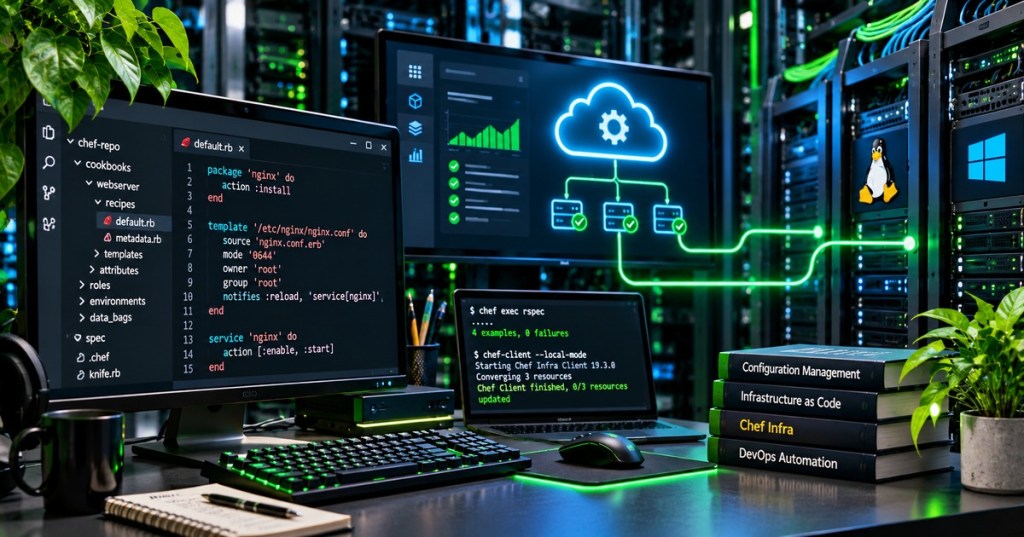
Chef Infra is a configuration-management system that describes the intended condition of computers as code and applies policies through Chef Infra Client. Learners will identify the role of Chef Workstation, cookbooks, recipes, resources, managed nodes, policy distribution, and convergence; distinguish server-based from local-mode operation; and explain why repeatable configuration matters. The practical exercise creates a local cookbook skeleton and inspects a Ruby-based recipe before any configuration is applied.
Prerequisites: a basic understanding of shell commands and scripts, files, operating-system permissions, and a disposable test environment. Prior PowerShell variables knowledge helps when comparing administration approaches, but Chef’s recipe DSL is Ruby-based rather than PowerShell or Bash.
Elementary Overview
Imagine a school with many computers. Each computer should have an approved set of software, settings, accounts, and configuration files. Checking every computer by hand is slow, and the machines can gradually become different. Chef Infra lets an administrator write down the desired condition as a recipe, then use software to bring computers closer to that condition.
The main idea is not to repeat a command blindly. It is to compare what is present with what is wanted, and make a change when the two differ. That is called convergence. If the computer already matches the recipe, a correctly designed resource should normally leave it alone. Chef also provides tools for developing, testing, and distributing those rules. These concepts are especially useful across Linux and Windows systems.
The Major Components of Chef Infra
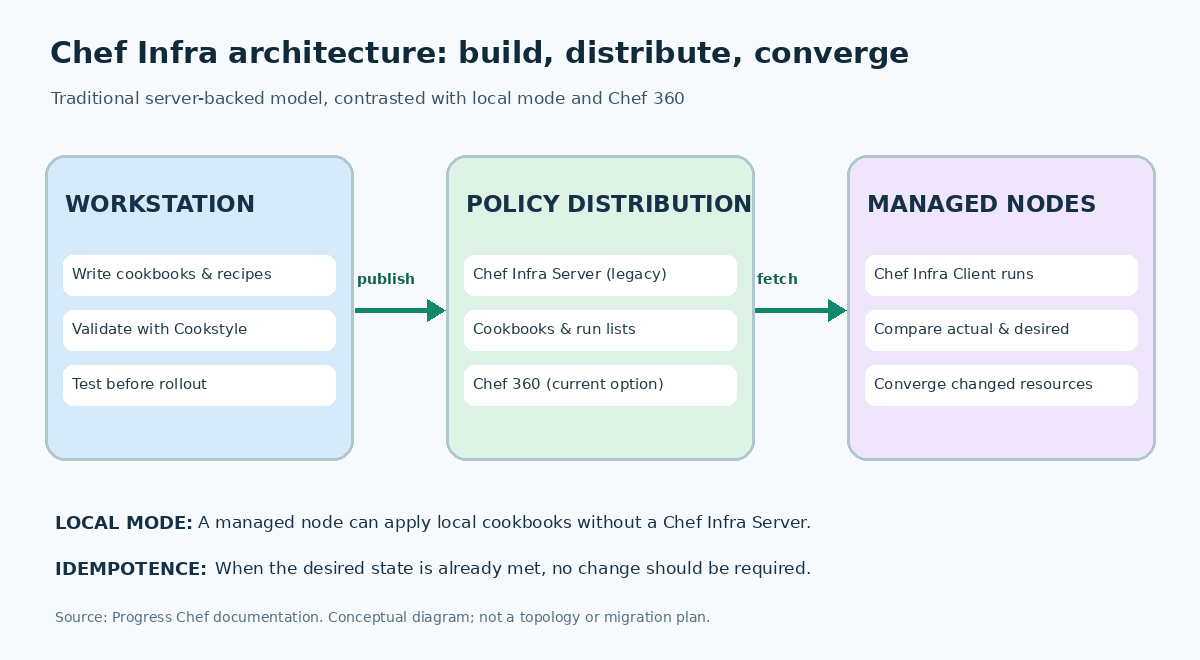
A Chef Workstation is the developer environment used to author infrastructure code, including the Chef command-line tools, Cookstyle linting, and testing utilities. A cookbook is a directory of related configuration instructions, files, templates, and metadata. A recipe is a Ruby-based file within a cookbook that declares resources such as packages, directories, or configuration files. A node is a managed machine or computing system. Chef Infra Client is the agent that evaluates and applies the desired resource state on that node.
In the traditional server-backed model, Chef Infra Server stores cookbook versions and node policy information, while Chef Infra Client fetches the required configuration and performs the actual work locally. A workstation authors and tests code before distribution. A separate local mode lets Chef Infra Client use local cookbooks without contacting an Infra Server. These are operational models, not distinct programming languages. Server network configuration and validation remain necessary when agents retrieve policy across a network.
2026 Platform Status and Migration Context
An important lifecycle distinction applies in November 2026: Progress Chef lists Chef Infra Server 15.x as deprecated, with an end-of-life date of November 30, 2026, and recommends evaluating Chef 360 Platform for replacement. Chef Infra Client 19.x and Chef Workstation 26.x are listed among the supported product lines. The server’s end-of-life date is not a statement that Chef Infra Client or every existing cookbook ceases to function on the same date. Version and compatibility choices should be checked against the current official supported-versions table for a specific deployment.
An established Chef Infra Server estate should inventory policies, clients, cookbooks, credentials, and dependencies before choosing a migration path. Chef 360 has different platform functions and should not be assumed to be a drop-in replacement for every older service or API. This lesson introduces the architecture; it does not instruct readers to deploy a new production Chef Infra Server.
Cookbooks, Recipes, and Resources
A resource describes the desired state of one system element. For example, a file resource can declare a path, content, and permissions. Chef Infra Client evaluates the resource during a run and decides whether changes are required. The resources are expressed with Ruby syntax, but are interpreted through Chef’s domain-specific configuration language.
file '/tmp/open-source-tech-cert-chef.txt' do
content 'Chef Infra practice file'
mode '0644'
action :create
end
The example declares a Linux-style practice file. On a disposable Linux test machine, Chef would create or update that file with the declared content and permissions. If the file already matches, the resource should not need to rewrite it. The recipe is a declarative instruction, not a transcript from a successfully executed test. On Windows, file paths, ownership, and permission behavior differ; do not reuse /tmp unchanged.
A recipe may contain multiple resources, such as a package followed by a service, and a cookbook can group related recipes. Later lessons will examine each resource type, attribute precedence, templates, notifications, and guards. Proper sequencing matters because one resource may depend on software or files managed by another. The concept resembles safe, repeatable administration with Bash loops and iteration, but Chef models desired end state rather than merely repeating commands.
Why Idempotence and Configuration Drift Matter
An idempotent operation produces the same intended state when applied again. Chef’s declarative resources are designed so repeated runs correct differences without making unnecessary changes. Configuration drift occurs when the actual state of a node diverges from the approved state—for example, when a file is manually edited or a required service is disabled. A subsequent Chef run can restore the declared condition, subject to the resources and policies actually being configured.
Consider a hypothetical fleet of 20 nodes where 3 have settings that differ from policy. The observed drift rate in that example would be (3 ÷ 20) × 100 = 15%. The figure is an instructional calculation, not production telemetry. An automation system can report which nodes converged, which were unchanged, and which failed, but a clean run cannot by itself prove the system satisfies every security or application requirement.
Permissions and trust are central to infrastructure automation. A flawed or excessively privileged cookbook can propagate misconfiguration across machines. Use version control, reviews, policy tests, least privilege, secret-management controls, and staged deployments. Review Windows users, groups, and permissions and Linux file attributes before treating permission settings as interchangeable across operating systems.
Practical Lab — Inspect a Cookbook Without Deploying
Install a supported Chef Workstation release from the official source and confirm the available tools with chef --version. A licensed or entitled installation may be required depending on the Chef product and edition. In an isolated development environment, create a starter cookbook, enter its directory, and inspect its default recipe:
chef --version
chef generate cookbook oschef_infra_starter
cd oschef_infra_starter
Review recipes/default.rb in a text editor.
The generator creates a cookbook structure. Open recipes/default.rb and study the resource definitions before modifying them. To check Ruby syntax when the workstation provides the bundled runtime, run the following read-only syntax check:
chef exec ruby -c recipes/default.rb
A syntactically valid file should report Syntax OK; that result checks Ruby parsing, not whether Chef resources would converge correctly, whether the desired state is secure, or whether a deployment is safe. A full test should instead run in a disposable VM with Test Kitchen or another isolated environment. Consult Chef’s official Workstation getting-started guide for the supported cookbook-test workflow and current prerequisites.
Testing, Verification, and Troubleshooting
Cookstyle evaluates the style and many common errors in recipes. Chef InSpec expresses assertions about the condition of a system; Test Kitchen can create a test machine, apply the cookbook, and run integration checks. A syntax check is only the first gate. The next gates validate resource compilation, repeat convergence, application function, security expectations, and test cleanup. Separate reported behavior from any steps the learner has personally executed.
- Cookbook not found: Confirm the working directory, cookbook name, local repository structure, and run-list name before changing system configuration.
- Unauthorized or failed policy download: Review network reachability, node credentials, certificate trust, and the actual deployment model; never bypass authentication to make a test pass.
- Repeated changes on every run: Inspect resource declarations, unstable inputs, templates, notifications, and the actual node state for causes of non-idempotent behavior.
- Permission denied: Check the account running Chef Infra Client, OS-specific file ownership, and approved privilege boundaries.
- Unsupported version: Consult the official supported-versions page and migration documentation rather than following archived tutorials literally.
Practice Exercises
- Identify the responsibility of Chef Workstation, Chef Infra Client, a cookbook, and a managed node.
- Explain which component stores the desired policy and which component performs configuration work in the traditional model.
- Write down what should happen when a file already has the exact content declared by a Chef resource.
- Calculate the percentage of drifted systems if 4 out of 25 managed nodes have incorrect settings.
- Explain why a 2021 video about deploying Chef Infra Server needs a 2026 lifecycle warning.
Knowledge Check Answers
- Workstation develops and tests automation; Infra Client applies resources; cookbooks organize configuration code; a node is a managed system.
- The legacy Chef Infra Server distributes policies and cookbooks, while Chef Infra Client performs configuration operations on each node. Local mode is a separate option.
- The intended file resource should make no change if the file already meets its declared state.
- The hypothetical rate is
(4 ÷ 25) × 100 = 16%. - Chef Infra Server 15.x is scheduled for end of life on November 30, 2026; archived videos may teach obsolete provisioning paths even when their conceptual explanations remain useful.
Primary Sources and Further Reading
- Progress Chef — Platform Overview
- Progress Chef — Chef Infra architecture and components
- Progress Chef — Infra quickstart
- Progress Chef — Workstation cookbook workflow
- Progress Chef — Supported versions and product lifecycles
- Progress Chef — Legacy Infra Server overview and deprecation warning
- Progress Chef — Original introductions to the official videos
Elementary Conclusion
Chef Infra helps many computers follow the same written instructions for their setup. An administrator prepares and tests a cookbook, and Chef Infra Client checks whether each managed computer matches the recipe. If something differs, the client can make the approved change. When everything already matches, the system should avoid changing it needlessly.
Reliable infrastructure automation is a combination of code, careful testing, trusted distribution, permissions, and repeated checks. Modern organizations must also consider whether a platform component is still supported. Chef Infra Server belongs to a legacy deployment model being replaced by newer Chef platform offerings; Chef Infra concepts remain useful for learning repeatable system configuration.
Editor’s Note: The OSChefInfra.001 identifier distinguishes Progress Chef infrastructure automation from the already-published OSChef.001–.003 lessons about the unrelated Chef esoteric programming language. Historical vendor videos are labeled by year; specifications and lifecycle status follow the current vendor documentation.

For mobile scanning, open this lesson on a larger screen and use a compatible Bitcoin wallet to scan the original QR code. Verify the address before sending 5,000 sats: 3C9o19EH5HSiwEPyCTmEKzxhNCbo2X6TTb.
BitcoinVersus.tech is not a financial advisor. This media platform reports on financial subjects purely for informational purposes.


Leave a Reply