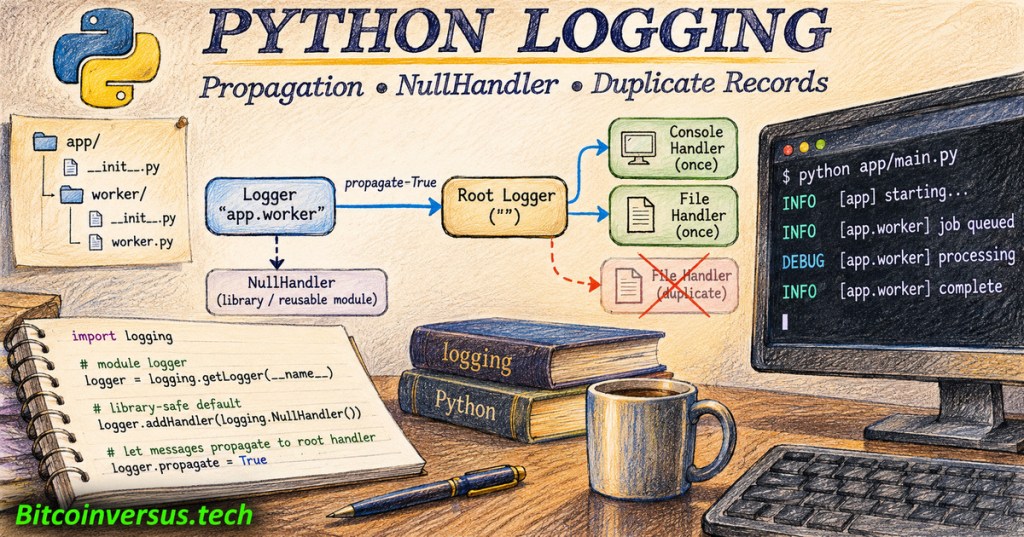
OSPython.047 addresses a persistent application-logging defect: one Python event appearing twice, or a reusable package printing messages without the host application’s permission. The cause is often a handler attached at two levels of a logger hierarchy, not two executions of the underlying operation. Python’s standard logging module provides a clear division of responsibility between library authors and the applications using their code.
Timnology, “Python Logging: Master the Module in Under 10 Minutes,” August 22, 2024. The tutorial introduces handlers and covers logger hierarchy from approximately 5:05. Credit: Timnology / YouTube.
Logger names form a hierarchy
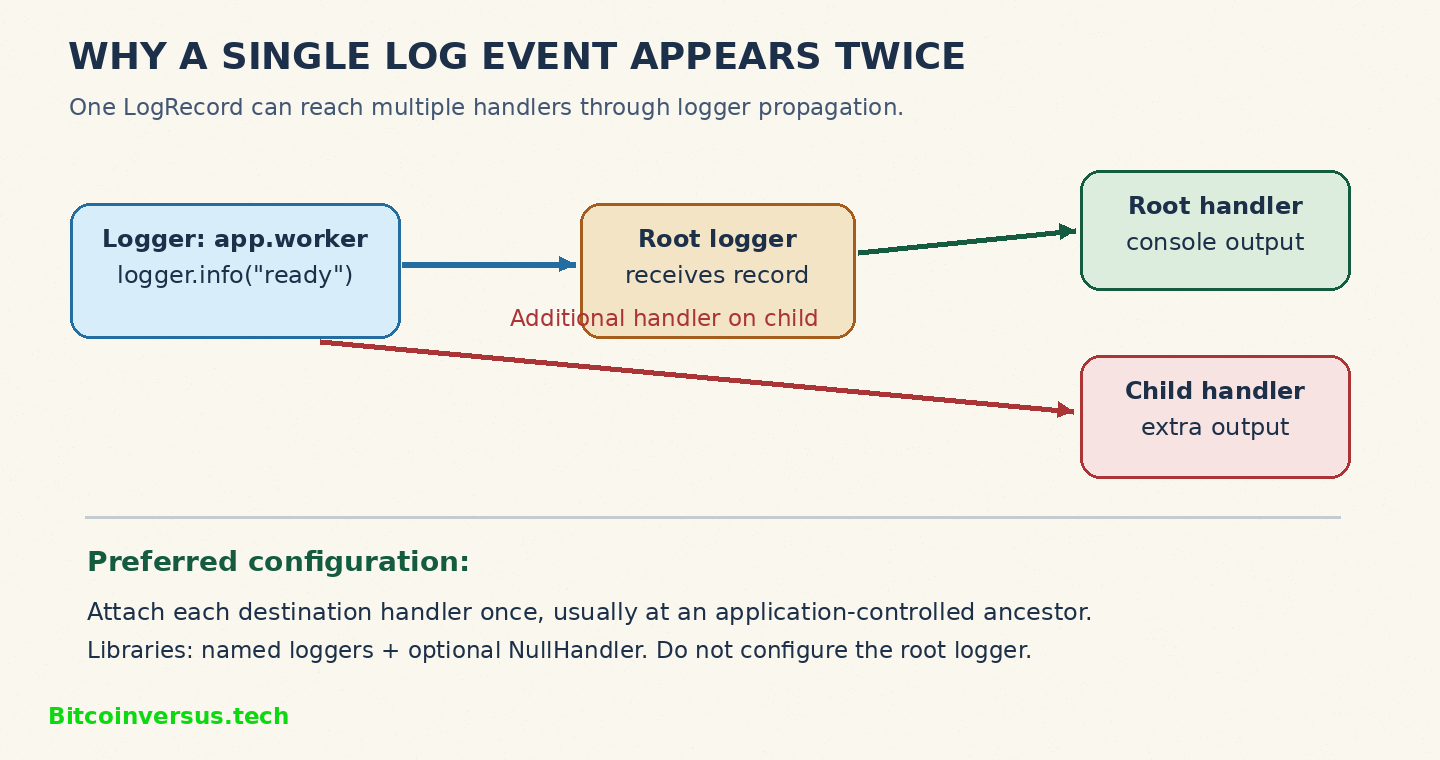
Python groups named loggers using periods. A logger called app.worker is a descendant of app, which ultimately descends from the root logger. Applications commonly use logging.getLogger(__name__) so module names map naturally to logger names. A message accepted by a child logger is normally offered to handlers on its ancestors because propagate defaults to True.
Propagation does not recreate an event. The same LogRecord passes through multiple handler destinations. Handlers attached to both a child and an ancestor can therefore produce duplicate visible lines. Python’s Logger reference further specifies that ancestor logger levels and filters are not reapplied during propagation, although ancestor handler levels and filters still matter. OSPython.046 on JSON logging explains how the resulting record can be serialized.
Reproduce the duplicate in a safe local script
The following standalone demonstration attaches one handler to lesson, then adds another to lesson.worker. The first event prints once; the second prints twice. The separate lesson namespace prevents the example from modifying a host application’s root logging configuration:
import logging

app = logging.getLogger("lesson")
app.setLevel(logging.INFO)
app.propagate = False  # Keep the demo isolated

console = logging.StreamHandler()
console.setFormatter(
    logging.Formatter("%(name)s: %(message)s")
)
app.addHandler(console)

worker = logging.getLogger("lesson.worker")
worker.info("first")  # One output line

worker.addHandler(logging.StreamHandler())
worker.info("second")  # Two output lines
A local Python 3 run produced lesson.worker: first, followed by second and lesson.worker: second. The differing formats expose which handler created each line. Removing the extra child handler restores one line per event without suppressing legitimate application logs.
Library-safe logging with NullHandler
A reusable Python package should publish named loggers while allowing the host application to choose destinations, formats, retention and severity thresholds. The Python Logging HOWTO advises library maintainers not to configure the root logger or add ordinary output handlers within their packages. An optional NullHandler prevents an unconfigured library’s warnings from reaching the last-resort stderr handler.
# In a reusable package, for example acme/__init__.py
import logging

logging.getLogger(__name__).addHandler(
    logging.NullHandler()
)

# In acme/worker.py
logger = logging.getLogger(__name__)
logger.warning("retry requested")
Important: NullHandler does not block propagation. Once the application configures an ancestor handler, matching library records can reach it normally. Turning propagate=False is appropriate only when a logger deliberately owns a complete, isolated handler configuration; otherwise records can disappear. OSPython.045 documents record customization, a separate concern from delivery paths.
MathByte Academy, “Python Logging Demystified: Part 2 — Coding,” August 28, 2024. Code walkthroughs demonstrate logger configuration and propagation at approximately 22:18. Credit: MathByte Academy / YouTube.
Production checklist
- Inspect each logger’s name,
propagatesetting and directly attachedhandlers. Compare its parents before changing configuration. - Assign each required destination handler at one intentional level; verify both logger and handler severity thresholds.
- Use an application-owned configuration, such as OSPython.036 on
dictConfig, rather than mutating shared handlers inside a library. - Run repeatable tests, including warnings and exceptions. Review OSPython.041 on credential-safe logging before storing live diagnostic records.
Duplicated lines can mislead alert thresholds, disk-usage estimates and incident timelines. Conversely, turning propagation off indiscriminately can hide failures. The objective is accurate, controlled delivery of each event to every intended destination—not necessarily a single output destination.
Primary sources: Python Logging HOWTO — configuring libraries; Python Logger Objects reference; Python Logging Cookbook — patterns to avoid. Example output was reproduced locally in Python 3. External tutorial videos are independently produced educational demonstrations, not Python Software Foundation endorsements.
Editor’s Note: OSPython.047 follows the published OSPython.046 structured-logging lesson. Technical claims were checked against the Python project’s logging documentation, and the illustrative example was executed locally. The 1200 × 630 colored-pencil featured cover and in-story logging diagram are original conceptual artwork with a neon-green Bitcoinversus.tech watermark. YouTube tutorial identities and their cited sections were checked against public listings; successful playback inside WordPress and mobile-browser layouts require separate live verification. No production logger or deployed application was modified.

BitcoinVersus.Tech is volunteer-run and publishes independent technical education. An optional 5,000-satoshi donation supports further research. Scan the original QR from a second screen with a compatible Bitcoin wallet. On the same phone, use a wallet that can import a saved QR image when supported. Independently verify recipient address 3C9o19EH5HSiwEPyCTmEKzxhNCbo2X6TTb and 5,000 sats before sending. Bitcoin payments are generally irreversible.
We volunteer daily to ensure the information on BitcoinVersus.Tech is Verifiably True. Educational articles are not a substitute for approved engineering changes or independent operational tests. BitcoinVersus.tech is not a financial advisor. This media platform reports on financial subjects purely for informational purposes.


Leave a Reply