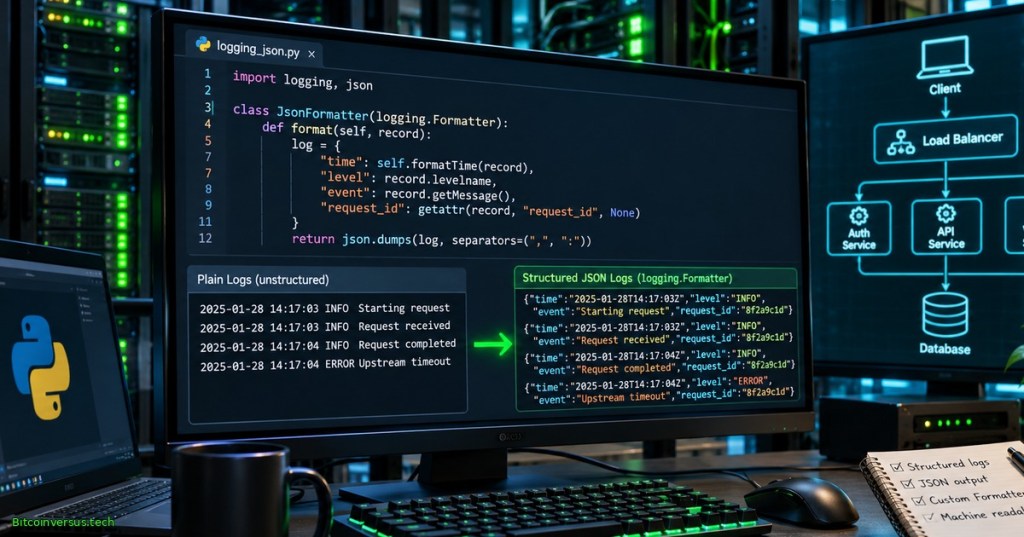
Python applications often send diagnostic events to files, terminals and log collectors. Human-readable lines help operators, but structured logs let software select events by severity, timestamp, logger name and request identifier without trying to parse arbitrary sentences. A custom logging.Formatter can turn each LogRecord into a compact JSON object, yielding a practical introduction to newline-delimited JSON logging.
Elementary Overview
Imagine a notebook where every entry always has the same labels: time, importance, place and what happened. A computer can search such a notebook more reliably than a pile of differently worded sentences. In Python, a logger creates an event record; a formatter decides how the event looks when it is written. A JSON formatter gives every event predictable names and values.
The skill extends record factories, logging configuration and credential-safe logging. No external package, cloud account or production server is required.
Learning Objectives and Prerequisites
- Identify the logger,
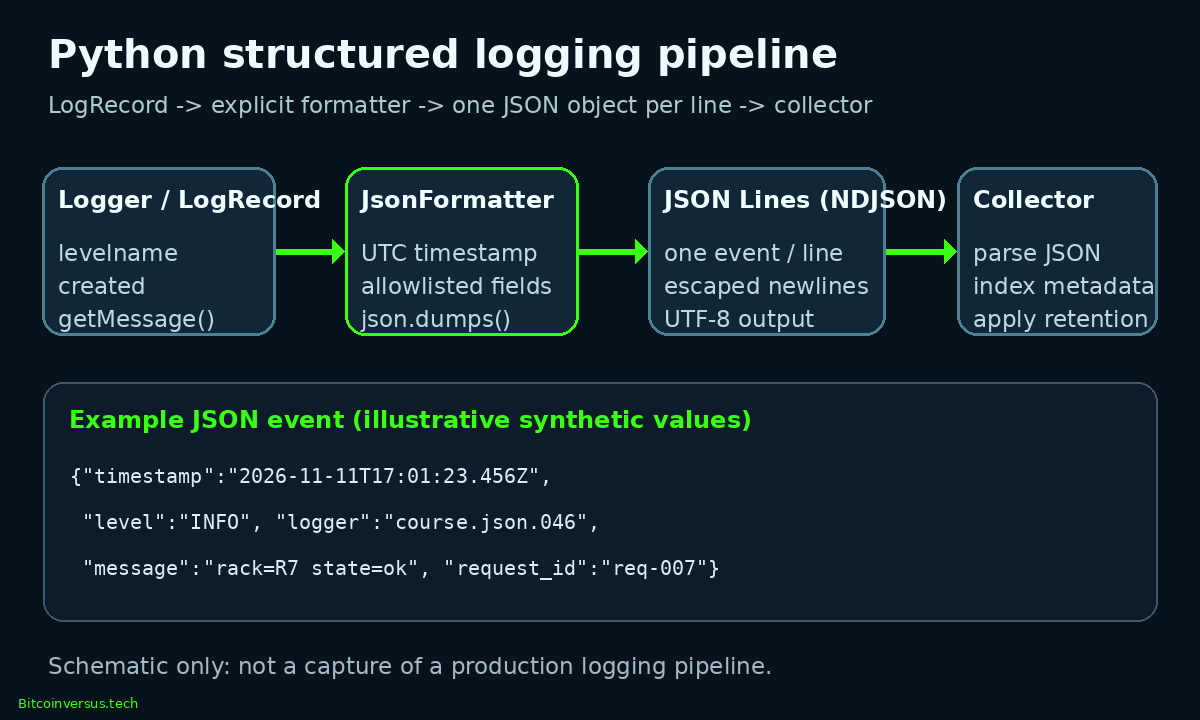
LogRecord, formatter, handler and downstream collector. - Write one valid JSON object per log event using an explicit schema.
- Generate UTC timestamps with timezone information and millisecond precision.
- Preserve message interpolation and optional request identifiers without automatically exporting every record attribute.
- Test newline escaping, missing fields, exception metadata and output parseability.
- Recognize privacy, backpressure, schema-version and distributed-system limitations.
Prerequisites: Python functions and classes; logging fundamentals; JSON serialization (or an equivalent introduction); and a local Python 3 interpreter.
mCoding, “Modern Python logging” (January 22, 2024). The source explains the logging pipeline and discusses JSON output near 12:37. Video identity and topic were verified; actual playback inside the published article remains a separate QA requirement.
Where Structured Formatting Fits
A logger first checks whether a record is enabled. The logging system creates a LogRecord with fields including created, levelname, name, msg and args. Handlers choose destinations, while formatters construct their final text. Calling record.getMessage() performs the ordinary message interpolation; serializing record.msg alone would omit substituted arguments. The official Python logging reference documents the record lifecycle and formatter interface.
JSON is a data representation, not a transport or storage system. A newline-delimited JSON stream places one independently parseable JSON object on each physical line. Each event can be read with json.loads(), indexed by a collector or stored in a line-oriented file. A JSON object embedded inside prose is harder for downstream software to process consistently.
A Safe, Explicit Event Schema
The formatter below exports five fields: UTC timestamp, severity, logger name, formatted message and optional request identifier. The exception type is added only when exception information exists. An allowlist prevents arbitrary extra attributes from being copied into collected events, although sensitive information written into the message itself still leaks.
The central formatter implementation uses only Python standard-library functions:
import json
import logging
from datetime import datetime, timezone

class JsonFormatter(logging.Formatter):
    def format(self, record):
        event = {
            "timestamp": datetime.fromtimestamp(
                record.created, timezone.utc
            ).isoformat(timespec="milliseconds").replace("+00:00", "Z"),
            "level": record.levelname,
            "logger": record.name,
            "message": record.getMessage(),
            "request_id": getattr(record, "request_id", None),
        }
        if record.exc_info:
            event["exception_type"] = record.exc_info[0].__name__
        return json.dumps(
            event, ensure_ascii=False, allow_nan=False,
            separators=(",", ":")
        )
The datetime.fromtimestamp(..., timezone.utc) call gives the timestamp an explicit UTC offset. Replacing +00:00 with Z preserves its UTC meaning. The json.dumps() encoder escapes literal newlines inside messages, allowing each event to occupy one log line. allow_nan=False rejects nonstandard NaN and infinity values if they enter the exported schema. Python’s JSON module documentation specifies the encoding behavior.
Attach the Formatter and Emit an Event
A formatter has no output destination by itself. Add it to a stream handler, attach the handler to a named logger and disable propagation so the parent logger does not duplicate a record. The following code runs after the class definition above:
import sys

handler = logging.StreamHandler(sys.stdout)
handler.setFormatter(JsonFormatter())
logger = logging.getLogger("course.json.046")
logger.setLevel(logging.INFO)
logger.propagate = False
logger.addHandler(handler)
logger.info(
    "rack=%s state=%s", "R7", "ok",
    extra={"request_id": "req-007"}
)
An illustrative JSON event contains "level":"INFO", "logger":"course.json.046", "message":"rack=R7 state=ok" and "request_id":"req-007". The actual timestamp depends on execution time. A production initialization routine should avoid adding a duplicate handler when configuration is repeated; it should also close or restore handlers during controlled shutdown.
Otávio Miranda, “How to Create a JSON Formatter from Scratch for Python Logging” (July 13, 2025). The Portuguese-language tutorial covers JSON Lines, timestamps, exceptions and extra fields. An external instructional resource, not a BitcoinVersus.Tech production test.
Validate JSON Lines Instead of Assuming Correctness
The format is useful only if each emitted event parses correctly. A test can capture the stream in an io.StringIO buffer, parse one line and assert expected keys. Avoid equality checks against a wall-clock timestamp; validate its shape and UTC marker instead. Check that messages containing newline characters remain a single physical JSON line.
The abbreviated assertion pattern operates on a captured JSON line:
import json

event = json.loads(captured_line)
assert event["level"] == "INFO"
assert event["message"] == "rack=R7 state=ok"
assert event["request_id"] == "req-007"
assert event["timestamp"].endswith("Z")
assert "api_token" not in event
Four automated tests were executed for the accompanying expanded Python example: formatted fields and UTC timestamps; exclusion of an unapproved token in extra; newline escaping; and exception-type output without an exception-message traceback. All four passed. The tests exercised synthetic data only, not a live server, shipping pipeline or log collector.
Troubleshooting and Operational Limits
- Missing request ID:
getattr(record, "request_id", None)yields JSONnullwhen no identifier was supplied. Add a stable identifier at the request boundary, as described in the correlation-ID lesson. - Unserializable objects: avoid serializing every record attribute. Restrict output to known JSON-compatible values; define an explicit normalization rule before adding custom objects.
- Leaking credentials: the allowlist excludes unintended
extrafields but does not automatically scrub message strings or exception text. Apply the logging redaction principles before collecting events. - Slow output: JSON serialization still consumes CPU and ordinary stream writes can block. Queue-based handlers may separate application work from slower sinks; review QueueHandler and QueueListener before deployment.
- Multi-process services: a structured record does not provide centralized delivery or synchronized process clocks. Use an explicit transport and collector; record schema changes require coordination with querying and retention rules.
- Unexpected duplicates: inspect logger propagation and repeated setup. A named logger can inherit parent handlers when propagation remains enabled.
Knowledge Check With Answers
- Why call
record.getMessage()? It returns the final formatted message after the logger applies positional arguments. - Does JSON automatically protect secrets? No. Structured output only changes representation; deliberate field selection and message sanitation remain necessary.
- What makes the output newline-delimited JSON? Each log event becomes one parseable object, followed by a record-separating newline from the stream handler.
- Why emit a UTC timezone marker? A stable time reference helps correlate events across machines with different local clocks.
- Does the formatter guarantee delivery to a monitoring service? No. Writing and transporting records are separate responsibilities.
Primary References and Further Learning
Consult the Python logging API, Logging Cookbook, JSON serialization reference, and timezone-aware datetime reference. The two videos are instructional supplements; the Python documentation governs the API behavior.
Elementary Conclusion
A JSON formatter works like a careful organizer: it takes the facts from a logging event and puts them under familiar labels. A computer can then identify important errors, connect related requests and read a long stream of events one line at a time. The format works best when developers choose safe fields, use clear UTC timestamps, test the output and plan how the records travel to their destination.
Editor’s Note: Open Source TechCert Python curriculum record OSPython.046 follows OSPython.045. Python standard-library behavior was checked against official documentation. Four executable tests passed for the companion reference implementation. The cover and in-story diagram are original conceptual illustrations; they do not represent a deployed production environment. Public YouTube pages and identities were verified separately from live playback. The prose and example use synthetic data.

To scan on a phone, display the donation QR on another screen and use a compatible Bitcoin wallet camera. Confirm the destination before sending 5,000 sats: 3C9o19EH5HSiwEPyCTmEKzxhNCbo2X6TTb.
We volunteer daily to ensure the credibility of the information on this platform is Verifiably True. If you would like to support our work and help further secure the integrity of our research initiatives, please scan the QR code above to donate 5,000 sats.
BitcoinVersus.tech is not a financial advisor. This media platform reports on financial subjects purely for informational purposes.


Leave a Reply