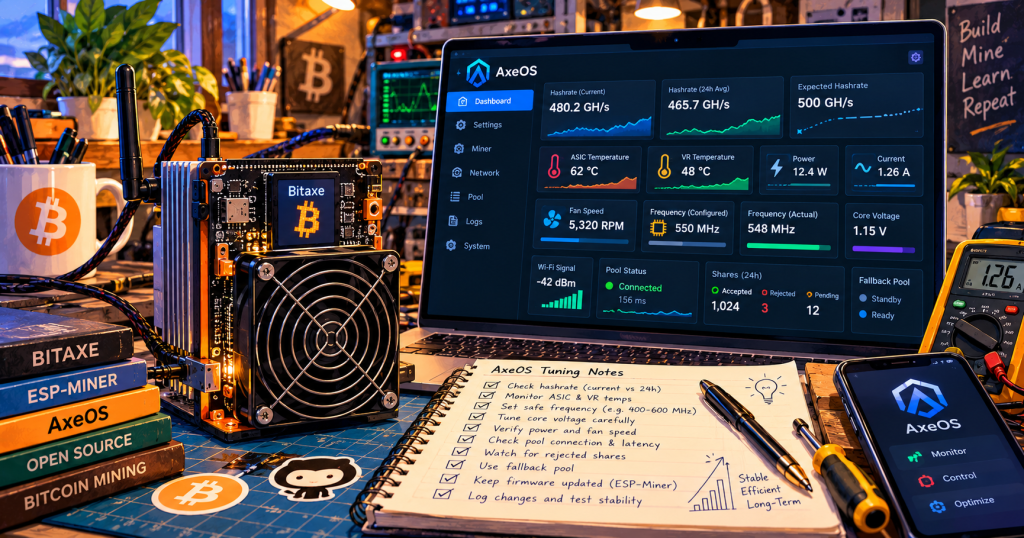
AxeOS can make a Bitaxe look simple: open a browser, see a hashrate number and watch the miner work. The dashboard becomes much more useful when its readings are treated as one electrical, thermal, network and mining system rather than isolated numbers.
This second fundamentals guide focuses on reading the machine before changing it. New readers can begin with BitcoinVersus.Tech’s AxeOS fundamentals overview, which explains the Bitaxe hardware, ESP-Miner firmware and AxeOS interface relationship.
Read Hashrate as a Trend
The current ESP-Miner interface can expose instantaneous hashrate plus one-minute, ten-minute and one-hour averages. It also tracks expected hashrate and hash-error percentage. That makes a longer average more useful than a single momentary reading when deciding whether a miner is stable.
A brief spike above expected hashrate does not prove a successful operating state, and a short dip does not automatically mean the ASIC is failing. Compare the current reading with longer averages, expected output and errors before drawing a conclusion.
The official ESP-Miner API specification documents these values separately. The separation is useful: stability is a trend, not a screenshot.
Configured and Actual Frequency Are Different Measurements
AxeOS distinguishes configured ASIC frequency from real-time actual frequency. If a miner is configured for one operating point but does not sustain it, the rest of the telemetry can help explain why.
Read actual frequency alongside ASIC temperature, voltage-regulator temperature, measured core voltage, input voltage, power and hash errors. A configured MHz value by itself does not describe the condition of the system.
Requested Voltage Is Not Measured Voltage
The software also distinguishes configured ASIC core voltage from the measured value. A setting describes the requested operating point; telemetry describes what the hardware is reporting.
Undervoltage behavior has received explicit attention upstream. ESP-Miner v2.15.0 improved undervoltage detection in AxeOS, while v2.15.3 changed low-frequency warnings so they derive from device presets. BitcoinVersus.Tech covered that v2.15.3 warning change separately.
Watch ASIC and Voltage-Regulator Temperatures Together
AxeOS reports ASIC temperature and voltage-regulator temperature separately because the hashing chip is not the only component converting electrical power into heat. The dashboard also exposes fan speed, fan RPM and target-temperature information.
That gives temperature context. A thermal reading makes more sense when it is considered alongside cooling effort, power consumption and whether the miner is holding its expected performance.
Power Shows What the Hashrate Costs
Hashrate alone is not efficiency. AxeOS reports power and current, allowing an operator to compare a performance change with the additional electrical load required to produce it.
If hashrate moves only slightly while power, temperature and errors rise sharply, the higher headline GH/s may not represent a better operating condition. The same principle scales to industrial mining: useful performance is hashrate delivered within electrical, thermal and reliability limits.
Shares Separate ASIC Performance From Pool Performance
A miner can hash locally while still having a pool-side problem. AxeOS exposes accepted shares, rejected shares, rejection reasons, pool difficulty and response time. Current Stratum V2 support can also expose shares that have been submitted but are still pending resolution.
A growing reject count therefore deserves a different investigation from low raw hashrate. Pool configuration, network conditions and protocol behavior can matter even when the ASIC itself is hashing.
That distinction became more visible when Bitaxe Pool added encrypted Stratum V2 through AxeOS. ESP-Miner v2.15.0 also added pending-SV2-share visibility to the dashboard.
Check Pool, Fallback and Wi-Fi State
ESP-Miner reports whether a fallback pool is active, along with pool connection information and Wi-Fi signal strength. When production changes unexpectedly, verify connectivity and the active pool before assuming the ASIC itself has changed behavior.
This is one reason AxeOS is useful as a network troubleshooting surface as well as an ASIC dashboard. A healthy chip still needs reliable work delivery and share submission.
Treat Manual Tuning as an Advanced Step
The upstream ESP-Miner project provides advanced controls for ASIC frequency and core voltage, but it also warns that additional cooling may be required and that aggressive overclocking can overheat or damage the miner.
The safer learning sequence is observation first: understand longer-term hashrate, errors, temperatures, power, fan behavior, measured frequency and voltage, pool status and connectivity before considering operating changes.
If the dashboard becomes inaccessible or readings are abnormal after a firmware change, BitcoinVersus.Tech’s Bitaxe Gamma troubleshooting guide covers additional recovery thinking. The older AxeOS firmware-update guide provides historical update context, while current unified releases embed AxeOS directly into the main ESP-Miner firmware image.
A Practical Dashboard Reading Order
Read AxeOS in a consistent order: network and pool connection, accepted and rejected shares, longer-term hashrate versus expected hashrate, hash errors, ASIC and voltage-regulator temperatures, fan behavior, power and current, and finally configured versus measured operating values.
That habit turns AxeOS from a colorful status page into what it really is: a compact field-instrument panel for an open-source Bitcoin ASIC miner.
BitcoinVersus.Tech Editor’s Note:
We volunteer daily to ensure the credibility of the information on this platform is Verifiably True. If you would like to support to help further secure the integrity of our research initiatives, please donate here: 3C9o19EH5HSiwEPyCTmEKzxhNCbo2X6TTb
BitcoinVersus.tech is not a financial advisor. This media platform reports on financial subjects purely for informational purposes.


Leave a comment