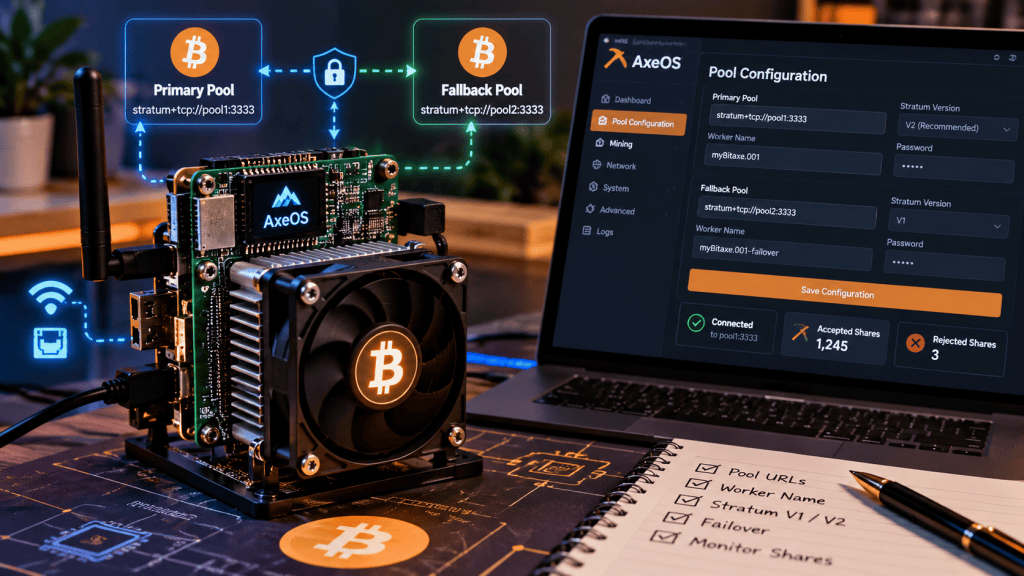
AxeOS makes a Bitaxe easy to point at a mining pool, but the fields in the pool screen represent several different parts of the Stratum connection. Understanding what each field does is more useful than copying somebody else’s settings blindly.
The current upstream ESP-Miner project supports multiple pool slots, primary and secondary selection, Stratum V1 and Stratum V2, suggested difficulty, extranonce subscription, TLS options, certificate handling and share diagnostics. The Bitaxe project describes the basic idea more simply: a Bitaxe can mine to the Stratum pool of your choice through AxeOS.
Start With the Four Fields Every Pool Needs
At the most basic level, a mining connection needs a server address, a port, a user identity and usually a password field. In AxeOS those map to the Stratum URL, Stratum port, Stratum user and Stratum password.
The URL identifies the pool endpoint. The port identifies which network service on that host accepts mining traffic. The user field tells the pool which account, Bitcoin address or worker should receive credit. The password field is pool-specific; many traditional Stratum V1 pools accept a placeholder such as x, while others use it for real authentication or configuration.
Do not assume another miner’s user field is safe to copy. Some pools expect a Bitcoin address, some expect an account name, and some use a pattern such as account.worker or address.worker. Always follow the pool’s own current instructions.
Worker Names Help You Separate Miners
A worker suffix is an operational label. If several Bitaxe miners all point to the same payout account, names such as .garage01, .desk02 or .lab03 can make pool-side troubleshooting much easier.
Worker naming does not change the Bitcoin network itself. It is metadata interpreted by the pool. The exact separator and naming format depend on the pool, so a worker convention that works on one service may not be valid on another.
This is the natural next step after learning how AxeOS and ESP-Miner fit together and how to read Bitaxe telemetry before tuning. Pool identity and share accounting are the network side of the same machine.
A Real-World AxeOS Pool Setup
A practical community example comes from CamCrypto, who documented connecting a Bitaxe through AxeOS to a locally hosted Public Pool instance. The post walks through locating the miner, opening AxeOS, entering the Stratum host and port, assigning a worker-style user string and then confirming that the worker appears on the pool side.
The important lesson is not the specific host or port in that example. Those values belong to that operator’s own setup. The reusable lesson is the sequence: get the correct endpoint from the pool, enter the matching user format, save the configuration, reconnect, and verify that shares are actually being accepted.
Primary and Fallback Pools Are Separate Jobs
Current ESP-Miner exposes multiple pool slots and separately identifies which slot is primary and which is secondary. That is more flexible than thinking of AxeOS as having only one permanent URL plus one hard-coded backup.
The primary pool is the preferred destination. The fallback pool exists so the miner can continue receiving work if the preferred endpoint becomes unavailable. AxeOS telemetry can report whether fallback Stratum is active, which helps distinguish a pool outage from an ASIC problem.
A fallback should be configured deliberately. If the secondary pool uses a different account system, payout address or worker syntax, copy-and-paste may silently send shares somewhere unintended. Treat the backup as a complete second configuration that must be verified on its own.
Stratum V1 and Stratum V2 Are Not the Same Setting
AxeOS now supports both Stratum V1 and Stratum V2 in current upstream builds. Stratum V1 is the long-established protocol used by most Bitcoin pools. Stratum V2 is a newer protocol family designed to improve mining communication, security and decentralization capabilities.
BitcoinVersus.tech recently covered how Bitaxe Pool added encrypted Stratum V2 mining through AxeOS. That matters because switching from V1 to V2 is not merely changing a port number. The server must actually support the selected protocol, and V2 can introduce channel type, authority-key and authentication settings that do not exist in a basic V1 connection.
The upstream API currently exposes standard and extended Stratum V2 channel types, an authority public key for certificate verification, and an option to refuse connection unless the server certificate verifies against that authority key. Those are advanced security controls; they should be populated from the pool or infrastructure operator’s documented values, not invented.
TLS Has More Than One Mode
ESP-Miner’s current pool schema distinguishes TLS states rather than treating encryption as one universal checkbox. Upstream defines disabled, enabled, and enabled-with-verification modes. It also supports a certificate field.
That distinction is important. Encryption without certificate verification can protect traffic differently from a connection that also verifies the identity of the remote endpoint. The correct choice depends on what the pool supports and documents.
Suggested Difficulty Is Not Your Hashrate
Suggested share difficulty tells the pool how difficult you would like submitted shares to be. It does not change the Bitcoin network difficulty and it does not make the ASIC hash faster.
Pools may ignore the requested value or adjust difficulty dynamically. The goal is efficient share accounting: difficulty should be appropriate for the miner’s hashrate so the pool receives useful proof of work without drowning in extremely low-difficulty shares.
Extranonce, Coinbase Decoding and Share Warnings
The upstream pool schema also exposes extranonce subscription, coinbase decoding and a coinbase-share warning. These are not required concepts for a beginner to start hashing, but they become useful when diagnosing pool behavior.
Extranonce mechanisms give miners additional space for unique work. Coinbase decoding lets the firmware inspect payout information contained in the coinbase transaction. The share warning can alert the dashboard when the user’s apparent payout share of the coinbase reward is unusually low, although the upstream documentation notes that it may need to be disabled for pools that pay miners through many separate coinbase outputs.
Watch a Full Bitaxe Setup Before Changing Everything at Once
Red Fox Crypto’s English Bitaxe setup walkthrough provides a useful visual companion to the field names in AxeOS. The channel has roughly 69,900 subscribers, and the YouTube page exposes a normal external embed player.
Verify the Connection With Shares, Not Just a Green Icon
A pool configuration is not proven merely because the miner says it connected. Confirm that accepted shares increase over time. AxeOS also reports rejected shares, rejection reasons, pool difficulty and response time.
If hashrate looks normal but accepted shares stop increasing, investigate the pool connection before changing ASIC voltage or frequency. If rejected shares rise, read the rejection reason. A stale job, authorization error or malformed worker identity points in a different direction from a thermal or silicon problem.
This diagnostic split is why the telemetry fundamentals module emphasizes pool state alongside temperatures and hashrate. The ASIC, network and pool are separate layers even though AxeOS displays them together.
A Safe Pool-Configuration Order
A reliable sequence is: identify the pool and protocol, copy the official host and port, confirm the required user or payout-address format, add a unique worker suffix if the pool supports it, enter the correct password or placeholder, save the configuration, wait for reconnection, confirm accepted shares, then configure and test the fallback separately.
Only after that baseline works should you experiment with suggested difficulty, TLS verification, Stratum V2 authority keys or other advanced fields. One change at a time makes failures much easier to isolate.
If firmware itself needs attention before pool configuration, BitcoinVersus.tech’s earlier AxeOS firmware-update guide provides historical context, while current upstream releases should always be checked because the AxeOS interface is now embedded with ESP-Miner rather than treated as a permanently separate web image.
BitcoinVersus.Tech Editor’s Note:
We volunteer daily to ensure the credibility of the information on this platform is Verifiably True. If you would like to support to help further secure the integrity of our research initiatives, please donate here: 3C9o19EH5HSiwEPyCTmEKzxhNCbo2X6TTb
BitcoinVersus.tech is not a financial advisor. This media platform reports on financial subjects purely for informational purposes.


Leave a Reply