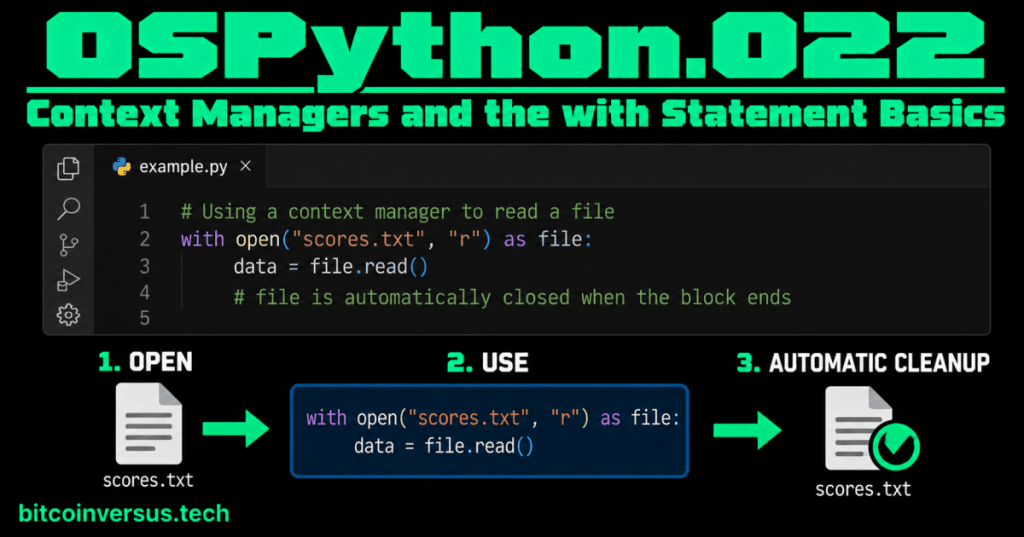
A context manager handles setup and cleanup around a block of Python code.
The easiest example is a file. You open it, use it, and then it needs to be closed. Python’s with statement lets that cleanup happen automatically when the block ends.
Start with the smallest useful example
with open("scores.txt", "r") as file:
    data = file.read()

print(data)
Read it in plain English:
- Open
scores.txt. - Call the opened file
file. - Read the file inside the indented block.
- Leave the block.
- Python closes the file through the file object’s context-management behavior.
Visual model: enter → use → exit
┌──────────────────┐     ┌──────────────────┐     ┌────────────────────┐
│ 1. ENTER / SETUP │  →  │ 2. USE RESOURCE  │  →  │ 3. EXIT / CLEANUP  │
│ open the file    │     │ read the file    │     │ close the file     │
└──────────────────┘     └──────────────────┘     └────────────────────┘
          ___________________ with block ___________________/
Visual learning diagram: a context manager surrounds the work with a controlled entry and exit.
That is the main idea. Everything else in this lesson explains how Python makes that pattern work.
Why not just call close() yourself?
You can write:
file = open("scores.txt", "r")
data = file.read()
file.close()
But cleanup becomes easier to forget as code grows. An error can also interrupt the normal path through the program. A context manager puts the resource-management rule around the block that uses the resource.
Python’s language reference says the with statement wraps a block using methods supplied by a context manager, and if entry succeeds, the corresponding exit method is called when the block is left.
Video 1: What the with statement really does
The two important methods
A class can participate in a normal with statement by implementing the context-manager protocol. The two names to recognize are:
__enter__()— runs when Python enters the context.__exit__()— runs when Python leaves the context.
with SomeContext() as thing:
     │
     ├── __enter__() runs
     │
     ├── indented block runs
     │
     └── __exit__() runs when the block is left
Visual model: enter establishes the context; exit performs the matching cleanup or exit work.
A tiny custom context manager
class GameSession:
    def __enter__(self):
        print("Session started")
        return self

    def __exit__(self, exc_type, exc_value, traceback):
        print("Session ended")
        return False

with GameSession() as session:
    print("Playing Hash Race")
Output:
Session started
Playing Hash Race
Session ended
The important part is the order: enter → work → exit.
What does “as” mean?
In this example:
with GameSession() as session:the value returned by __enter__() is assigned to session. With files, the opened file object is what you normally use after as.
Video 2: Context managers and the with statement
What if an error happens inside the block?
Python passes exception information to __exit__() when the block is being left because of an exception. That gives the context manager a chance to perform its exit work even when the normal flow was interrupted.
For a beginner, remember this:
ENTER
  ↓
USE RESOURCE
  ↓
normal finish OR exception
  ↓
EXIT / CLEANUP
Whether an exception is then allowed to continue depends on what __exit__() returns. Returning a false value, including False or None, does not suppress the exception. Returning a true value tells the with machinery that the exception was handled.
How this connects to the earlier file lesson
OSPython.007: Reading and Writing Files introduced file operations. This lesson explains why the with open(...) pattern is so useful: the file object is a context manager that handles its exit behavior for you.
Context managers are not only for files
The same pattern can manage many kinds of resources or temporary states. Examples include locks, database connections, temporary directories, and other resources that need a clear beginning and end.
The exact setup and cleanup depend on the context manager. The common idea stays the same:
with resource_manager() as resource:
    # use the resource here
    pass

# exit work has happened here
Video 3: What exactly is a Python context manager?
A useful connection to generators and decorators
Python’s contextlib module includes a @contextmanager decorator. It can turn a specially written generator function into a context manager. This connects two recent lessons—decorators and generators—to the idea in this lesson.
from contextlib import contextmanager

@contextmanager
def game_session():
    print("Session started")
    try:
        yield
    finally:
        print("Session ended")

with game_session():
    print("Playing Hash Race")
You do not need to memorize this version yet. The important connection is that yield marks where the body of the with block runs, while the code around it handles entry and exit work.
Common beginner mistakes
- Thinking
withis only special syntax for files. - Forgetting that the indented block defines the active context.
- Assuming
__exit__()means every exception is automatically ignored. - Manually calling
__enter__()and__exit__()when a normalwithstatement is clearer. - Putting code that still needs the resource after the
withblock has ended.
Quick practice
- Create a small text file named
score.txt. - Open it with
with open("score.txt", "r") as file:. - Read and print the contents inside the block.
- Draw the three boxes: ENTER → USE → EXIT.
- Explain which method corresponds to entering and which corresponds to exiting a custom context manager.
- Explain why resource cleanup is easier to reason about when it is attached to the context.
Key takeaway
A Python context manager defines what should happen when code enters and leaves a controlled context. The with statement makes that lifecycle easy to use. Start by remembering one visual: ENTER → USE → EXIT/CLEANUP.


Leave a Reply