Managed and unmanaged Ethernet switches can both move traffic, learn MAC addresses, and connect devices—but they are built for very different levels of control. An unmanaged switch is designed to work almost immediately after power and Ethernet cables are connected. A managed switch adds configuration, monitoring, segmentation, security, redundancy, and troubleshooting features that become increasingly important as a network grows.
For a tiny desk setup, lab bench, or simple group of devices, unmanaged may be exactly the right answer. For a business, data center, mining site, industrial network, camera deployment, Wi-Fi infrastructure, or any environment where you need visibility and predictable behavior, managed switching is usually the stronger choice.
Both Are Still Ethernet Switches
At the most basic level, both switch types perform the same Layer 2 job described in BitcoinVersus.Tech’s Network Switch Basics: they receive Ethernet frames, learn source MAC addresses, build a MAC-address table, and forward frames toward the correct port when they know the destination.
The real difference is not whether the box can switch Ethernet traffic. The difference is how much of that behavior an administrator can see, configure, monitor, protect, and automate.
Unmanaged Means Plug It In and Let It Switch
Cisco’s current managed-versus-unmanaged guidance describes unmanaged switches as plug-and-play devices with no normal configuration interface. They automatically negotiate speed and duplex with connected devices, learn MAC addresses, and begin forwarding traffic without an administrator logging in.

That simplicity is useful. If you just need to add a few Ethernet ports to a small room, workstation cluster, home lab, printer area, camera closet, or temporary test bench, an unmanaged switch can be cheaper, faster to deploy, and harder to misconfigure.
Managed Means You Can Change How the Network Behaves
A managed switch adds a control plane that administrators can use through a web interface, command-line interface, controller, API, or other management system. Depending on the model, that can include VLANs, Quality of Service, access-control lists, port security, 802.1X authentication, link aggregation, storm control, port mirroring, Spanning Tree Protocol, monitoring, logging, and remote configuration.
NETGEAR’s current switch guidance similarly separates unmanaged products from smart and fully managed models. The middle category matters: a smart managed switch can provide features such as VLANs, QoS, and monitoring without exposing every enterprise feature found in a full managed platform.
VLANs Are One of the Biggest Reasons to Go Managed
An unmanaged switch normally places connected devices into the same local Layer 2 environment. A managed switch can use VLAN segmentation to separate devices logically even when they share the same physical switch.
That matters when guest Wi-Fi should not share the same broadcast domain as business systems, when cameras should be isolated from office PCs, when a mining-management network should be separate from miner traffic, or when servers, storage, phones, and management interfaces need different security boundaries.
Managed Switches Give You Visibility When Something Breaks
An unmanaged switch may show little more than link/activity LEDs. A managed switch can expose interface counters, errors, dropped frames, negotiated speed, duplex, PoE status, VLAN membership, MAC tables, topology information, and other telemetry.
That makes the difference between “port 17 is down” and “port 17 negotiated at 100 Mbps, is accumulating CRC errors, belongs to VLAN 20, and has been flapping every few minutes.” BitcoinVersus.Tech’s Ethernet Link Negotiation lesson explains why those counters and negotiated settings matter during troubleshooting.
SNMP Turns the Switch Into Something You Can Monitor
Managed switches commonly expose telemetry through SNMP or newer APIs and telemetry systems. That allows network-management platforms to graph bandwidth, alert on port failures, track errors, poll temperatures, watch uptime, and monitor switch health remotely.
For a Bitcoin mining site, industrial facility, or data-center floor, that visibility can be more valuable than the switch hardware itself. If hundreds or thousands of devices depend on Ethernet, knowing which port failed and when is operationally important.
STP and Redundancy Are Managed-Network Problems
Redundant network links improve resilience, but Layer 2 loops can create broadcast storms. Managed switches support protocols such as STP and RSTP to keep redundant physical paths while blocking the forwarding loop.
A tiny unmanaged edge switch may be perfectly fine when there is only one uplink and no redundancy. Once a topology has multiple interconnected switches, redundant links, trunks, or larger failure domains, managed control becomes much more important.
PoE Does Not Automatically Mean Managed
Power over Ethernet is separate from management. An unmanaged switch can provide PoE to cameras, phones, or access points. A managed PoE switch, however, may also let administrators view per-port power draw, disable or restart PoE on one port, apply power budgets, or troubleshoot a failing powered device remotely.
Security Is Where Unmanaged Simplicity Becomes a Limitation
Unmanaged switches are intentionally simple, so they generally do not provide configurable VLAN segmentation, ACLs, 802.1X, port-security policy, authentication controls, or centralized logging. In a simple trusted network, that may be acceptable. In an enterprise or operational network, the inability to define policy at the switch can become a major limitation.
Managed switching does not make a network secure automatically. It simply gives administrators the tools to enforce and observe security decisions.
The Tradeoff Is Simplicity vs. Control
| Feature | Unmanaged Switch | Managed Switch |
|---|---|---|
| Basic Ethernet forwarding | Yes | Yes |
| Plug-and-play setup | Yes | Usually requires at least some administration |
| VLAN configuration | Usually no | Yes |
| SNMP / remote monitoring | Usually no | Common |
| STP / redundancy control | Limited or absent | Common |
| Port mirroring | Usually no | Common |
| QoS configuration | Usually no | Common |
| Security policy controls | Minimal | Model-dependent but much broader |
| Remote troubleshooting | Minimal | Strong |
| Administration overhead | Very low | Higher |
Where Unmanaged Switches Still Make Sense
Use unmanaged when the network is genuinely simple: a handful of trusted devices, a single uplink, no VLAN requirement, no monitoring requirement, no redundant Layer 2 design, and no need to troubleshoot remotely. A small desktop switch behind a workstation or inside a temporary lab can be a great example.
Unmanaged also makes sense when failure is cheap and replacement is easy. If the whole troubleshooting procedure is “swap the five-port switch and reconnect four cables,” adding a management plane may not create much value.
Where Managed Switches Become the Better Tool
Use managed switching when the network needs segmentation, monitoring, redundancy, traffic control, security, remote administration, PoE management, troubleshooting data, or predictable configuration. That includes most serious business networks, data centers, mining facilities, industrial systems, school campuses, surveillance networks, and larger Wi-Fi deployments.
It also includes environments where a single port failure can take down revenue-producing or safety-relevant equipment. In those cases, the ability to query a switch remotely, inspect counters, identify the affected VLAN, or mirror traffic for analysis can save far more time than the initial hardware savings of an unmanaged model.
Smart Managed Switches Sit in the Middle
There is also a middle ground. Cisco, NETGEAR, TP-Link, and other vendors sell “smart” or “easy smart” switches with a reduced feature set. These can provide VLANs, QoS, monitoring, PoE controls, or web management without the full complexity of an enterprise switch platform.
For a small business or homelab, that can be the sweet spot: enough control to segment and troubleshoot the network without buying features you do not need.
The Bottom Line
An unmanaged switch gives you Ethernet ports. A managed switch gives you Ethernet ports plus control over what those ports are doing.
If your network is small, trusted, flat, and easy to physically reach, unmanaged may be the cleanest answer. If you need VLANs, SNMP, STP, port mirroring, QoS, security policy, remote troubleshooting, or growth, managed switching is usually worth the extra complexity.
Editor’s Note
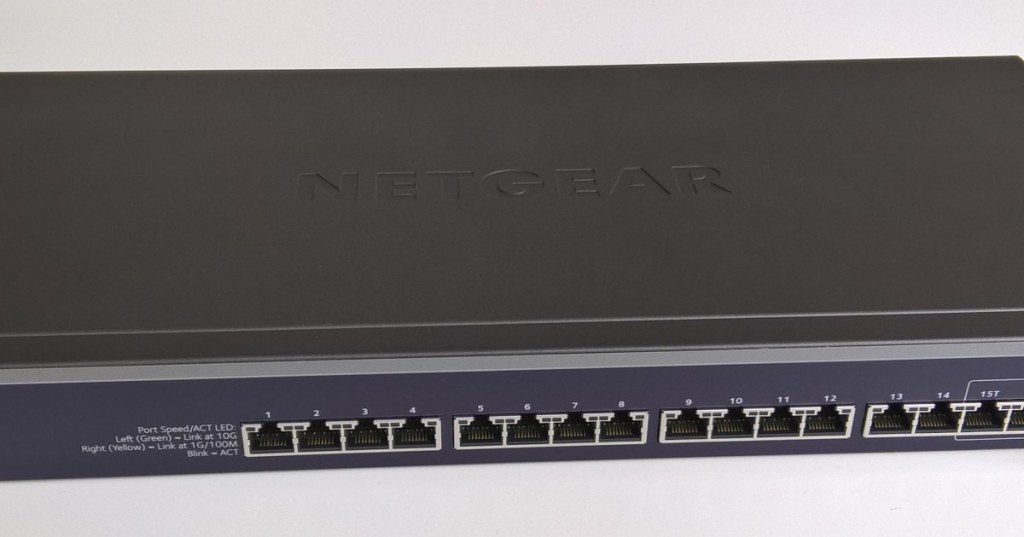
The 1200×630 featured image directly shows a smart managed Ethernet switch. The separate body image directly shows a simple five-port desktop switch representative of unmanaged plug-and-play hardware. No unrelated networking stock image is used. Technical references include current Cisco and NETGEAR switch guidance. The two YouTube videos are distinct Cisco explainers, and the Bluesky embed directly discusses a real managed-versus-unmanaged homelab decision.
Support and donation options are available through BitcoinVersus.Tech.
BitcoinVersus.Tech is not a financial advisor. Content is provided for informational and educational purposes.


Leave a Reply