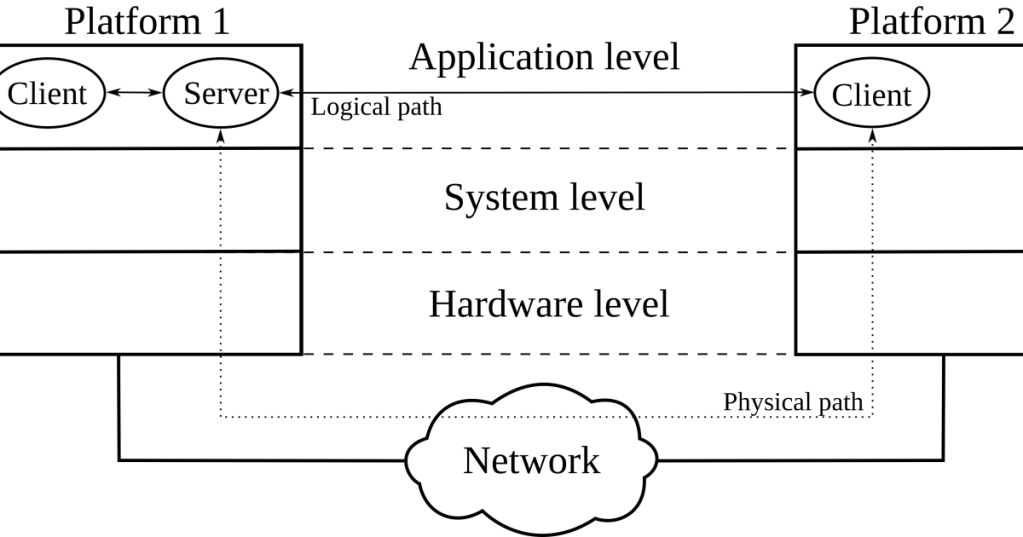
A network socket is the operating-system object an application uses to send or receive data through a network protocol such as TCP or UDP. It is the software endpoint between an application and the kernel’s networking stack.
The easiest way to remember it is: an IP address identifies the machine or interface, a port identifies the service, and a socket is the application’s usable endpoint for that communication.
A Socket Is the Application’s Door Into the Network Stack
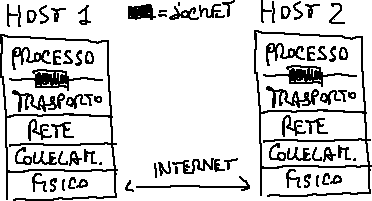
An application does not normally construct Ethernet frames, IP packets, or TCP segments by hand. It asks the operating system to create a socket, then uses system calls or higher-level library functions to configure that socket and move data through it. The kernel handles the lower networking layers on the application’s behalf.
On Linux, the socket(7) manual describes sockets as the interface between user processes and the kernel networking protocols. The lower-level socket(2) system call creates a communication endpoint and returns a file descriptor.
On Linux, a Socket Is Also a File Descriptor
This connects directly to the recent file-descriptor evergreen. When a Linux process successfully calls socket(), the kernel returns a small integer file descriptor. The process then passes that descriptor into later calls such as bind(), connect(), listen(), accept(), send(), recv(), and close().
That means FD 6 could represent an open log file in one process and an active TCP connection in another. The number is only meaningful inside that process’s descriptor table.
socket() creates a descriptor, bind() attaches an address, and listen()/accept() build the server side of a TCP connection.IP Address + Port Identify a Network Endpoint
For Internet sockets, an endpoint is commonly associated with an IP address and a transport-layer port. BitcoinVersus.Tech’s older network-port explainer covers why ports let many services share one host.
For example, a web server might listen on 192.0.2.10:443. The IP address identifies the host/interface path, while port 443 tells the transport layer which application service should receive the traffic.
TCP and UDP Use Sockets Differently
TCP and UDP both use sockets, but they provide different communication models. A TCP socket normally represents a connection-oriented byte stream with connection establishment, sequencing, acknowledgments, retransmission, flow control, and connection state. A UDP socket sends and receives independent datagrams without establishing a TCP-style connection first.
In code, that distinction often begins when the application creates the socket: SOCK_STREAM commonly selects TCP-style stream semantics, while SOCK_DGRAM selects datagram semantics such as UDP.
socket, bind, connect, listen, accept, and close behavior.A TCP Server Usually Follows socket → bind → listen → accept
The classic TCP-server flow is straightforward. socket() creates the endpoint. bind() associates it with a local IP address and port. listen() marks that socket as a passive listener for incoming connections. accept() takes a completed incoming connection and returns a new connected socket for communication with that client.
server_fd = socket(...)
bind(server_fd, local_address)
listen(server_fd, backlog)
client_fd = accept(server_fd, ...)
recv(client_fd, ...)
send(client_fd, ...)
close(client_fd)
The listening socket usually remains open so the server can accept additional clients. Each accepted TCP connection gets its own connected socket descriptor.
A TCP Client Usually Follows socket → connect
A TCP client typically creates a socket and calls connect() with the server’s address and port. The operating system normally chooses a temporary local ephemeral port if the application did not explicitly bind one.
client_fd = socket(...)
connect(client_fd, server_address)
send(client_fd, ...)
recv(client_fd, ...)
close(client_fd)
After the TCP handshake completes, the connection is identified by both endpoints: local IP, local port, remote IP, and remote port, plus the protocol. That combination lets a server support many simultaneous client connections to the same listening port.
Listening Sockets and Connected Sockets Are Not the Same Thing
This is one of the most important socket concepts. A TCP listening socket waits for connection attempts. When the server accepts one, the kernel returns another socket for that specific client connection. The original listening socket can continue accepting new clients.
That is how thousands of clients can reach one server port such as 443: they are not all sharing one single connected socket. The operating system tracks many individual connections behind the listening endpoint.
bind() Controls the Local Address and Port
bind() attaches a socket to a local address. A server that binds 127.0.0.1:8080 is normally reachable only through the local loopback interface. A server binding an appropriate non-loopback address can be reachable through that interface. Binding a wildcard address such as 0.0.0.0 tells IPv4 networking to accept traffic addressed to any suitable local IPv4 interface, subject to firewall and routing policy.
That difference explains a common troubleshooting problem: “The service is running, but another machine cannot reach it.” The program may be listening only on loopback instead of the network-facing interface.
The Backlog Is a Queue, Not the Number of Clients a Server Can Ever Handle
The listen() backlog controls kernel queueing related to incoming connection establishment; it is not simply the lifetime maximum number of clients the application can support. The exact queue semantics depend on the operating system and TCP implementation.
This connects naturally to the recent buffers and queues evergreen: networking uses finite queues at several layers, and pressure appears when producers create work faster than consumers process it.
Sockets Have Send and Receive Buffers
Applications do not necessarily place each byte directly onto the wire when they call send(). The kernel maintains socket send and receive buffers. Application writes can enter the send buffer while TCP handles segmentation, retransmission, flow control, and actual transmission. Incoming data can sit in the receive buffer until the application reads it.
That is why a program can have a valid established socket and still appear slow: data may be waiting in application queues, socket buffers, NIC queues, or farther across the network path.
Linux ss Lets You Inspect Live Sockets
Linux includes ss—socket statistics—for viewing listening and connected sockets. The current ss(8) manual describes it as a tool for dumping socket statistics and viewing TCP state information.
ss -tulpn
ss -tn state ESTABLISHED
ss -ltn
ss -ua
ss -x
ss -tulpn is especially useful when asking, “What process is listening on this TCP or UDP port?” Output can show the protocol, state, local address/port, peer address/port, and—when permissions allow—the owning process and descriptor.
Unix Domain Sockets Stay on the Same Machine
Not every socket uses IP networking. Unix domain sockets provide process-to-process communication on the same system. They can use filesystem pathnames such as /run/service.sock or platform-specific abstract addressing rather than IP addresses and Internet port numbers.
Databases, container runtimes, desktop services, and local daemons often use Unix sockets because the communicating processes are on the same machine and do not need a network packet to leave the host.
A Socket Is Not the Same Thing as a Port
A port is a transport-layer number used for traffic demultiplexing. A socket is the operating-system communication endpoint an application manipulates. One listening port can therefore be associated with a listening socket plus many accepted connected sockets.
Likewise, a client may use a temporary local port and a socket to connect to a server’s well-known port. Saying “the socket is port 443” is convenient shorthand, but the socket contains more state than the port number alone.
A WebSocket Is a Different Higher-Level Protocol
Do not confuse a general operating-system network socket with the WebSocket protocol used by web applications. WebSocket is an application-layer protocol that typically runs over a TCP connection. The browser and server ultimately still rely on lower-level operating-system sockets, but “WebSocket” refers to a specific web protocol, not every socket.
close() Releases the Application’s Socket Descriptor
When an application finishes with a socket, it closes the descriptor. For TCP, protocol state may continue inside the kernel after the application closes because TCP has to complete connection teardown correctly. States such as FIN-WAIT, CLOSE-WAIT, and TIME-WAIT are part of that connection lifecycle.
This explains why an application can exit while a recently used TCP port or connection state remains visible for a while in ss. The userspace descriptor and the protocol’s remaining kernel state are related, but they are not identical lifetimes.
The Simple Way to Remember Network Sockets
A network socket is the kernel-managed endpoint an application uses to communicate through TCP, UDP, or another socket family.
The basic TCP-server chain is socket() → bind() → listen() → accept() → send()/recv() → close(). The TCP-client chain is socket() → connect() → send()/recv() → close().
Put together with recent BitcoinVersus fundamentals: application → system call → socket file descriptor → socket buffers → TCP/UDP/IP stack → NIC → network.
Editor’s Note
The 1200×630 featured image directly shows client/server network endpoints. The separate body diagram directly shows where network sockets sit between application software and the transport/network stack. No generic networking stock photography is used. The two YouTube videos are distinct and directly cover sockets, client/server flow, ports, and socket programming. The Reddit embed is a current 2026 discussion specifically about the internal behavior of socket(), bind(), listen(), and accept().
Support and donation options are available through BitcoinVersus.Tech.
BitcoinVersus.Tech is not a financial advisor. Content is provided for informational and educational purposes.


Leave a Reply