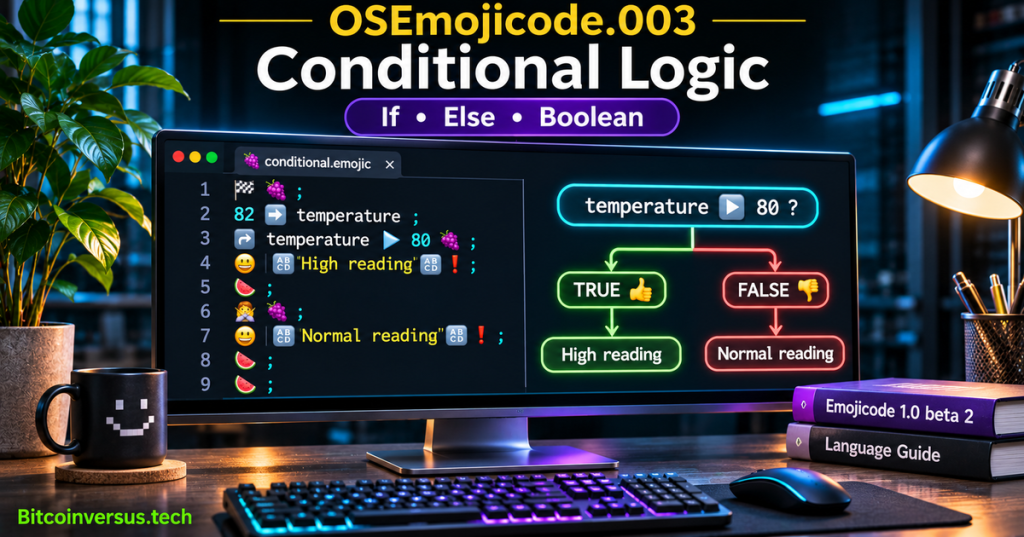
OSEmojicode.003 teaches how programs choose between alternative instructions in Emojicode 1.0 beta 2. Emojicode is a compiled, strongly typed language whose control structures use emoji tokens. The official reference defines ↪️ for an if branch, 🙅 for else, and 🙅↪️ for an additional conditional branch. A comparison produces a Boolean value, 👍 or 👎, which determines which block runs. The lesson follows OSEmojicode.002 on constants, mutation, and scope, progressing from storing values to making decisions using those values.
Learning Objectives and Prerequisites
- Explain how Boolean values
👍and👎control a conditional block. - Write a documented
↪️branch with an🙅fallback. - Use
🙅↪️to distinguish greater-than, equal-to, and lower-than cases. - Interpret
▶️,◀️, and🙌in comparisons and distinguish them from value assignment. - Combine Boolean expressions using short-circuit AND
🤝and OR👐. - Trace program execution and expected output for different input values.
- Compile a standalone
.emojicexample on a supported installation and record compiler results rather than presuming success. - Explain the security and reliability limits of example numeric thresholds.
Prerequisites include OSEmojicode.001 on program structure and the preceding variables lesson. Knowledge of C# variables and Boolean types can provide a useful comparison. Learners need a UTF-8 text editor and, for compilation, the compiler and C++ toolchain described by Emojicode’s official installation guide. The example values are fictional programming data, not validated temperature, electrical, industrial, or health thresholds.
Elementary Overview
A computer program often has to answer a yes-or-no question. Is a number greater than a limit? Does a name match the expected text? Has a requested task completed? A conditional expression answers such a question with one of two Boolean results, usually called true or false. In Emojicode those values are represented by thumbs-up 👍 and thumbs-down 👎.
When the answer is true, an if block runs. An optional else block runs when the earlier tests are false. The program does not execute every alternative; it chooses the path permitted by the condition. Braces in many other languages serve the same grouping function as Emojicode’s grape 🍇 and watermelon 🍉 block delimiters.
Origins and Version Scope
Emojicode was conceived by Theo B. Weidmann and publicly released in the mid-2010s as an experiment in a programming language that uses emoji as syntactic markers. It supports conventional software concepts, including types, methods, conditional logic, optionals, and collections. The official site currently presents Emojicode 1.0 beta 2 and supplies language-reference documentation rather than a verified newly released stable 2026 edition. Examples are deliberately scoped to that documented beta; a future compiler could change token handling or installation details. Official documentation describes the language version.
A conditional in Emojicode works much like the corresponding statement in C# control-flow programming. The tokens are different, but the engineering goal is the same: evaluate a Boolean expression, perform exactly the applicable actions, and handle the remaining cases without ambiguity.
Boolean Values and Comparison Operators
A comparison such as temperature ▶️ 80 asks whether the numeric value of temperature is strictly greater than eighty. For a value of 82, the expression is 👍. For a value of 80, the result is 👎 because strict greater-than excludes equality. The related ◀️ operator checks strict less-than, while 🙌 compares for equality. Emojicode uses separate assignment operators, so 🙌 must not be confused with the arrow ➡️ that declares a constant.
The comparison forms below show their mathematical counterparts. Each is an expression fragment for teaching, not a complete executable program:
82 ▶️ 80    -> 👍  (82 > 80)
82 ◀️ 80    -> 👎  (82 < 80)
80 🙌 80    -> 👍  (80 equals 80)
80 ▶️ 80    -> 👎  (strictly greater excludes equality)
80 ◀️ 80    -> 👎  (strictly less excludes equality)
The official operator reference documents comparison symbols, precedence, and Boolean operators. Evaluate the expression against its actual type: arbitrary strings and unrelated objects cannot be ordered numerically without an operation provided for those types.
Writing an If Block
An ↪️ statement evaluates the expression immediately following it. When the result is 👍, statements inside 🍇 and 🍉 run. If the result is 👎, that block is skipped. For example, a local constant holding 82 can be checked against an educational threshold of 80:
🏁 🍇
  82 ➡️ temperature
  ↪️ temperature ▶️ 80 🍇
    😀 🔤High reading🔤❗️
  🍉
🍉
The expected output is High reading. The starting 🏁 marks the entry point, ➡️ declares a value, and the 😀 call prints a string. Copying the proper emoji code points matters: visually similar replacement symbols or text-only approximations may not be recognized by the compiler. The official control-flow chapter supplies the statement grammar.
If and Else Form a Two-Path Decision
The 🙅 fallback executes when the preceding ↪️ condition and any intervening conditional alternatives do not match. It does not have a separate Boolean test. For each evaluation of the complete if/else structure, one of the two branches below is chosen:
🏁 🍇
  82 ➡️ temperature
  ↪️ temperature ▶️ 80 🍇
    😀 🔤High reading🔤❗️
  🍉
  🙅 🍇
    😀 🔤Normal reading🔤❗️
  🍉
🍉
For temperature = 82, the expected result is High reading. Change the constant to 80, save the file and recompile: temperature ▶️ 80 becomes false, so the fallback should print Normal reading. Both outcomes are predictions derived from the language specification, not evidence of an executed compiler test in the authoring environment.
Else-If Selects Among Three Cases
The 🙅↪️ form is an additional conditional alternative. The first successful condition wins and later alternatives are skipped; if none matches, the final 🙅 block runs. The next example distinguishes a number above, equal to, or below 80. The form follows the official multi-branch example:
🏁 🍇
  80 ➡️ temperature
  ↪️ temperature ▶️ 80 🍇
    😀 🔤Above threshold🔤❗️
  🍉
  🙅↪️ temperature 🙌 80 🍇
    😀 🔤At threshold🔤❗️
  🍉
  🙅 🍇
    😀 🔤Below threshold🔤❗️
  🍉
🍉
The expected message is At threshold for the assigned value 80. At 81 the first branch should print Above threshold, and at 79 the fallback should print Below threshold. Equal-to does not mean “less than or equal”; the equality branch has been specified explicitly. The exact code-point sequence for 🙅↪️ is worth copying from the official reference if a particular keyboard or font changes its representation.
Short-Circuit Boolean Logic
Emojicode uses 🤝 for logical AND and 👐 for logical OR. AND is true only when both conditions are true; OR is true when at least one is true. They are short-circuit operators: AND does not evaluate its second operand if the first is false, and OR does not evaluate its second operand if the first is true. Short-circuiting can avoid unnecessary work, but it must not be relied on as the only protection for security-sensitive input.
The following truth table is written as unboxed code so each result remains readable on narrow screens:
👍 🤝 👍  -> 👍    👍 👐 👍  -> 👍
👍 🤝 👎  -> 👎    👍 👐 👎  -> 👍
👎 🤝 👍  -> 👎    👎 👐 👍  -> 👍
👎 🤝 👎  -> 👎    👎 👐 👎  -> 👎
For example, a hypothetical monitored reading can be classified only when both numeric conditions are met. The sample is educational and does not measure physical sensors:
🏁 🍇
  82 ➡️ temperature
  45 ➡️ humidity
  ↪️ temperature ▶️ 80 🤝 humidity ◀️ 50 🍇
    😀 🔤Both conditions satisfied🔤❗️
  🍉
  🙅 🍇
    😀 🔤Conditions not both satisfied🔤❗️
  🍉
🍉
With temperature 82 and humidity 45, both comparisons should be true, giving the expected message Both conditions satisfied. Changing humidity to 50 makes the strict less-than test false and selects the fallback. Logical operators operate on Boolean expressions, not arbitrary integers; comparing a number first creates the Boolean needed by the operator.
Precedence and Grouping Matter
In Emojicode, numeric comparisons generally bind more tightly than logical AND, and logical AND binds more tightly than logical OR. Without parentheses, a combination of comparisons and logical operators follows the precedence listed by the language specification. Explicit grouping uses 🤜 and 🤛. Grouping makes the intended condition clear and helps code reviewers avoid misreading expressions.
For example, a condition testing whether an observed number falls into a two-sided range can use logical AND. A value must pass both tests for the result to be true:
70 ◀️ temperature 🤝 temperature ◀️ 90The interval expression is a fragment rather than a complete program. Its meaning is (70 < temperature) AND (temperature < 90); the result is expected to be 👍 when temperature is 82. To write comments inside an actual Emojicode file, use the documented 💭 form instead of comment markers borrowed from another language.
A Small Decision-Making Lab
Create a file named conditional.emojic and paste the complete if/else example shown earlier. The program uses one constant and has no user input, network calls, or external dependencies beyond the Emojicode compiler toolchain. On a Linux or macOS-style terminal with the official 1.0 beta 2 compiler installed and a supported C++ linker available, the documented workflow is:
emojicodec conditional.emojic
./conditional
Compilation should produce a native executable named conditional on a compatible supported platform, and running it should print High reading. Check the compiler exit code and actual output before marking the exercise successful. The official compile-and-run guide documents the emojicodec command and executable invocation. Executable names and suffixes differ on some operating systems, so follow the compiler output rather than assuming Unix-style paths work on Windows.
After verifying the first case, change 82 to 80 and rebuild. Predict that the message changes to Normal reading. Then substitute the three-branch example and vary the constant among 79, 80 and 81. Record each actual output and compare it with the predicted branch. Preserve the exact file in version control only after confirming its syntax on the intended compiler.
Guarding Optional Values
Beyond plain Boolean comparisons, the official documentation allows certain assignments in the condition of an ↪️ statement. If the source expression is an optional, a successful conditional assignment unwraps its value into a variable scoped to the true branch. If no value is present, the branch is skipped. The official guide’s dictionary lookup demonstration shows a safe way to check that a key exists before using its result. That technique is more robust than assuming a returned value must always exist.
Optional-value checks are distinct from a generic truthiness rule. Emojicode is strongly typed: a condition ordinarily evaluates to its Boolean type, and conditional assignment has special explicitly documented optional semantics. A missing value should be handled through those language rules rather than by treating arbitrary numbers, strings, or references as interchangeable Booleans.
Troubleshooting and Reliability
- Unexpected branch: distinguish
▶️from◀️, and check whether the comparison is strict or includes equality. - Compiler rejects an emoji: verify exact Unicode characters, variation selectors, and the documented Emojicode compiler version; fonts may display equivalent-looking but distinct sequences.
- Else never runs: check that the if expression can actually become false, and that the else block is attached directly to the correct conditional.
- Multiple competing rules: order conditional alternatives from the most specific case to a general fallback; only the first matching branch in a chain runs.
- Type mismatch: compare compatible values and use Boolean operators on conditions that produce the documented Boolean type.
- Missing compiler or linker: the official beta installer requires a working C++ compiler such as Clang or GCC; do not run unreviewed remote installation scripts with elevated privileges.
- Real telemetry: never promote the exercise’s invented limits to electrical, medical, or environmental safety thresholds. Production systems require independently validated limits, alarms, test coverage, and a safe failure state.
Practice and Knowledge Check
- With
temperature = 80, which branch of the complete if/else program runs and why? - With
temperature = 79, which branch of the three-case chain prints a message? - Is
80 ▶️ 80true? How would you test equality instead? - Evaluate
👍 🤝 👎and👍 👐 👎. - Why does short-circuit AND sometimes skip its second expression?
- What is the difference between a Boolean condition and optional conditional assignment?
- What tools are required to compile the sample from the official beta source and run the resulting native executable?
- How would you confirm that a compiler result, rather than a hand prediction, is correct?
Answer key: At 80, the fallback prints Normal reading because 80 is not strictly greater than 80. At 79, the three-case program prints Below threshold. 80 ▶️ 80 is false; 80 🙌 80 checks equality and is true. True AND false is false, while true OR false is true. AND skips a second operand when the first is false because the final result is already known. Ordinary conditions evaluate Boolean expressions; special optional conditional assignment unwraps a present value in a successful branch. Compilation needs the Emojicode compiler and a compatible C++ linker, followed by actual execution and comparison against predicted output.
Primary References
- Emojicode — official 1.0 beta 2 reference index.
- Emojicode — Control Flow: If, Else, Else-If, Blocks.
- Emojicode — Operators, Precedence and Short-Circuit Logic.
- Emojicode — Source Syntax and Statement Grammar.
- Emojicode — Compile and Run Your First Program.
- Emojicode — Installing 1.0 beta 2.
- Codecademy — Emojicode Conditionals.
- Codecademy — Learn Emojicode (includes conditionals).
Elementary Conclusion
Emojicode uses the same decision-making ideas found in other programming languages. A comparison answers a question with a thumbs-up or thumbs-down Boolean value. The ↪️ instruction chooses a true branch; 🙅 handles the fallback; and 🙅↪️ introduces more choices. Logical AND and OR combine conditions, sometimes avoiding unnecessary work. The essential skill is to predict which statements run, then confirm that prediction by compiling and testing an actual program.
Editor’s Note: OSEmojicode.003 advances the published OSEmojicode.002 curriculum and references the official Emojicode 1.0 beta 2 language documentation. The executable examples and expected output were checked against the published grammar, but the Emojicode compiler is not installed in the authoring environment; compilation and execution have not been independently performed. The original 1200 × 630 featured image is conceptual artwork, not an actual compiler screenshot. The two selected YouTube videos were identified through their public pages; rendering an iframe does not establish live playback or mobile visual compliance.

We volunteer daily to ensure the information on this platform is Verifiably True. If you would like to support the research, please scan the QR code. Always verify the destination and requested amount in your wallet before sending funds.


Leave a Reply