
Learning objectives and prerequisites
Emojicode is a compiled, strongly typed programming language that expresses many operations with emoji. In OSEmojicode.001, learners explored the program entry point and basic syntax. The next step is understanding how programs remember values. By the end of the lesson, learners should distinguish constants from mutable variables, name the major built-in value types, read assignment direction, and explain variable scope. A working Emojicode 1.0 beta 2 compiler is recommended for the laboratory exercise but not required to understand the examples.
The simplest idea behind a variable
A variable is a name associated with a value. A program may need to remember the number of devices in a rack, the name of a computer, or whether a task has finished. The name makes the value accessible to later instructions. Emojicode uses ordinary text for variable names and emoji to signal much of the surrounding grammar. Although the source looks different from C# or PowerShell, the underlying concept is the same.
In Emojicode, the arrow ➡️ points from a value on the left to its name on the right. The official language documentation demonstrates constant assignment using a number and a string. Read each statement aloud as ‘store the value in the named variable’:
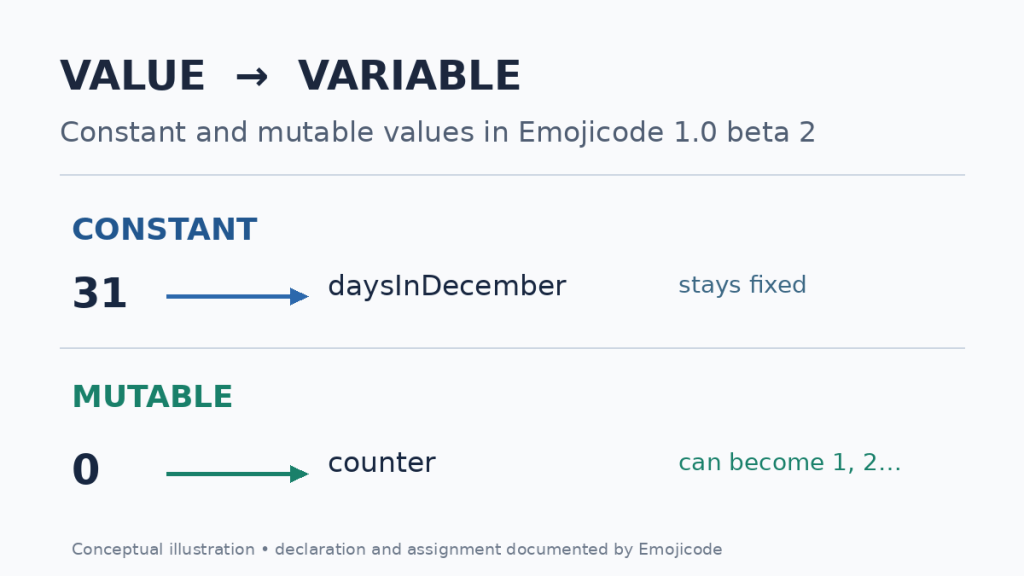
31 ➡️ daysInDecember
🔤Earth🔤 ➡️ thirdPlanet
The first declaration creates a constant holding the integer 31. The second creates a constant holding text. The compiler can infer each type from its initial value. Unlike a text label in an illustration, the name is later used as a real expression. Variable names cannot contain spaces or emojis, and cannot begin with a number. They may nevertheless use punctuation permitted by the documented grammar.
Constants protect an assigned value
A constant variable cannot be reassigned after its initial declaration. Use one for a value that should stay stable throughout the relevant scope. Constants reduce accidental state changes and make a program easier to reason about. The example below preserves the first number and prints it through a string interpolation expression:
🏁 🍇
  31 ➡️ daysInDecember
  😀 🔤Days: 🧲daysInDecember🧲🔤❗️
🍉
The expected displayed message is ‘Days: 31’. The 🏁 block is the entry point, 🍇 opens it, and 🍉 closes it. The 🧲 markers tell the string literal to evaluate the enclosed expression. A later attempt to assign another number to the same constant name would produce a compiler error rather than quietly changing the stored value.
Mutable variables can change
Some values genuinely change while a program runs: a counter increases, a sensor reading updates, or a job transitions between states. Emojicode marks a mutable declaration with 🖍🆕. An existing mutable variable is assigned with ➡️ 🖍 or updated through operator assignment. The compiler uses the initial value to infer the variable’s type unless the programmer explicitly declares one:
0 ➡️ 🖍🆕 counter
counter ⬅️➕ 1
counter ⬅️➕ 5
The initial counter is zero. The first operator assignment adds one, and the second adds five, leaving six. The ⬅️➕ combination means add the expression and store the result in the existing mutable variable. The official reference also provides ➗ and other operators; details of their behavior belong in later arithmetic lessons. The distinction here is mutability, not the mathematical operation itself.
The basic types and their roles
Emojicode is strongly typed: each value has a type, and the compiler checks whether an operation is compatible with that type. The built-in 🔢 type represents a signed 64-bit integer. 💯 represents a real-number type, 💧 a small signed byte, 🔡 a string, and 👌 a Boolean. Boolean literals are written using 👍 for true and 👎 for false. The following constants demonstrate automatic type inference:
12 ➡️ devices
3.5 ➡️ average
🔤rack-A7🔤 ➡️ label
👍 ➡️ active
The number 12 naturally produces an integer variable, 3.5 a real number, a pair of 🔤 delimiters a string, and 👍 a Boolean. Type inference does not mean the language is dynamically typed: the compiler determines types before running the generated program. A string cannot be used as an arbitrary replacement for an integer in numeric arithmetic.
Declaring a type before assigning a value
An explicit declaration is helpful when a value is not ready yet. The 🖍🆕 marker can introduce a mutable variable followed by its declared type. The variable must receive a compatible value before the program reads it. For example, a string named catName can be declared, assigned, and then printed:
🏁 🍇
  🖍🆕 catName 🔡
  🔤Kitty🔤 ➡️ 🖍 catName
  😀 catName❗️
🍉
A compiled version is expected to display ‘Kitty’. Trying to read catName before assignment produces a compile-time error in the language’s definite-assignment rules. Type constraints also prevent the programmer from assigning arbitrary incompatible objects simply because the same variable name is available.
Operator assignment and controlled change
The operator-assignment syntax combines a left-pointing assignment emoji with an arithmetic operator. The value of the mutable variable is read, the operation is applied, and its result is stored back in the same variable. For a counter initialized to zero, the following short sequence increments the value and then adds another five:
0 ➡️ 🖍🆕 counter
counter ⬅️➕ 1
counter ⬅️➕ 5
The final value is six. The statement does not introduce another variable each time; it changes the existing one. The same conceptual difference appears in C# variables and PowerShell variables, though the punctuation and typing rules are different.
Where variables remain visible
Every block between 🍇 and 🍉 establishes a scope. Variables introduced inside a block are available within that scope and are not automatically accessible once execution leaves it. The compiler also applies scope rules around classes and value types. Scope prevents a temporary value in one part of a program from accidentally becoming a global name.
For comparison, JavaScript’s block scope and C# string variables illustrate how different languages balance declarations and lifetime. Do not assume that a variable name in one Emojicode function can be referenced from another without an appropriate parameter, field, or other explicit relationship.
Practical lab — record a small workload
Create a UTF-8 source file named values.emojic with the following complete program. The example combines a constant rack name, a mutable numeric counter, an operator update and string interpolation. It makes no file modifications and requires no network connection when running:
🏁 🍇
  🔤rack-A7🔤 ➡️ rack
  0 ➡️ 🖍🆕 completed
  completed ⬅️➕ 1
  completed ⬅️➕ 5
  😀 🔤🧲rack🧲: 🧲completed🧲 jobs🔤❗️
🍉
The program is expected to print rack-A7: 6 jobs. The name remains constant while the counter changes from zero to one and then six. String interpolation incorporates both names into one displayed message. The syntax was reviewed against the official Emojicode 1.0 beta 2 reference; execution and compiler acceptance have not been independently confirmed in the publishing environment.
If a compatible Emojicode compiler is installed, open a terminal in the folder containing the file. The official guide documents compilation with emojicodec, which creates a native executable. On macOS or Linux, the basic commands are:
emojicodec values.emojic
./values
Windows executable naming and invocation may differ, and an installed compiler may require platform-specific setup. Use the official installation instructions rather than copying an unverified executable from an unknown mirror. The language project currently presents documentation for Emojicode 1.0 beta 2; compiler distributions and third-party tutorials from older revisions may use different syntax.
Troubleshooting and safe diagnostics
When the compiler reports an unexpected type, inspect the original variable’s declaration and the value being assigned. A numeric variable cannot freely become text. If the compiler reports an unknown name, check whether the name was declared, whether its case and spelling match, and whether the program is still inside the defining scope. If it reports an invalid name, remove any spaces or emoji from the variable identifier.
For a mutable variable, include 🖍 in the proper assignment form. Omitting it can cause the compiler to interpret the statement as an attempt to create or overwrite a constant. A variable explicitly declared without a value must be assigned before being read. Preserve UTF-8 encoding and the exact emoji characters: visually similar symbols and variation selectors can have distinct Unicode encodings.
Practice exercises and knowledge-check answers
Modify the constant rack name to rack-B2 while preserving the counter. Predict the displayed message before compiling. Then change the second increment from five to three. The expected numeric result becomes four. Finally, introduce a Boolean constant using 👍 ➡️ active and explain why it is not interchangeable with a text label.
What does ➡️ indicate? It sends a value toward the named variable. What is different about 🖍🆕? It creates a mutable variable rather than a constant. What does ⬅️➕ do? It adds a value and writes the new result to a mutable variable. What type do 🔤 delimiters produce? A string, represented by 🔡. When does a block’s variable lifetime end? When execution leaves its defining scope unless the program explicitly transfers the value through another mechanism.
Authoritative documentation and next lesson
The official Variables and Assignment reference documents constant and mutable declarations, operator assignment and scope. The Literals reference defines number and Boolean literals. The Types and Namespaces guide explains type inference and built-in types. The Compile and Run tutorial documents the source-file and compiler workflow. For structured practice, Codecademy’s Emojicode course includes exercises on variables and basic types.
The next Emojicode lesson can extend the same foundation into conditional logic. Branching requires a Boolean expression, making an accurate understanding of values, types and state essential before introducing control-flow syntax.
Elementary conclusion
A constant preserves a value, while a mutable variable can be updated. Emojicode makes that distinction visible through assignment emojis and confirms type compatibility through its compiler. Reading code becomes easier by tracing the value, the arrow, the variable name, and the relevant scope. The practical exercise combines those pieces into a small report without relying on decorative code containers.
Editor’s Note: The syntax and type descriptions were checked against the official Emojicode 1.0 beta 2 reference. Example output follows documented language rules, but the program was not compiled or executed in the publication environment. The cover and variable-flow diagram are original conceptual artwork, not screenshots of running Emojicode.

For mobile scanning, open the lesson on a separate display and use a compatible Bitcoin wallet to scan the original QR code. Verify the destination before sending 5,000 sats: 3C9o19EH5HSiwEPyCTmEKzxhNCbo2X6TTb.
We volunteer daily to ensure the credibility of the information on this platform is Verifiably True. If you would like to support our work and help further secure the integrity of our research initiatives, please scan the QR code below to donate 5,000 sats.
BitcoinVersus.tech is not a financial advisor. This media platform reports on financial subjects purely for informational purposes.


Leave a Reply